

OpsPick
Seecog Softwares Business
Task & project management with Kanban boards, teams, and recurring tasks.
- Downloads
- 7+
- on Google Play
- Price
- Free
- No in-app purchases
- Updated
- Oct 21
- 2026 · v2.1.1
Screenshots


About OpsPick
Whether you run a small team or manage your own tasks, OpsPick keeps projects, statuses, and deadlines in one place on Android.
KEY FEATURES
• Kanban boards — Visual workflow columns, drag tasks between statuses, and see progress at a glance
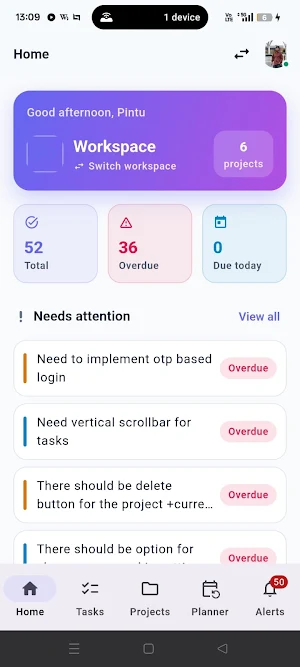
• Workspaces — Switch between organizations and keep team work separate
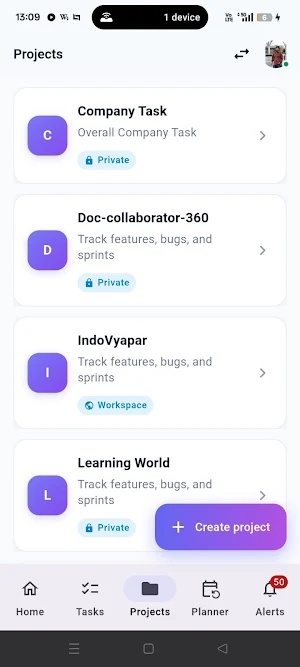
• Projects — Browse all projects; recently viewed lists stay available when you're offline
• Tasks — Create tasks, edit details, checklists, comments, and attachments (photos, PDFs, and more)
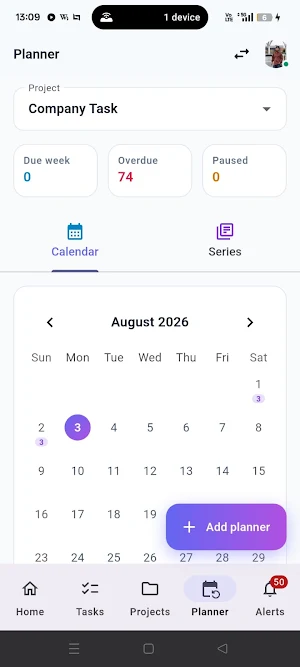
• Recurring planner — Calendar and series views for repeating work; pause or resume schedules
• Notifications — In-app inbox with unread badges; stay updated on what matters
• Home dashboard — Workspace summary and quick access to your last project board
• Dark mode — Light, dark, or follow system preference
BUILT FOR REAL WORK
OpsPick is the mobile companion to the OpsPick web app. Sign in with your existing account, pick a workspace, and pick up where you left off — on the board, in the planner, or in your notification inbox.
Team-friendly and personal-task friendly: use it for sprint boards, client projects, ops checklists, or your own daily plan.
GET STARTED
1. Sign in with your OpsPick account (or create one on the web)
2. Select your workspace
3. Open a project board and start managing tasks
Questions or feedback? Contact your workspace admin or visit SeeCog support.
OpsPick — pick the work that matters, and get it done.
What’s new
Version 2.1.1 · Updated October 21, 2026
What’s new - Manage workspaces and projects in Settings - Pencil opens Edit Workspace; delete only in Danger Zone - Upload project logos - Custom task status colors - Filter Tasks by workspace and project - Subtask comment count - Home: Tasks, Recurring, Notes + clearer Due tabs - Clearer Owner / Admin / Member permissions - Open tasks from notifications - More reliable reminders and checklist order
Alternatives to OpsPick
Looking for apps like OpsPick? Here are 6 similar Android apps on Google Play. The highest rated is Time Clock: Easy Tracker (4.7/5), and all 6 are free to download.
-
Time Clock: Easy Tracker 4.7
-
TimeTree - Shared Calendar 4.7
-
Calendly: Meeting Scheduling 4.7
-
Daily Planner Organizer: Brite 4.1
-
Wondr Note: Fun Notes & Tools 4.6
-
Nozbe: Tasks & Projects 4.6
| App | Rating | Price | Installs | Last updated | Compare |
|---|---|---|---|---|---|
| OpsPick | – | Free | 5+ | Oct 21, 2026 | |
| Time Clock: Easy Tracker | 4.7 / 5 | Free | 1,000,000+ | Oct 5, 2026 | Compare |
| TimeTree - Shared Calendar | 4.7 / 5 | Free | 10,000,000+ | Oct 7, 2026 | Compare |
| Calendly: Meeting Scheduling | 4.7 / 5 | Free | 1,000,000+ | Oct 23, 2026 | Compare |
| Daily Planner Organizer: Brite | 4.1 / 5 | Free | 500,000+ | May 14, 2026 | Compare |
| Wondr Note: Fun Notes & Tools | 4.6 / 5 | Free | 100,000+ | Apr 14, 2026 | Compare |
| Nozbe: Tasks & Projects | 4.6 / 5 | Free | 50,000+ | – | Compare |
Compare OpsPick with the top alternatives: ratings, updates, ASO score and keyword gaps →
Similar apps on Google Play
- Time Clock: Easy Tracker
- TimeTree - Shared Calendar
- Calendly: Meeting Scheduling
- Daily Planner Organizer: Brite
- Wondr Note: Fun Notes & Tools
- Nozbe: Tasks & Projects
- Asana: Work Management
- Daypad - Simple Time Tracker
- Humanity Schedule by TCP
- SupaTask - Daily Task Planner
- To-Do List & Planner: Taskito
- Habit Check Calendar
- eCalendar - Daily Planner
- Tasks: To Do List & Reminders
- FastField: Field Service Forms
- MeisterTask - Task Management
- Weekly Planner - Diary, Notes
- Listok: To do list & Notes
- Listta: to-do list & planner
- LiveIt Journal, Planner, Notes
- Student Calendar - Timetable
- Tasks.org: to-do list & tasks
- TimeTune - Schedule Planner
- Nested Folder Notes - Folino
- Zoho Sheet: Spreadsheet App
- Any.do - To do list & Calendar
- Focus To-Do: Pomodoro & Tasks
- Dext: Receipt Tracker
- Smartsheet: Projects & Teams
- When I Work Team Scheduling
- Planday Employee Scheduling
- Engross: ADHD Focus Timer
- 2Do - To do List & Reminders
- Rocketbook
- Planning Center Services
- DigiCal Calendar Agenda
- To-Do List & Daily Planner
- Structured - Daily Planner
- BillOut - Bill Organizer
- Deputy: Employee Scheduling
- Basecamp - Project Management
- Business Calendar 2 Planner
- ClickUp: Tasks, Chat, Docs, AI
- Cozi Family Organizer
- monday.com - AI Work Platform
- Todoist: To Do List & Calendar
- Trello: Personal Planner App
- Boosted Time Tracker
- Homebase: Scheduling & Payroll
- Microsoft Planner
- TickTick:To Do List & Calendar