
Smart Switch App: Copy My Data
Tools In-app purchases Contains ads
Easily transfer my data & send anywhere with this smart data transfer clone app
- Rating
- 3.0
- 128 ratings
- Downloads
- 503K+
- on Google Play
- Price
- Free
- In-app purchases
- Updated
- Aug 19
- 2026 · v1.18
Screenshots


About Smart Switch App: Copy My Data
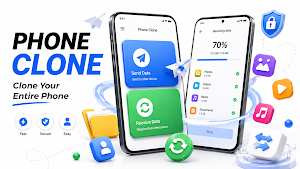
Smart Switch App: Copy My Data allows you to move your entire phone data to a new phone. Whether you’re upgrading your phone or just switching, this transfer my data app helps you switch mobile and transfer everything without losing any important data.
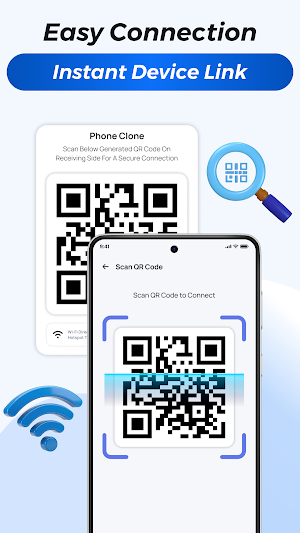
Connect both phones using WiFi direct or a mobile hotspot to send anywhere, scan the QR code, and let the clone phone app transfer all your apps, photos, videos, messages, files, and contacts wirelessly through a smooth mobile transfer process.
Benefits of Smart Switch: Copy My Data App
• Smart switch with one tap
• Transfer your data up to 10× faster than Bluetooth
• Secure phone-to-phone encrypted file transfer
• Auto-detect and connect to nearby devices instantly
• Pause & resume smart transfer anytime
• Built-in file cleaner & storage analyzer
• Quickly and easy share
Phone clone app
Clone your new phone with an old phone in just a few taps. Use secure QR or local hotspot pairing to clone. It’s the ideal solution when you switch mobile, and want everything copied exactly as it was on your old phone.
Enjoy complete phone cloning freedom with our phone transfer feature, which makes switching phones secure.
Transfer my data securely
Phone to phone transfer data quickly and safely. This feature gives you full control over what to send. Every smart transfer is private and protected, done directly between your two phones using a secure local connection, no cloud.
Smart switch cleanup
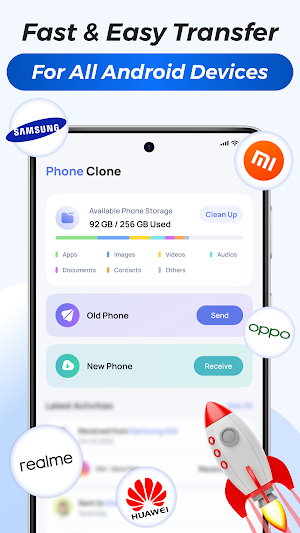
Keep your phone organized and free up space with the built-in cleanup feature. This tool helps you understand your storage clearly by showing total space, used storage, and available free space, along with how much data can be cleaned.
How to use transfer my data app - mobile clone app
Sender (Old phone)
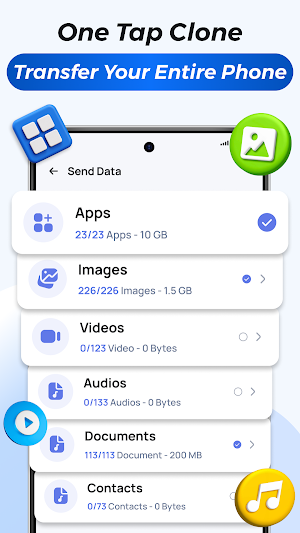
• Open the content transfer app and tap Send for android switch
• Select data like apps, photos, videos, contacts, etc.
• Allow the required permissions and send anywhere
• The app will auto-detect nearby devices; if no device is found, scan the QR code from the receiver phone.
• After connection, smart switch starts automatically
• Transfer successful message will appears after completion
Receiver (New phone) for Smart Switch App: Copy My Data
• Open the file transfer app and tap Receive
• Grant necessary permissions (storage, location, nearby devices) etc.
• Connect will build automatically or QR code to be scanned
• Mobile transfer begins instantly
• Transfer successful confirmation appears after completion
Why users prefer smart phone switch contact transfer
• Clean and easy-to-use design for quick understanding
• Stable and smooth connection during transfers
• Supports full content transfer in one go
• Copy my data transfer without losing apps, photos, transfer contacts or files
• Ideal for phone upgrades and data migration
• Built for everyday android switch users
• Wireless phone to phone transfer data
• Use QR code if auto-detection does not work
These steps keep the connection stable and ensure a smooth smart transfer.
Profile setup – personalize your device with Smart Switch App: Copy My Data
Add a name and photo from your gallery or choose a system avatar to identify your device easily during pairing. This connection makes the process clear when you send anywhere or use share me to receive files.
Privacy Policy: https://sites.google.com/view/phoneclone-datatransfer/home
Support: Need help with clone phone & data transfer app. Contact us at [email protected]
Download transfer data app: Copy my data now and enjoy a secure way to move your memories, apps, and files share to your new phone.
Connect both phones using WiFi direct or a mobile hotspot to send anywhere, scan the QR code, and let the clone phone app transfer all your apps, photos, videos, messages, files, and contacts wirelessly through a smooth mobile transfer process.
Benefits of Smart Switch: Copy My Data App
• Smart switch with one tap
• Transfer your data up to 10× faster than Bluetooth
• Secure phone-to-phone encrypted file transfer
• Auto-detect and connect to nearby devices instantly
• Pause & resume smart transfer anytime
• Built-in file cleaner & storage analyzer
• Quickly and easy share
Phone clone app
Clone your new phone with an old phone in just a few taps. Use secure QR or local hotspot pairing to clone. It’s the ideal solution when you switch mobile, and want everything copied exactly as it was on your old phone.
Enjoy complete phone cloning freedom with our phone transfer feature, which makes switching phones secure.
Transfer my data securely
Phone to phone transfer data quickly and safely. This feature gives you full control over what to send. Every smart transfer is private and protected, done directly between your two phones using a secure local connection, no cloud.
Smart switch cleanup
Keep your phone organized and free up space with the built-in cleanup feature. This tool helps you understand your storage clearly by showing total space, used storage, and available free space, along with how much data can be cleaned.
How to use transfer my data app - mobile clone app
Sender (Old phone)
• Open the content transfer app and tap Send for android switch
• Select data like apps, photos, videos, contacts, etc.
• Allow the required permissions and send anywhere
• The app will auto-detect nearby devices; if no device is found, scan the QR code from the receiver phone.
• After connection, smart switch starts automatically
• Transfer successful message will appears after completion
Receiver (New phone) for Smart Switch App: Copy My Data
• Open the file transfer app and tap Receive
• Grant necessary permissions (storage, location, nearby devices) etc.
• Connect will build automatically or QR code to be scanned
• Mobile transfer begins instantly
• Transfer successful confirmation appears after completion
Why users prefer smart phone switch contact transfer
• Clean and easy-to-use design for quick understanding
• Stable and smooth connection during transfers
• Supports full content transfer in one go
• Copy my data transfer without losing apps, photos, transfer contacts or files
• Ideal for phone upgrades and data migration
• Built for everyday android switch users
• Wireless phone to phone transfer data
• Use QR code if auto-detection does not work
These steps keep the connection stable and ensure a smooth smart transfer.
Profile setup – personalize your device with Smart Switch App: Copy My Data
Add a name and photo from your gallery or choose a system avatar to identify your device easily during pairing. This connection makes the process clear when you send anywhere or use share me to receive files.
Privacy Policy: https://sites.google.com/view/phoneclone-datatransfer/home
Support: Need help with clone phone & data transfer app. Contact us at [email protected]
Download transfer data app: Copy my data now and enjoy a secure way to move your memories, apps, and files share to your new phone.
What’s new
Version 1.18 · Updated August 19, 2026
Improved ad management for a smoother user experience. Enhanced app performance and stability. Fixed bugs and improved overall reliability.
User reviews

fast sharing

so cute app

good
Alternatives to Smart Switch App: Copy My Data
Looking for apps like Smart Switch App: Copy My Data? Here are 6 similar Android apps on Google Play. The highest rated is Samsung Smart Switch Mobile (3.9/5), and all 6 are free to download.
-
Samsung Smart Switch Mobile 3.9
-
OnePlus Community 3.9
-
Swift Backup 3.6
-
OPPO Clone Phone 3.6
-
Phone Clone Tool: Switch data 3.8
-
Mutsapper - Chat App Transfer 3.6
| App | Rating | Price | Installs | Last updated | Compare |
|---|---|---|---|---|---|
| Smart Switch App: Copy My Data | 3.0 / 5 | Free | 500,000+ | Aug 19, 2026 | |
| Samsung Smart Switch Mobile | 3.9 / 5 | Free | 1,000,000,000+ | Sep 3, 2026 | Compare |
| OnePlus Community | 3.9 / 5 | Free | 1,000,000+ | Jun 24, 2026 | Compare |
| Swift Backup | 3.6 / 5 | Free | 500,000+ | Jul 30, 2026 | Compare |
| OPPO Clone Phone | 3.6 / 5 | Free | 10,000,000+ | Oct 14, 2026 | Compare |
| Phone Clone Tool: Switch data | 3.8 / 5 | Free | 1,000,000+ | Sep 24, 2026 | Compare |
| Mutsapper - Chat App Transfer | 3.6 / 5 | Free | 5,000,000+ | Oct 20, 2026 | Compare |
Similar apps on Google Play
- Samsung Smart Switch Mobile
- OnePlus Community
- Swift Backup
- OPPO Clone Phone
- Phone Clone Tool: Switch data
- Mutsapper - Chat App Transfer
- Transfer All Data - PhoneClone
- Smart Transfer: File Sharing
- Dr.Fone: Photo & Data Recovery
- Taskbar
- LocalSend: Transfer Files
- Quikshort: Shortcut Creator
- Explorer
- My Data Manager: Data Usage
- ScreenStream
- Data Transfer - MobileTrans
- Super File Manager Explorer
- Autosync - File Sync & Backup
- Xiaomi Community
- Floating Apps (multitasking)
- WeTransfer : File Transfer
- MediaFire
- Multiple Accounts - Assist
- Multi App-Space
- Material Files
- Multiple Accounts: Dual Space
- ShareMe: File sharing
- File Manager
- HiOS Launcher - Fast
- ZX File Manager
- Parental Control App- FamiSafe
- RICOH Smart Device Connector
- Clone App-Parallel Dual Space
- Parallel App - Dual App Cloner
- My Folder : Safe Secure Hidden
- Send Anywhere (File Transfer)
- spacedesk - USB Display for PC
- EasyShare
- Multi App: Dual Space
- pCloud: Cloud Storage
- Smart Connect
- Call Recorder - Auto Recording
- Lenovo
- File Sharing - InShare
- Call Recorder - Talker ACR
- Quick Settings app
- Smart Tutor for SAMSUNG Mobile
- AirDroid: File & Remote Access
- File Manager
- Screen Recorder Unlimited
- Macrorify - Image Auto Clicker
- Samsung My Files
- App Locker - Lock App
- Authenticator App
- One Hand Operation +
- realme Link
- dynamicSpot - Dynamic Island
- AppDash: App Manager & Backup
- Virtual Master - Android Clone
- CrookCatcher: Who Touched?
- IronVest - Security & Privacy
- Duo Mobile
- Onoff Numbers
- ASTRO File Manager & Cleaner
- RDFit
- Move to iOS
- G-CPU:Monitor CPU, RAM, Widget
- EX File Manager
- POCO Launcher 2.0 - Customize,
- One Key: password manager
- AirDroid Parental Control
- Private Screenshots
- DNA Launcher ‧ Home Screen
- Calculator Pro: Calculator App
- Starlink
- Pushbullet: SMS on PC and more
- 2FA Authenticator (2FAS)
- SHAREit Premium: Pure Share
- Connecteam Team Management App
- Print Master
- HryFine
- JYouPro - Fitness Tracker
- Galaxy Wearable
- Qustodio Parental Control App
- GHome - GHome Smart
- RAR
- DeskIn Remote Desktop
- ScreenMaster:Screenshot Markup
- TeamViewer QuickSupport
- Second Phone Number - 2Number
- P Launcher
- Samsung Members
- FlashGet Kids:parental control
- Photo & Video Recovery
- App Usage - Manage/Track Usage
- Parental Control - Kroha
- Storage Analyzer & Disk Usage
- Link to Windows
- TeamViewer Remote Control
- Touch Lock Screen Touch Photo
- HappyLighting
- MobiSaver: Data&Photo Recovery
- AppLock - Fingerprint
- TAP Kiln Control Mobile
- Super S9 Launcher for Galaxy S
- Wabi - Virtual Phone Number
- Nuki Smart Lock
- 2nd Phone Number - Call & Text
- HP Print Service Plugin
- Total Drive - Cloud Storage
- Right Dialer
- UltData: Photo & Data Recovery
- All Call Recorder
- Simple App Launcher
- 2nd Line - Second Phone Number
- Virtual SIM
- Shortcut Maker
- Screen Recorder GU Recorder
- NetShare - no-root-tethering
- HyperClean AI
- App Lock: Fingerprint, Pattern
- Phone Dialer
- realme Community
- iRISCO
- MYTECNO
- Zoiper IAX SIP VOIP Softphone
- nzb360 - Media Server Manager
- LOCKit: App Lock, Photos Vault
- My Health
- Aegis Authenticator - 2FA App
- Magazine Lockscreen XOS
- pCloud Pass - Password manager
- Solid Explorer File Manager
- Dropbox: Secure Cloud Storage
- Parental Control - Kidslox
- Calculator
- Cinmoore
- Touch Screen Test
- App Lock - AppLock VIP
- Volume Styles - Custom control
- NetShare+ Wifi Tether
- TP-Link VIGI
- QR Scanner: Barcode Scanner
- Screen Mirroring: Phone to TV
- Call Blocker - Blacklist
- MonokaiToolkit
- Lotus Lantern
- Caller ID, Phone Dialer, Block
- FITEQ
- Parental Control App Blocker
- iCallScreen - Phone Dialer