
Touch Lock Screen - Touch Photo Position Password
Pic Frame Photo Collage Maker & Picture Editor Personalization In-app purchases Contains ads
The Touch Lock Screen is an app that secures your phone by setting a password.
- Rating
- 4.4
- 96.9K ratings
- Downloads
- 20.4M+
- on Google Play
- Price
- Free
- In-app purchases
- Updated
- Oct 21
- 2026 · v4.1.0
Screenshots


About Touch Lock Screen - Touch Photo Position Password
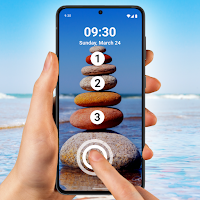
Touch Lock Screen - Touch Photo Position Password is a modern screen lock specially made for mobile security purposes. You can secure your mobile by setting touch passwords. You can set a touch password by touching 2-4 positions. Don’t worry if you forget the password, you can set a recovery password (Pin Password) for in case you don’t remember the touch lock screen password. If you entered an incorrect password six times then you must have to initialize the setting by using pin-code. You can change the existing pin which has set on your mobile phone. You can enable or disable sound and vibration for the lock screen. In this application, there is a 20+ theme available for the lock screen. Users can see and set the touch lock screen preview.
Features of Touch Lock Screen - Touch Photo Position Password:-
# You can set a recovery password (Pin Password) for in case you don’t remember the touch lock screen password.
# You can select an image from the wallpaper or gallery or the camera.
# You can set a touch lock password in two or four selected positions.
# You can enable or disable sound and vibration for the lock screen.
# You can change the theme and can set a new theme.
# You can select 20+ themes for your screen lock.
# You can see the set touch lock screen preview.
# You can change the existing pin.
Touch lock screen - touch photo position password is very essential application because nowadays mobile security is the main priority of every person. if you don’t set your mobile screen password or screen lock then anyone can see your private messages, your private information, contact details, photos, etc. The touch lock screen is an advanced mobile screen lock technology user can select their particular touch position to lock mobile phones. You can set two to four touch positions for the lock screen. Only, you must have to remember the set touch position, You can set a recovery password (Pin Password) for in case you don’t remember the touch lock screen password.
Touch lock screen - touch photo position password set your favorite theme as a lock screen. We provide 20+ amazing themes for your home screen lock, set any of theme whatever you like. You can set home screen wallpaper from a list of wallpaper, gallery or can take the photo by a camera to set home screen wallpaper. In case you lost your phone or someone stole your phone, you don’t have to worry about your phone privacy no one can unlock your phone except you. The application provides you higher and better security. Passwords set more than once in the same or different positions. which is unpredictable to anyone will greatly improve your phone’s security. Once you get the hang of it you do so quickly. In-app purchase is available to remove ads. If you can’t log in with your pin-code or pin password then please restart your phone and try again. Install our application Touch lock screen, secure your mobile phone from others.
Download and give us reviews of Touch Lock Screen - Touch Photo Position Password.
Features of Touch Lock Screen - Touch Photo Position Password:-
# You can set a recovery password (Pin Password) for in case you don’t remember the touch lock screen password.
# You can select an image from the wallpaper or gallery or the camera.
# You can set a touch lock password in two or four selected positions.
# You can enable or disable sound and vibration for the lock screen.
# You can change the theme and can set a new theme.
# You can select 20+ themes for your screen lock.
# You can see the set touch lock screen preview.
# You can change the existing pin.
Touch lock screen - touch photo position password is very essential application because nowadays mobile security is the main priority of every person. if you don’t set your mobile screen password or screen lock then anyone can see your private messages, your private information, contact details, photos, etc. The touch lock screen is an advanced mobile screen lock technology user can select their particular touch position to lock mobile phones. You can set two to four touch positions for the lock screen. Only, you must have to remember the set touch position, You can set a recovery password (Pin Password) for in case you don’t remember the touch lock screen password.
Touch lock screen - touch photo position password set your favorite theme as a lock screen. We provide 20+ amazing themes for your home screen lock, set any of theme whatever you like. You can set home screen wallpaper from a list of wallpaper, gallery or can take the photo by a camera to set home screen wallpaper. In case you lost your phone or someone stole your phone, you don’t have to worry about your phone privacy no one can unlock your phone except you. The application provides you higher and better security. Passwords set more than once in the same or different positions. which is unpredictable to anyone will greatly improve your phone’s security. Once you get the hang of it you do so quickly. In-app purchase is available to remove ads. If you can’t log in with your pin-code or pin password then please restart your phone and try again. Install our application Touch lock screen, secure your mobile phone from others.
Download and give us reviews of Touch Lock Screen - Touch Photo Position Password.
What’s new
Version 4.1.0 · Updated October 21, 2026
Thanks for staying with us! The new version offers: - Improve Performance. - Bug Fixes We love getting feedback from all of you! Please leave your feedback.
User reviews

Ms

Umar g

☺☺☺☺☺🙋🙋🙋🙋AyushDeshwal Sab😎

Verr good

Good

Nice
Alternatives to Touch Lock Screen - Touch Photo Position Password
Looking for apps like Touch Lock Screen - Touch Photo Position Password? Here are 6 similar Android apps on Google Play. The highest rated is Newlook Launcher - Galaxy Star (4.6/5), and all 6 are free to download.
-
Caller Name Announcer 4.2
-
ALocker: Private App Lock 4.3
-
App Locker - Lock App 4.1
-
Newlook Launcher - Galaxy Star 4.6
-
Applock 4.4
-
PassKeep - Password Manager 4.4
| App | Rating | Price | Installs | Last updated | Compare |
|---|---|---|---|---|---|
| Touch Lock Screen - Touch Photo Position Password | 4.4 / 5 | Free | 10,000,000+ | Oct 21, 2026 | |
| Caller Name Announcer | 4.2 / 5 | Free | 10,000,000+ | Nov 1, 2025 | Compare |
| ALocker: Private App Lock | 4.3 / 5 | Free | 1,000+ | Oct 27, 2020 | Compare |
| App Locker - Lock App | 4.1 / 5 | Free | 5,000,000+ | Oct 11, 2026 | Compare |
| Newlook Launcher - Galaxy Star | 4.6 / 5 | Free | 10,000,000+ | Aug 30, 2026 | Compare |
| Applock | 4.4 / 5 | Free | 5,000,000+ | – | Compare |
| PassKeep - Password Manager | 4.4 / 5 | Free | 1,000,000+ | Aug 26, 2026 | Compare |