

Notarium: Sheet Music
Music & Audio In-app purchases
Sheet music library and viewer with setlists, metronome and a notation editor.
- Downloads
- 100+
- on Google Play
- Price
- Free
- In-app purchases
- Updated
- Sep 24
- 2026 · v1.0.11
Screenshots


About Notarium: Sheet Music
Notarium is a sheet music app for musicians: a library for PDF and image scores, a clean full-screen viewer, setlists, practice tools and a notation editor — all of it working offline.
📚 Library
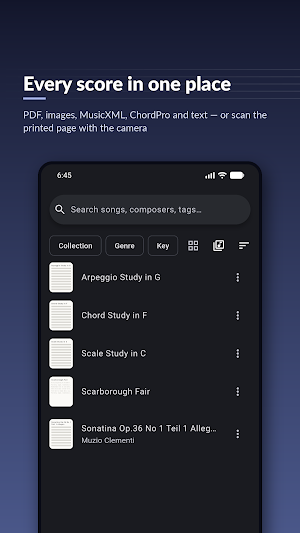
• Import PDF files, images, MusicXML (plain or compressed), ChordPro and text — or scan printed pages with your camera
• Search across titles, composers, artists, genres and tags
• Group by composer, genre, collection or what you opened recently
• Collections and filters by genre, key and difficulty
• List or cover grid, alphabetical index for large libraries
🎼 Viewer
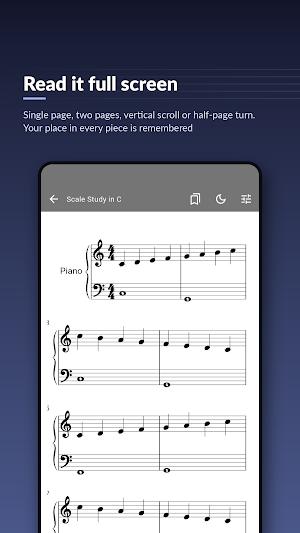
• Full-screen reading with minimal interface
• Page modes: single page, two pages side by side, vertical scroll and half-page turn
• Crop margins to make the music larger on screen
• Bookmarks and link points — jump instantly at repeats and codas
• Night mode with inverted colors for dark stages
• Your last position in every song is remembered
✏️ Annotations
• Pen, highlighter and text notes directly on the page
• Two layers, eraser and undo
• Original files stay untouched — markings are stored separately
🎶 Setlists
• Build your program by drag and drop
• Performance mode: continuous page turning through the whole setlist
🥁 Practice tools
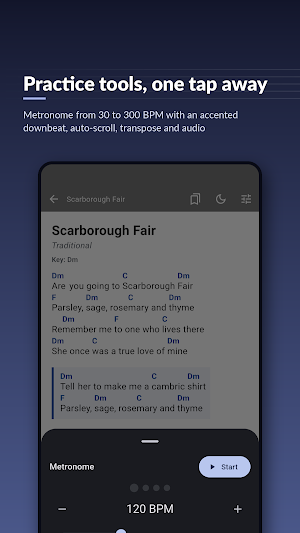
• Metronome: 30–300 BPM, accented downbeat, visual beat indicator
• Audio player: attach recordings to songs, slow down without changing pitch, A–B loop for tricky passages
🎸 Chord sheets
• ChordPro and plain text files with chords over the syllable you play them on
• Transpose the whole sheet by semitones with musically correct spelling
• Adjustable text size, choruses and tab blocks laid out properly
🎹 Notation editor
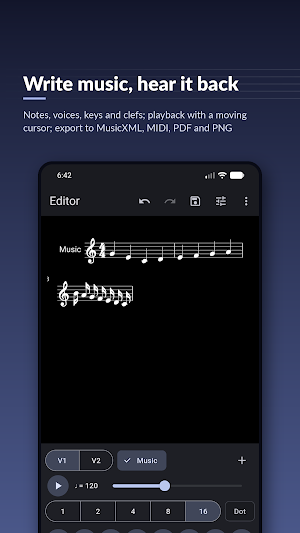
• Write music from scratch: notes, rests, accidentals, ties, dynamics, lyrics
• Select several notes at once and edit or transpose them in one step
• Properties panel for the selection; two voices and parts; key, time signature and clef settings
• Transpose by any interval with correct spelling
• Playback with piano sound and a moving cursor
• Import MusicXML; export MusicXML, MIDI, PDF and PNG
• Engraving powered by Verovio
📷 Scanner
• Scan printed sheet music straight into your library
• Automatic edge detection and perspective correction, batch scanning of up to 30 pages
• Scanned pages are stored in your library as images
⚙️ Yours to keep
• Light, dark or system theme, Material You colors, and an interface in 44 languages
• Back up your whole library — scores, markings, setlists — into one file and restore it on another device
• See exactly how much space the library takes and clear derived caches
🔒 On your device
• Reading, marking up and writing music work offline; the scanner and buying Pro go through Google Play
• Your scores, markings and recordings are kept in the app’s own storage on your device
💳 Free, with an optional Pro
• Everything you need to play from the screen is free: the library, the viewer, annotations, setlists and performance mode, the metronome, the audio player, the scanner, the notation editor, and export to MusicXML, MIDI, PDF and PNG
• Notarium Pro adds what teachers and arrangers need on paper: PDF with a title page and printing margins, PNG at high resolution, a whole setlist as a single file, plus stamps, shapes, custom palettes, extra annotation layers and exporting a page with your markings on it
• Pro is a monthly or yearly subscription, or a one-time purchase. Google Play handles the payment; your library stays where it was
Who is it for?
• Performers: full-screen viewer, setlists, night mode
• Students: metronome, slowed-down playback, A–B loop, annotations
• Teachers: scan exercises, mark them up, keep them organized
• Composers and arrangers: notation editor, transposition, MusicXML and MIDI export
Notarium is in beta. If something does not work the way you expect, write to [email protected] — feedback directly shapes the next releases.
📚 Library
• Import PDF files, images, MusicXML (plain or compressed), ChordPro and text — or scan printed pages with your camera
• Search across titles, composers, artists, genres and tags
• Group by composer, genre, collection or what you opened recently
• Collections and filters by genre, key and difficulty
• List or cover grid, alphabetical index for large libraries
🎼 Viewer
• Full-screen reading with minimal interface
• Page modes: single page, two pages side by side, vertical scroll and half-page turn
• Crop margins to make the music larger on screen
• Bookmarks and link points — jump instantly at repeats and codas
• Night mode with inverted colors for dark stages
• Your last position in every song is remembered
✏️ Annotations
• Pen, highlighter and text notes directly on the page
• Two layers, eraser and undo
• Original files stay untouched — markings are stored separately
🎶 Setlists
• Build your program by drag and drop
• Performance mode: continuous page turning through the whole setlist
🥁 Practice tools
• Metronome: 30–300 BPM, accented downbeat, visual beat indicator
• Audio player: attach recordings to songs, slow down without changing pitch, A–B loop for tricky passages
🎸 Chord sheets
• ChordPro and plain text files with chords over the syllable you play them on
• Transpose the whole sheet by semitones with musically correct spelling
• Adjustable text size, choruses and tab blocks laid out properly
🎹 Notation editor
• Write music from scratch: notes, rests, accidentals, ties, dynamics, lyrics
• Select several notes at once and edit or transpose them in one step
• Properties panel for the selection; two voices and parts; key, time signature and clef settings
• Transpose by any interval with correct spelling
• Playback with piano sound and a moving cursor
• Import MusicXML; export MusicXML, MIDI, PDF and PNG
• Engraving powered by Verovio
📷 Scanner
• Scan printed sheet music straight into your library
• Automatic edge detection and perspective correction, batch scanning of up to 30 pages
• Scanned pages are stored in your library as images
⚙️ Yours to keep
• Light, dark or system theme, Material You colors, and an interface in 44 languages
• Back up your whole library — scores, markings, setlists — into one file and restore it on another device
• See exactly how much space the library takes and clear derived caches
🔒 On your device
• Reading, marking up and writing music work offline; the scanner and buying Pro go through Google Play
• Your scores, markings and recordings are kept in the app’s own storage on your device
💳 Free, with an optional Pro
• Everything you need to play from the screen is free: the library, the viewer, annotations, setlists and performance mode, the metronome, the audio player, the scanner, the notation editor, and export to MusicXML, MIDI, PDF and PNG
• Notarium Pro adds what teachers and arrangers need on paper: PDF with a title page and printing margins, PNG at high resolution, a whole setlist as a single file, plus stamps, shapes, custom palettes, extra annotation layers and exporting a page with your markings on it
• Pro is a monthly or yearly subscription, or a one-time purchase. Google Play handles the payment; your library stays where it was
Who is it for?
• Performers: full-screen viewer, setlists, night mode
• Students: metronome, slowed-down playback, A–B loop, annotations
• Teachers: scan exercises, mark them up, keep them organized
• Composers and arrangers: notation editor, transposition, MusicXML and MIDI export
Notarium is in beta. If something does not work the way you expect, write to [email protected] — feedback directly shapes the next releases.
What’s new
Version 1.0.11 · Updated September 24, 2026
Build #1025 https://gi-gante.com/apps/notarium/changelog/
Alternatives to Notarium: Sheet Music
Looking for apps like Notarium: Sheet Music? Here are 6 similar Android apps on Google Play. The highest rated is TF STUDIO (4.6/5), and all 6 are free to download.
-
Song Maker - Music Mixer 3.8
-
Soundtrap: Music Making Studio 4.4
-
Music Worx: Play Like a DJ 3.9
-
flowkey: Learn piano 4.5
-
TF STUDIO 4.6
-
tonestro - Music Lessons 4.6
| App | Rating | Price | Installs | Last updated | Compare |
|---|---|---|---|---|---|
| Notarium: Sheet Music | – | Free | 100+ | Sep 24, 2026 | |
| Song Maker - Music Mixer | 3.8 / 5 | Free | 10,000,000+ | Oct 15, 2026 | Compare |
| Soundtrap: Music Making Studio | 4.4 / 5 | Free | 1,000,000+ | Oct 7, 2026 | Compare |
| Music Worx: Play Like a DJ | 3.9 / 5 | Free | 100,000+ | Oct 15, 2026 | Compare |
| flowkey: Learn piano | 4.5 / 5 | Free | 5,000,000+ | Sep 17, 2026 | Compare |
| TF STUDIO | 4.6 / 5 | Free | 10,000+ | Sep 19, 2026 | Compare |
| tonestro - Music Lessons | 4.6 / 5 | Free | 1,000,000+ | Sep 28, 2026 | Compare |
Similar apps on Google Play
- Song Maker - Music Mixer
- Soundtrap: Music Making Studio
- Music Worx: Play Like a DJ
- flowkey: Learn piano
- TF STUDIO
- tonestro - Music Lessons
- Bandpass
- musicat: Music, Stats, Reviews
- Rewind: Music Discovery
- Tunefox
- InstaDrum - Be a Drummer Now
- SongbookPro
- Piano by Yousician
- n-Track Studio DAW: Make Music
- Genius — Song Lyrics Finder
- Music Theory Companion
- Learn Piano: Beginner Tutorial
- Musixmatch Dynamic Lyrics
- Chord ai - learn any song
- Splice: Make music now
- AI Cover & Songs: Music AI
- Cadence: Guitar Theory
- n-Track Studio Pro | DAW
- Chordify: Song Chords & Tuner
- Songsterr Guitar Tabs & Chords
- Songstats: Music Analytics
- Metronome & BPM - Camtronome
- Ear Gym: Ear Training & Theory
- Offtop Rap Studio & Song Maker
- The Metronome by Soundbrenner
- Musis - Rate Music for Spotify
- UnitedMasters: Release Music
- KP AI Music & Song Maker
- FiiO Music
- smart Chords: 40 guitar tools…
- Piano Marvel
- Music Maker JAM: Beatmaker app
- Set List Maker
- Functional Ear Trainer
- Metronome Beats
- Flat: Music Score & Tab Editor
- MuseScore: Music Chords & Tabs
- DI.FM: Electronic Music Radio
- Music Speed Changer
- Tomplay Sheet Music
- IMSLP
- Podcast Republic - Podcast app
- Podcast Guru - Podcast App
- Koala Sampler
- Shuttle Music Player (Legacy)
- LANDR - Master & Release Music
- Sword And Scale
- AI Vocal Remover - unMix
- DRC - Polyphonic Synthesizer
- Vocal Remover, Cut Song Maker
- Thomann: Discover Music Gear
- Up Tempo: Pitch, Speed Changer
- Dolby On: Record Audio & Music
- DJ Music Mixer - Equalizer
- Yoto: Music, Stories, Sleep
- Vocabulary flashcards: Vocabuo
- iRig Guitar Amp & FX · Deplike
- USB Audio Player PRO
- Chaos Audio: Effects & Amp AI
- Read notes & drum notation
- Flow : Music Therapy
- WallStream
- Frolomuse: MP3 Music Player
- The Original Piano
- Transkriptor - Speech to Text
- NaturalReader - Text to Speech
- Skoove: Learn Piano
- Shoom・AI Music Video Generator
- Music Player
- Pi Music Player: Offline Music
- Letterly: Write by Voice & AI
- Sony | Music Center
- Fender Play: Music Lessons
- Poweramp Equalizer
- CraftNote – AI Note Taker
- rova – radio, music, podcasts
- Binaural Beats Brainwaves
- Audials Play: Radio & Podcasts
- Moon+ Reader Pro
- Music Player
- Noji – Flashcards study app
- Flute Lessons - tonestro
- Beatport: Music for DJs App
- Mureka: AI Radio & Music Maker
- MyScript Notes: AI Note Taking
- Ukulele Tuner
- Guitar Tuner - LikeTones
- Music Audio Editor, MP3 Cutter
- Stellio - Music and mp3 Player
- AI Grammar Checker App
- Cannondale
- Music Equalizer - Bass Booster
- White Noise
- AudioLab Audio Cutter & Editor
- Walk Band - Multitracks Music
- Listening: Text to Speech
- HiNotes by HiDock
- Notesnook Secure Private Notes
- Boom: Bass Booster & Equalizer
- Jabra Sound+
- Sonos
- Zona: AI Song Maker & Creator
- Earz Solo - Game to the Music
- Snipd | AI Podcast Player
- Music Player - MP3 & Equalizer
- Equalizer- Bass Booster&Volume
- Offline Music Player
- Oto Music
- Music Player - Mp3 Player
- JAMMATES
- Guitar Tuner - Simply Tune
- Music Player With Equalizer