
ReleasePad: Model Release PDF
Dog_Foot Productivity
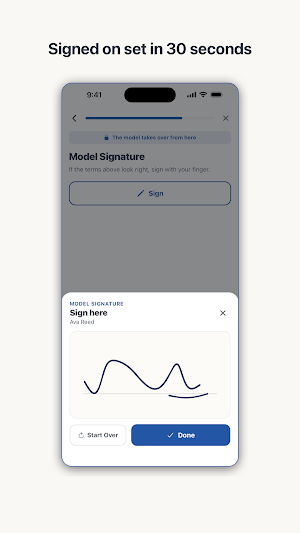
30 seconds on set — the model signs with a finger and the release PDF is done.
- Downloads
- 6+
- on Google Play
- Price
- Free
- No in-app purchases
- Updated
- Sep 5
- 2026 · v1.0.0
Screenshots

About ReleasePad: Model Release PDF
The fastest way to get a model release signed isn't a printer or a clipboard. It's the phone already in your hand. ReleasePad is a tool for photographers: hand your phone to the model on set, they fill in their details and sign with a finger, and a finished model release PDF assembles on the spot.
■ 30 seconds on set
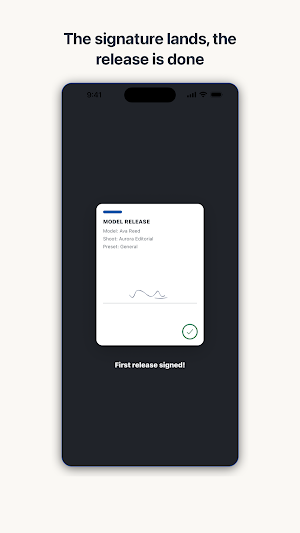
Your photographer profile and your own signature are saved once and reused. Shoot details are entered once per shoot. So on set, the only input left is the model's: name, contact, date of birth, and a finger signature. When they sign, the document snaps together into a single release, with your signature attached automatically.
■ The exact fields stock agencies ask for
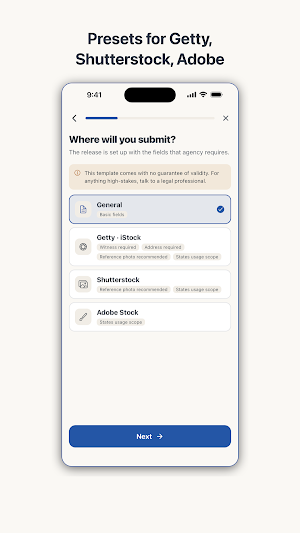
Getty, Shutterstock, and Adobe Stock each require different fields on a release. ReleasePad's presets are built from each agency's public contributor guidelines, so picking a preset reshapes the wizard to match that submission — required fields, witness step and all. A generic preset covers everyday portrait work.
■ Handoff Guard
While the phone is in the model's hands, the app stays on the release being created. Getting to anything else — earlier releases, other models' names and contact details — requires the photographer's own verification: biometrics or the device passcode. Verification happens entirely on the device.
■ Minors, witnesses, reference photos
If the model is a minor, guardian details and a guardian signature step are added automatically. If a preset requires a witness, a witness signature step appears. You can attach a reference photo from the camera or your library, and the signing time is recorded on the document.
■ Everything stays on this phone
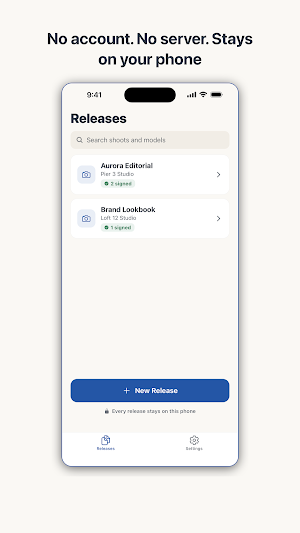
No server, no account, no analytics. The model's name, contact, birth date, and signature live only on your phone. A release leaves the device only when you send it yourself through the share sheet — email, save to files, or print. Every feature works fully offline, whether the shoot is in a basement studio or on a mountainside.
For stock photography contributors, the presets keep agency requirements covered. For portrait, event, and street photographers, releases stop interrupting the shoot. Printing paper forms, chasing signatures, scanning, and filing — all of it disappears.
ReleasePad is a template tool, not legal advice. The effect of any document may vary by jurisdiction and circumstances. The app is completely free.
■ 30 seconds on set
Your photographer profile and your own signature are saved once and reused. Shoot details are entered once per shoot. So on set, the only input left is the model's: name, contact, date of birth, and a finger signature. When they sign, the document snaps together into a single release, with your signature attached automatically.
■ The exact fields stock agencies ask for
Getty, Shutterstock, and Adobe Stock each require different fields on a release. ReleasePad's presets are built from each agency's public contributor guidelines, so picking a preset reshapes the wizard to match that submission — required fields, witness step and all. A generic preset covers everyday portrait work.
■ Handoff Guard
While the phone is in the model's hands, the app stays on the release being created. Getting to anything else — earlier releases, other models' names and contact details — requires the photographer's own verification: biometrics or the device passcode. Verification happens entirely on the device.
■ Minors, witnesses, reference photos
If the model is a minor, guardian details and a guardian signature step are added automatically. If a preset requires a witness, a witness signature step appears. You can attach a reference photo from the camera or your library, and the signing time is recorded on the document.
■ Everything stays on this phone
No server, no account, no analytics. The model's name, contact, birth date, and signature live only on your phone. A release leaves the device only when you send it yourself through the share sheet — email, save to files, or print. Every feature works fully offline, whether the shoot is in a basement studio or on a mountainside.
For stock photography contributors, the presets keep agency requirements covered. For portrait, event, and street photographers, releases stop interrupting the shoot. Printing paper forms, chasing signatures, scanning, and filing — all of it disappears.
ReleasePad is a template tool, not legal advice. The effect of any document may vary by jurisdiction and circumstances. The app is completely free.
What’s new
Version 1.0.0 · Updated September 5, 2026
First release. The fastest way to get a model release signed isn't a printer or a clipboard. It's the phone already in your hand. ReleasePad is a tool for photographers: hand your phone to the model on set, they fill in their details and sign with a finger, and a finished model release PDF assembles on the spot.
Alternatives to ReleasePad: Model Release PDF
Looking for apps like ReleasePad: Model Release PDF? Here are 6 similar Android apps on Google Play. All of them are free to download.
-
NanaFrame: Grandkids Widget
-
HiveScribe: Hive Inspections
-
Fanspot: K-pop Fan Map
-
DutyWheel: Police Shifts
-
Yarnline: Knitting WIP Tracker
-
SteamLog: Sauna & Cold Plunge
| App | Rating | Price | Installs | Last updated | Compare |
|---|---|---|---|---|---|
| ReleasePad: Model Release PDF | – | Free | 5+ | Sep 5, 2026 | |
| NanaFrame: Grandkids Widget | – | Free | 1+ | – | Compare |
| HiveScribe: Hive Inspections | – | Free | 0+ | Sep 10, 2026 | Compare |
| Fanspot: K-pop Fan Map | – | Free | 0+ | – | Compare |
| DutyWheel: Police Shifts | – | Free | 1+ | – | Compare |
| Yarnline: Knitting WIP Tracker | – | Free | 1+ | – | Compare |
| SteamLog: Sauna & Cold Plunge | – | Free | 1+ | Sep 5, 2026 | Compare |
Similar apps on Google Play
- NanaFrame: Grandkids Widget
- HiveScribe: Hive Inspections
- Fanspot: K-pop Fan Map
- DutyWheel: Police Shifts
- Yarnline: Knitting WIP Tracker
- SteamLog: Sauna & Cold Plunge
- CrashPack: Car Accident Record
- Warmthly: Keep in Touch
- QuietCheck: Elderly Check In
- Shotaway - Screenshot Cleaner
- HoofBook: Farrier Shoeing Log
- ColorCarte: Hair Formulas
- BrainSheet: Nurse Report Sheet
- LightTide: Golden Hour Map
- RoundTally: Window Round Book
- CrackLog: Coffee Roast Log
- Knokk Couple Widget - Photos
- Zenith: Prayer Times & Qibla