
CrashPack: Car Accident Record
Dog_Foot Productivity
One photo at a time. Offline.
- Downloads
- 2+
- on Google Play
- Price
- Free
- No in-app purchases
- Updated
- Sep 5
- 2026 · v1.0.0
Screenshots

About CrashPack: Car Accident Record
Now take this photo. Then the next one. That is all CrashPack asks of you in the minutes after a collision.
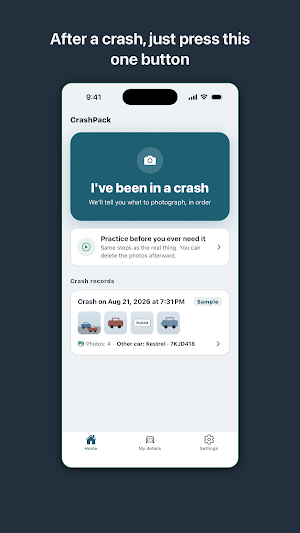
Open the app, tap "I had an accident," and it walks you through the scene one shot at a time: the wide view, the other car, the license plate, driver's license, insurance card, the damage, the road and the signals. Big buttons, short prompts, no countdown. By the time you put your phone away, your insurer-ready record is already built.
HOW IT WORKS
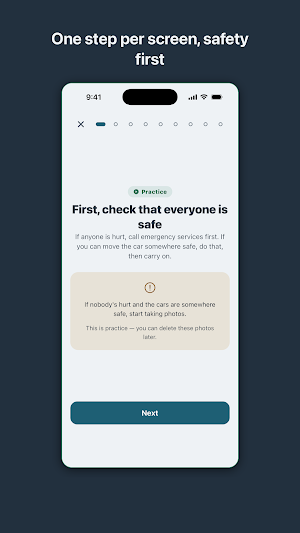
- One step per screen. You see only what to capture right now, never a checklist of everything left.
- A safety check comes first. Injuries and emergency calls come before any photo.
- Photos stack into a strip as you go, so you can see at a glance what you have covered.
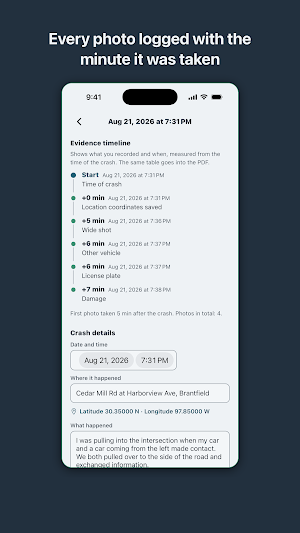
- Every shot is timestamped against the moment of the accident, building a clear evidence timeline. Anyone reading it can tell these photos were taken at the scene.
- Typing waits. Names, addresses, witness details and notes can be added later at home.
WHAT YOU GET
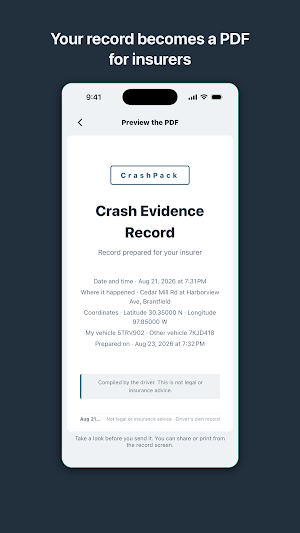
- A PDF built for submission: cover page, side-by-side driver and vehicle details, the evidence timeline, and photo pages with captions and capture times. Preview it in the app before you share or print.
- A practice run. Walk through the whole flow on your couch before you ever need it, then delete the practice photos.
- Your car and policy details saved once, filled in automatically on every record.
- A home screen shortcut. Press and hold the app icon to start a record without going through the home screen.
WORKS WITHOUT A SIGNAL
CrashPack is fully offline. No account, no sign-in, no server. It makes no network requests at all, so it behaves the same in a parking garage, on a rural road, or at the mouth of a tunnel. The other driver's license and insurance photos are someone else's personal information; they stay on your phone until you choose to share the PDF.
CrashPack is a recording tool. It does not give legal or insurance advice, assign fault, or estimate claims. It does one thing well: it keeps an accurate record of what happened.
Open the app, tap "I had an accident," and it walks you through the scene one shot at a time: the wide view, the other car, the license plate, driver's license, insurance card, the damage, the road and the signals. Big buttons, short prompts, no countdown. By the time you put your phone away, your insurer-ready record is already built.
HOW IT WORKS
- One step per screen. You see only what to capture right now, never a checklist of everything left.
- A safety check comes first. Injuries and emergency calls come before any photo.
- Photos stack into a strip as you go, so you can see at a glance what you have covered.
- Every shot is timestamped against the moment of the accident, building a clear evidence timeline. Anyone reading it can tell these photos were taken at the scene.
- Typing waits. Names, addresses, witness details and notes can be added later at home.
WHAT YOU GET
- A PDF built for submission: cover page, side-by-side driver and vehicle details, the evidence timeline, and photo pages with captions and capture times. Preview it in the app before you share or print.
- A practice run. Walk through the whole flow on your couch before you ever need it, then delete the practice photos.
- Your car and policy details saved once, filled in automatically on every record.
- A home screen shortcut. Press and hold the app icon to start a record without going through the home screen.
WORKS WITHOUT A SIGNAL
CrashPack is fully offline. No account, no sign-in, no server. It makes no network requests at all, so it behaves the same in a parking garage, on a rural road, or at the mouth of a tunnel. The other driver's license and insurance photos are someone else's personal information; they stay on your phone until you choose to share the PDF.
CrashPack is a recording tool. It does not give legal or insurance advice, assign fault, or estimate claims. It does one thing well: it keeps an accurate record of what happened.
What’s new
Version 1.0.0 · Updated September 5, 2026
First release. Now take this photo. Then the next one. That is all CrashPack asks of you in the minutes after a collision. Open the app, tap "I had an accident," and it walks you through the scene one shot at a time: the wide view, the other car, the license plate, driver's license, insurance card, the damage, the road and the signals. Big buttons, short prompts, no countdown. By the time you put your phone away, your insurer-ready record is already built.
Alternatives to CrashPack: Car Accident Record
Looking for apps like CrashPack: Car Accident Record? Here are 6 similar Android apps on Google Play. All of them are free to download.
-
NanaFrame: Grandkids Widget
-
HiveScribe: Hive Inspections
-
Fanspot: K-pop Fan Map
-
DutyWheel: Police Shifts
-
Yarnline: Knitting WIP Tracker
-
ReleasePad: Model Release PDF
| App | Rating | Price | Installs | Last updated | Compare |
|---|---|---|---|---|---|
| CrashPack: Car Accident Record | – | Free | 1+ | Sep 5, 2026 | |
| NanaFrame: Grandkids Widget | – | Free | 5+ | Sep 28, 2026 | Compare |
| HiveScribe: Hive Inspections | – | Free | 1+ | Sep 10, 2026 | Compare |
| Fanspot: K-pop Fan Map | – | Free | 1+ | Sep 10, 2026 | Compare |
| DutyWheel: Police Shifts | – | Free | 5+ | Sep 5, 2026 | Compare |
| Yarnline: Knitting WIP Tracker | – | Free | 10+ | Oct 17, 2026 | Compare |
| ReleasePad: Model Release PDF | – | Free | 5+ | Sep 5, 2026 | Compare |
Similar apps on Google Play
- NanaFrame: Grandkids Widget
- HiveScribe: Hive Inspections
- Fanspot: K-pop Fan Map
- DutyWheel: Police Shifts
- Yarnline: Knitting WIP Tracker
- ReleasePad: Model Release PDF
- SteamLog: Sauna & Cold Plunge
- Warmthly: Keep in Touch
- QuietCheck: Elderly Check In
- Shotaway - Screenshot Cleaner
- HoofBook: Farrier Shoeing Log
- ColorCarte: Hair Formulas
- BrainSheet: Nurse Report Sheet
- LightTide: Golden Hour Map
- RoundTally: Window Cleaning
- CrackLog: Coffee Roast Log
- Knokk Couple Widget - Photos
- Zenith: Prayer Times & Qibla