

Knokk Couple Widget - Photos
Dog_Foot Lifestyle
Reply to your partner's photo straight from the home screen widget
- Downloads
- 25+
- on Google Play
- Price
- Free
- No in-app purchases
- Updated
- Oct 5
- 2026 · v1.0.2
Screenshots
About Knokk Couple Widget - Photos
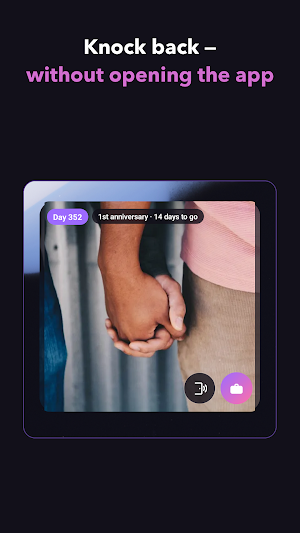
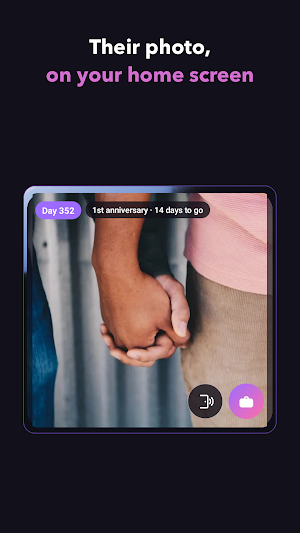
Knokk is a couple app built to be opened as little as possible. The photo your partner sends shows up on your home screen widget, and your reply leaves from that same widget. Every other couple widget hands you the photo and then sends you into an app to answer it. That one difference is the entire product.
■ The reply leaves from the widget
Their photo lands on your home screen. Tap the button sitting on it once and the reply is sent — nothing launched, nothing typed, no keyboard at all. The sender is the one who picks which button comes back: So lovely, Just ate, or Good night. Send a photo of dinner and ask for Just ate, and a single tap tells you they have eaten too. That is why Knokk has no caption field anywhere. Choosing the button is the message.
■ Miss you, without turning into nagging
The knock button is called Miss you. Press it and a notification is on their phone — no text to write, nothing to explain. Knokk is deliberately stingy with it, because a button you can hammer all morning stops meaning anything by noon. Ten minutes have to pass before the next knock, and ten is the ceiling. The server keeps that count, not the app, and the twenty-four hours it counts are always the twenty-four sitting right behind you. Midnight hands nothing back.
■ The day count rides next to today's photo
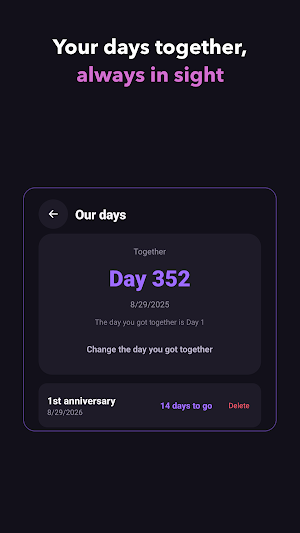
Set the day you got together; that day itself is Day 1. Then add the dates you are actually waiting on — the anniversary of your first date, a birthday, Valentine's Day — and the widget counts down the days left. If your connection drops, the last photo simply stays on the widget, and across time zones every glance at your home screen still has their day on it.
■ Knokk fits if
- The photos you send in a chat are buried under twenty messages by dinner
- You arrange your home screen carefully and want your person on it
- You are in different time zones and would rather check in often and briefly
- You would rather a widget kept the dates than you did
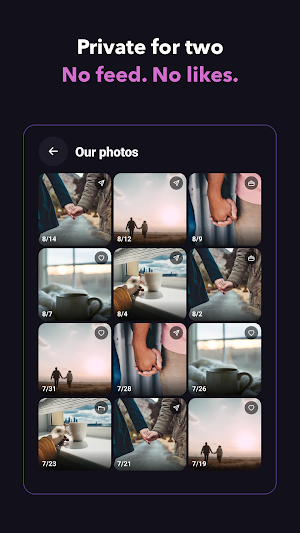
Two people and nobody else: no feed, no followers, no likes, no ads, and every feature is free. Only the two connected people can see a photo. The server strips location data (EXIF) out of every upload, and deleting your account deletes the photos you sent with it. Your partner is never told when you opened a photo — there are no read receipts, so nobody is answering against a clock.
Setup is two things: you both install Knokk, and one of you sends the other an invite code. Each person pairs with exactly one other, and from then on there is nothing left to open.
■ The reply leaves from the widget
Their photo lands on your home screen. Tap the button sitting on it once and the reply is sent — nothing launched, nothing typed, no keyboard at all. The sender is the one who picks which button comes back: So lovely, Just ate, or Good night. Send a photo of dinner and ask for Just ate, and a single tap tells you they have eaten too. That is why Knokk has no caption field anywhere. Choosing the button is the message.
■ Miss you, without turning into nagging
The knock button is called Miss you. Press it and a notification is on their phone — no text to write, nothing to explain. Knokk is deliberately stingy with it, because a button you can hammer all morning stops meaning anything by noon. Ten minutes have to pass before the next knock, and ten is the ceiling. The server keeps that count, not the app, and the twenty-four hours it counts are always the twenty-four sitting right behind you. Midnight hands nothing back.
■ The day count rides next to today's photo
Set the day you got together; that day itself is Day 1. Then add the dates you are actually waiting on — the anniversary of your first date, a birthday, Valentine's Day — and the widget counts down the days left. If your connection drops, the last photo simply stays on the widget, and across time zones every glance at your home screen still has their day on it.
■ Knokk fits if
- The photos you send in a chat are buried under twenty messages by dinner
- You arrange your home screen carefully and want your person on it
- You are in different time zones and would rather check in often and briefly
- You would rather a widget kept the dates than you did
Two people and nobody else: no feed, no followers, no likes, no ads, and every feature is free. Only the two connected people can see a photo. The server strips location data (EXIF) out of every upload, and deleting your account deletes the photos you sent with it. Your partner is never told when you opened a photo — there are no read receipts, so nobody is answering against a clock.
Setup is two things: you both install Knokk, and one of you sends the other an invite code. Each person pairs with exactly one other, and from then on there is nothing left to open.
What’s new
Version 1.0.2 · Updated October 5, 2026
We tidied up the design of the Continue button on the sign-in screen. Nothing else has changed.
Alternatives to Knokk Couple Widget - Photos
Looking for apps like Knokk Couple Widget - Photos? Here are 6 similar Android apps on Google Play. All of them are free to download.
-
NanaFrame: Grandkids Widget
-
HiveScribe: Hive Inspections
-
Fanspot: K-pop Fan Map
-
DutyWheel: Police Shifts
-
Yarnline: Knitting WIP Tracker
-
ReleasePad: Model Release PDF
| App | Rating | Price | Installs | Last updated | Compare |
|---|---|---|---|---|---|
| Knokk Couple Widget - Photos | – | Free | 10+ | Oct 5, 2026 | |
| NanaFrame: Grandkids Widget | – | Free | 5+ | Sep 28, 2026 | Compare |
| HiveScribe: Hive Inspections | – | Free | 1+ | Sep 10, 2026 | Compare |
| Fanspot: K-pop Fan Map | – | Free | 1+ | Sep 10, 2026 | Compare |
| DutyWheel: Police Shifts | – | Free | 5+ | Sep 5, 2026 | Compare |
| Yarnline: Knitting WIP Tracker | – | Free | 10+ | Oct 17, 2026 | Compare |
| ReleasePad: Model Release PDF | – | Free | 5+ | Sep 5, 2026 | Compare |
Similar apps on Google Play
- NanaFrame: Grandkids Widget
- HiveScribe: Hive Inspections
- Fanspot: K-pop Fan Map
- DutyWheel: Police Shifts
- Yarnline: Knitting WIP Tracker
- ReleasePad: Model Release PDF
- SteamLog: Sauna & Cold Plunge
- CrashPack: Car Accident Record
- Warmthly: Keep in Touch
- QuietCheck: Elderly Check In
- Shotaway - Screenshot Cleaner
- HoofBook: Farrier Shoeing Log
- ColorCarte: Hair Formulas
- BrainSheet: Nurse Report Sheet
- LightTide: Golden Hour Map
- RoundTally: Window Cleaning
- CrackLog: Coffee Roast Log
- Zenith: Prayer Times & Qibla