

Cisco Webex Meetings
Cisco Systems, Inc. Business
Tap into a Webex meeting, wherever you are, with Webex Meetings for Android!
- Rating
- 4.3
- 501K ratings
- Downloads
- 10M+
- on Google Play
- Price
- Free
- No in-app purchases
- Updated
- Apr 28
- 2020 · v40.4.1
Screenshots




About Cisco Webex Meetings
Don’t let being away from the office slow your business down. Experience engaging, productive meetings from wherever you are.
Cisco Webex Meetings delivers over 6 billion meetings per month, offering industry-leading video and audio conferencing with sharing, chat, and more. Experience why more people use Webex Meetings than all other meeting vendors combined.
General features:
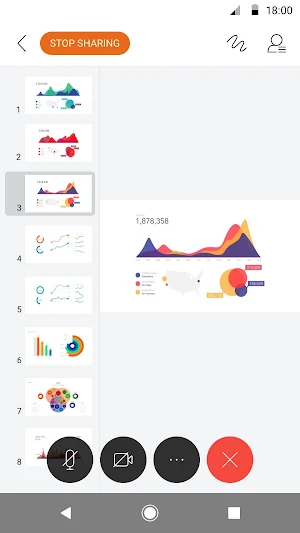
• Join and present from any meeting, event, or training session
• Hands-free voice commands with Google Assistant and Google Home Hub
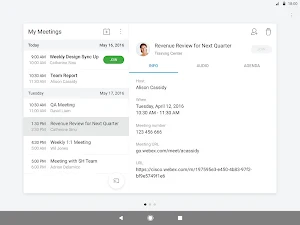
• Seamless joining directly from your calendar or customizable widget
• Schedule meetings or playback recordings directly from your app
• Customizable video layouts
• Share your screen to everyone
Want to learn more? See https://help.webex.com/article/nowvmhw.
Follow us:
• Twitter - https://twitter.com/webex
• Facebook - https://www.facebook.com/CiscoCollab
By installing this application, you are accepting the Terms of Service (http://www.webex.com/terms-of-service-text.html) and Privacy Statement (https://www.cisco.com/web/siteassets/legal/privacy.html) and are consenting to receive communications, updates, and upgrades for Cisco Webex services. Cisco Webex may collect meeting usage data and personal information, such as your email address, from your computer or device.
What's New in Version 40.4.1?
• Additional language support (Polish, Czech, Hungarian, Romanian)
• Google Assistant and Google Home scheduler voice command support
• Webex Training breakout session support in VoIP Only sessions
• Smart Meeting improvement – low battery detection
• Usability improvements
• Bug fixes
Old information to be transferred to Collabhelp Usage Guide
REQUIREMENTS
Android OS 5.0+
Dual-core CPU is required for video.
Webex service is not available in all countries. See www.webex.com for information.
Cisco Webex Meetings delivers over 6 billion meetings per month, offering industry-leading video and audio conferencing with sharing, chat, and more. Experience why more people use Webex Meetings than all other meeting vendors combined.
General features:
• Join and present from any meeting, event, or training session
• Hands-free voice commands with Google Assistant and Google Home Hub
• Seamless joining directly from your calendar or customizable widget
• Schedule meetings or playback recordings directly from your app
• Customizable video layouts
• Share your screen to everyone
Want to learn more? See https://help.webex.com/article/nowvmhw.
Follow us:
• Twitter - https://twitter.com/webex
• Facebook - https://www.facebook.com/CiscoCollab
By installing this application, you are accepting the Terms of Service (http://www.webex.com/terms-of-service-text.html) and Privacy Statement (https://www.cisco.com/web/siteassets/legal/privacy.html) and are consenting to receive communications, updates, and upgrades for Cisco Webex services. Cisco Webex may collect meeting usage data and personal information, such as your email address, from your computer or device.
What's New in Version 40.4.1?
• Additional language support (Polish, Czech, Hungarian, Romanian)
• Google Assistant and Google Home scheduler voice command support
• Webex Training breakout session support in VoIP Only sessions
• Smart Meeting improvement – low battery detection
• Usability improvements
• Bug fixes
Old information to be transferred to Collabhelp Usage Guide
REQUIREMENTS
Android OS 5.0+
Dual-core CPU is required for video.
Webex service is not available in all countries. See www.webex.com for information.
What’s new
Version 40.4.1 · Updated April 28, 2020
• Additional language support (Polish, Czech, Hungarian, Romanian) • Google Assistant and Google Home scheduler voice command support • Webex Training breakout session support in VoIP Only sessions • Smart Meeting improvement – low battery detection • Usability improvements • Bug fixes
User reviews

Good

Locdown time best meeting app

Good

Nice app.

Good

Supper
Frequently asked questions
What is Cisco Webex Meetings?
Cisco Webex Meetings is a video and audio conferencing platform that offers industry-leading features such as sharing, chat, and more.
What are the general features of Cisco Webex Meetings?
The general features of Cisco Webex Meetings include joining and presenting from any meeting, event or training session, using hands-free voice commands with Google Assistant and Google Home Hub, seamless joining directly from your calendar or customizable widget, scheduling meetings or playback recordings directly from your app, customizable video layouts, and screen sharing to everyone.
Where can I learn more about Cisco Webex Meetings?
You can visit https://help.webex.com/article/nowvmhw to learn more about Cisco Webex Meetings.
Which social media platforms can I follow Cisco Webex Meetings on?
You can follow Cisco Webex Meetings on Twitter at https://twitter.com/webex and on Facebook at https://www.facebook.com/CiscoCollab.
What are the requirements to use Cisco Webex Meetings?
To use Cisco Webex Meetings, you need Android OS 5.0+ and a dual-core CPU for video. Additionally, note that Webex service may not be available in all countries. You can visit www.webex.com for more information.
What's new in Version 40.4.1 of Cisco Webex Meetings?
Version 40.4.1 of Cisco Webex Meetings includes additional language support (Polish, Czech, Hungarian, Romanian), Google Assistant and Google Home scheduler voice command support, Webex Training breakout session support in VoIP Only sessions, Smart Meeting improvement – low battery detection, usability improvements, and bug fixes.
Alternatives to Cisco Webex Meetings
Looking for apps like Cisco Webex Meetings? Here are 6 similar Android apps on Google Play. The highest rated is Microsoft Kaizala (4.7/5), and all 6 are free to download.
-
Webex 4.2
-
Intune Company Portal 3.0
-
Zoom - One Platform to Connect 4.3
-
Zoom for BlackBerry 4.2
-
Webex Intune 3.5
-
Microsoft Kaizala 4.7
| App | Rating | Price | Installs | Last updated | Compare |
|---|---|---|---|---|---|
| Cisco Webex Meetings | 4.3 / 5 | Free | 10,000,000+ | Apr 28, 2020 | |
| Webex | 4.2 / 5 | Free | 10,000,000+ | Oct 12, 2026 | Compare |
| Intune Company Portal | 3.0 / 5 | Free | 50,000,000+ | Oct 26, 2026 | Compare |
| Zoom - One Platform to Connect | 4.3 / 5 | Free | 1,000,000,000+ | Sep 21, 2026 | Compare |
| Zoom for BlackBerry | 4.2 / 5 | Free | 1,000,000+ | Sep 24, 2026 | Compare |
| Webex Intune | 3.5 / 5 | Free | 100,000+ | Oct 12, 2026 | Compare |
| Microsoft Kaizala | 4.7 / 5 | Free | 1,000,000+ | Jun 22, 2020 | Compare |
Similar apps on Google Play
- Webex
- Intune Company Portal
- Zoom - One Platform to Connect
- Zoom for BlackBerry
- Webex Intune
- Microsoft Kaizala
- Microsoft Teams
- Meetly - Secure Video Meetings
- ClickMeeting Webinars & Meetin
- Duo Mobile
- AnyMeeting: Online Meeting
- Microsoft SharePoint
- Video Conference - TeamLink
- Office (Microsoft 365)
- Azure Information Protection
- Microsoft Power BI
- Cisco Jabber
- Glide - Video Chat Messenger
- Microsoft Authenticator
- Zoho Cliq - Team Chat
- Microsoft Excel: Spreadsheets
- BOTIM - Video and Voice Call
- Jitsi Meet
- Cloud Academy
- Microsoft OneDrive
- Dayforce
- Microsoft To Do: Lists & Tasks
- Microsoft PowerPoint
- Yammer
- Pushbullet: SMS on PC and more
- Microsoft Family Safety
- Yandex.Telemost
- Microsoft 365 Admin
- Slack
- Stack Team App
- Microsoft Outlook Lite
- Send Anywhere (File Transfer)
- Engkoo
- Learn Azure: AZ-900/AZ-104/204
- Microsoft Lens - PDF Scanner
- ICQ Video Calls & Chat Rooms
- Microsoft Planner
- Microsoft Edge: Web Browser
- Workday
- Tidio
- Zoho Lens
- Firefox Focus: No Fuss Browser
- Wire - Secure Messenger
- Skype
- Confluence Cloud
- Email Aqua Mail - Fast, Secure
- Signal Private Messenger
- ClassIn
- Link to Windows
- SmartOffice - Doc & PDF Editor
- SAP Concur
- DuckDuckGo Privacy Browser
- Google Meet (original)
- Google Meet
- Google Drive
- Lookout - Assisted vision