

Microsoft 365 Admin
Productivity
Microsoft 365 Admin mobile app
- Rating
- 4.1
- 30.2K ratings
- Downloads
- 4.7M+
- on Google Play
- Price
- Free
- No in-app purchases
- Updated
- Jul 16
- 2026 · v6.0.0.0
Screenshots
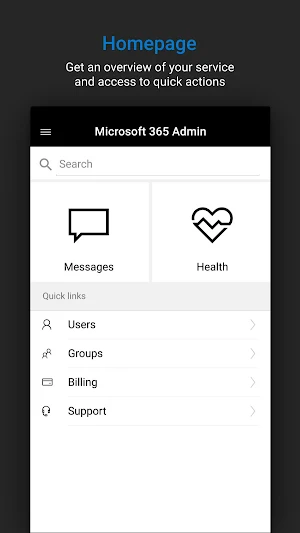
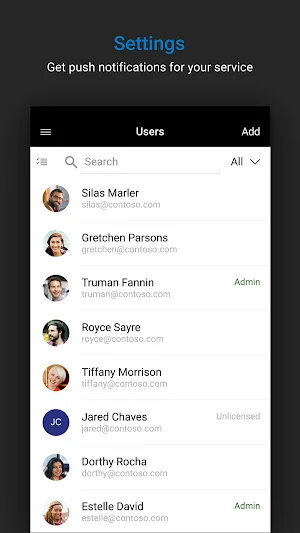
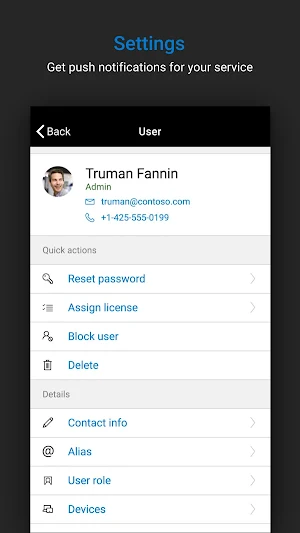
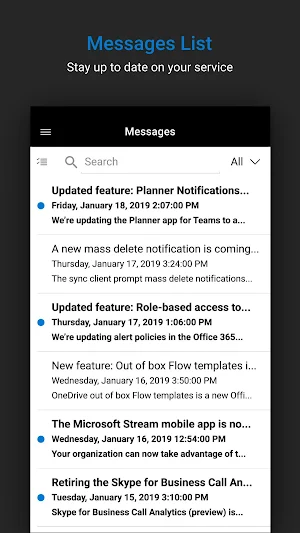


About Microsoft 365 Admin
Are you a Microsoft 365 admin? Then you need the Microsoft 365 Admin app (previously Office 365 admin).
Check out all the things you can do from your phone or tablet:
• Connect to the Microsoft 365 admin center from anywhere
• Add, edit, block, and delete users
• Reset passwords
• Assign product licenses
• Turn on notifications to get service alerts and new Message Center messages
• Contact Microsoft support
• New: Perform actions on Intune enrolled devices
The Microsoft 365 Admin app supports Azure Active Directory multi-factor authentication and includes the option to set a unique application-specific PIN code.
We're listening. Tell us what you like, what we can do better, and what features you'd like to see next. Send your feedback to [email protected].
IMPORTANT: You need to have a Microsoft 365 or Office 365 enterprise or business subscription with admin privileges to use this app.
Check out all the things you can do from your phone or tablet:
• Connect to the Microsoft 365 admin center from anywhere
• Add, edit, block, and delete users
• Reset passwords
• Assign product licenses
• Turn on notifications to get service alerts and new Message Center messages
• Contact Microsoft support
• New: Perform actions on Intune enrolled devices
The Microsoft 365 Admin app supports Azure Active Directory multi-factor authentication and includes the option to set a unique application-specific PIN code.
We're listening. Tell us what you like, what we can do better, and what features you'd like to see next. Send your feedback to [email protected].
IMPORTANT: You need to have a Microsoft 365 or Office 365 enterprise or business subscription with admin privileges to use this app.
What’s new
Version 6.0.0.0 · Updated July 16, 2026
This release contains - Bug fixes for a more reliable experience Refreshed app icon for a cleaner, more modern look
User reviews

Good one

A great help

A+

Really useful for sorting problems on the go

Its lite and nice but soo powerfull

Very useful for quick access. Doesn't always open quickly.
Frequently asked questions
What is the Microsoft 365 Admin app?
The Microsoft 365 Admin app is an app specifically designed for Microsoft 365 admins to manage their account from their phone or tablet.
What can I do with the Microsoft 365 Admin app?
With the Microsoft 365 Admin app, you can connect to the Microsoft 365 admin center, manage users (add, edit, block, delete), reset passwords, assign product licenses, receive service alerts and messages, contact Microsoft support, and perform actions on Intune enrolled devices.
Can I use the Microsoft 365 Admin app on any device?
Yes, you can use the Microsoft 365 Admin app on both phones and tablets.
Does the Microsoft 365 Admin app support multi-factor authentication?
Yes, the Microsoft 365 Admin app supports Azure Active Directory multi-factor authentication.
Can I set a PIN code for the Microsoft 365 Admin app?
Yes, you have the option to set a unique application-specific PIN code for the Microsoft 365 Admin app.
How can I provide feedback for the Microsoft 365 Admin app?
You can send your feedback to [email protected].
Do I need a specific subscription to use the Microsoft 365 Admin app?
Yes, you need to have a Microsoft 365 or Office 365 enterprise or business subscription with admin privileges to use the Microsoft 365 Admin app.
Alternatives to Microsoft 365 Admin
Looking for apps like Microsoft 365 Admin? Here are 6 similar Android apps on Google Play. The highest rated is Yammer (4.5/5), and all 6 are free to download.
-
Microsoft SharePoint 4.3
-
Dynamics 365 Business Central 3.5
-
Microsoft Planner 4.3
-
Azure Information Protection 3.1
-
Power Automate 3.4
-
Yammer 4.5
| App | Rating | Price | Installs | Last updated | Compare |
|---|---|---|---|---|---|
| Microsoft 365 Admin | 4.1 / 5 | Free | 1,000,000+ | Jul 16, 2026 | |
| Microsoft SharePoint | 4.3 / 5 | Free | 10,000,000+ | Sep 30, 2026 | Compare |
| Dynamics 365 Business Central | 3.5 / 5 | Free | 100,000+ | Oct 1, 2026 | Compare |
| Microsoft Planner | 4.3 / 5 | Free | 5,000,000+ | Sep 24, 2026 | Compare |
| Azure Information Protection | 3.1 / 5 | Free | 100,000+ | Dec 22, 2019 | Compare |
| Power Automate | 3.3 / 5 | Free | 100,000+ | Nov 6, 2019 | Compare |
| Yammer | 4.5 / 5 | Free | 5,000,000+ | Oct 26, 2026 | Compare |
Similar apps on Google Play
- Microsoft SharePoint
- Dynamics 365 Business Central
- Microsoft Planner
- Azure Information Protection
- Power Automate
- Yammer
- Microsoft Advertising
- Microsoft Power BI
- Tasks & Notes
- SmartOffice - Doc & PDF Editor
- Collabora Office
- Microsoft Edge Dev
- Microsoft Authenticator
- Quip: Docs, Chat, Spreadsheets
- Power Apps
- Microsoft Start: News & more
- BizConnect - Card Scanner
- All Documents Reader & Viewer
- OfficeSuite: Word, Sheets, PDF
- Field Service
- Confluence Cloud
- Engkoo
- Microsoft To Do: Lists & Tasks
- OfficeSuite Pro + PDF
- Stack Team App
- Office (Microsoft 365)
- Zoho Analytics – Mobile BI Das
- Memento Database
- Microsoft Family Safety
- Airtable
- WorkJam
- Content - Workspace ONE
- Email App for Any Mail
- Bigin by Zoho CRM
- Microsoft Outlook Lite
- Transact eAccounts