

Warehouse Management
Productivity
Warehouse Management mobile app in Dynamics 365 Supply Chain Management
- Rating
- 3.7
- 295 ratings
- Downloads
- 100K+
- on Google Play
- Price
- Free
- No in-app purchases
- Updated
- Sep 2
- 2026 · v4.1.6.0
Screenshots



About Warehouse Management
The Warehouse Management mobile app in Microsoft Dynamics 365 Supply Chain Management empowers warehouse workers to complete warehouse tasks using a mobile device. It connects directly do your Dynamics 365 Supply Chain Management environment and enables workers to complete material handling, receiving, picking, putaway, cycle counting, and production tasks from the warehouse floor.
The Warehouse Management mobile app provides the following benefits and productivity boosting features:
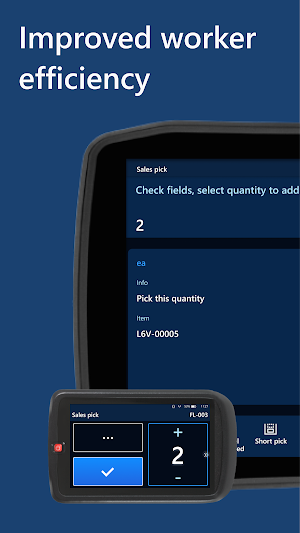
Improved worker efficiency:
○ A tailored interface for fast-paced warehouse scanning
○ Over 50 different warehouse processes backed by Dynamics 365 Supply Chain Management
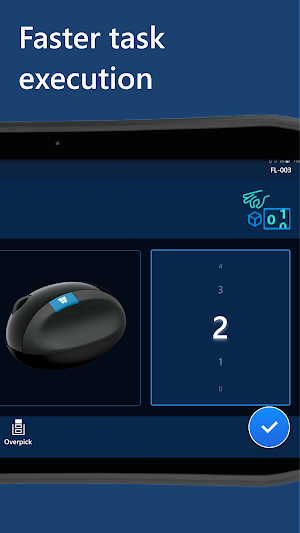
○ Large input controls to quickly dial in quantities
○ Built-in numpad with calculator that opens automatically for quantities over 20
○ The most important information is easy to find and is set in a large font
○ Stored worker preferences and device-specific settings that can be managed centrally
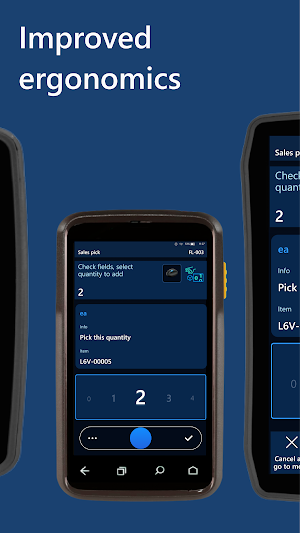
Improved ergonomics:
○ Large touch targets and other features that make the app easy to use with gloves
○ A high-contrast design that provides clear text on dirty screens
○ Custom button locations to match each worker's grip, device, and handedness
Faster ramp up of new workers:
○ Clear titles and illustrations for each step
○ Full-screen photos to verify product selections
Want to try it out? You can download the app and run it in demo mode, which lets you explore many of the features without connecting to a Dynamics 365 Supply Chain Management environment.
The Warehouse Management mobile app provides the following benefits and productivity boosting features:
Improved worker efficiency:
○ A tailored interface for fast-paced warehouse scanning
○ Over 50 different warehouse processes backed by Dynamics 365 Supply Chain Management
○ Large input controls to quickly dial in quantities
○ Built-in numpad with calculator that opens automatically for quantities over 20
○ The most important information is easy to find and is set in a large font
○ Stored worker preferences and device-specific settings that can be managed centrally
Improved ergonomics:
○ Large touch targets and other features that make the app easy to use with gloves
○ A high-contrast design that provides clear text on dirty screens
○ Custom button locations to match each worker's grip, device, and handedness
Faster ramp up of new workers:
○ Clear titles and illustrations for each step
○ Full-screen photos to verify product selections
Want to try it out? You can download the app and run it in demo mode, which lets you explore many of the features without connecting to a Dynamics 365 Supply Chain Management environment.
What’s new
Version 4.1.6.0 · Updated September 2, 2026
We regularly release updates to the app, which include great new features, as well as improvements for speed and reliability.
Frequently asked questions
What is the Warehouse Management mobile app in Microsoft Dynamics 365 Supply Chain Management?
The Warehouse Management mobile app is a tool that allows warehouse workers to complete tasks using a mobile device, connecting directly to Dynamics 365 Supply Chain Management.
What are the benefits and features of the Warehouse Management mobile app?
The app offers improved worker efficiency with a tailored interface, over 50 different warehouse processes, large input controls, a built-in numpad, and easy-to-find information. It also provides improved ergonomics with large touch targets, a high-contrast design, and custom button locations. Additionally, it allows for faster ramp up of new workers with clear titles, illustrations, and full-screen photos.
Can I try out the Warehouse Management mobile app without connecting it to Dynamics 365 Supply Chain Management?
Yes, you can download the app and run it in demo mode, which allows you to explore many of the features even without connecting to a Dynamics 365 Supply Chain Management environment.
Alternatives to Warehouse Management
Looking for apps like Warehouse Management? Here are 6 similar Android apps on Google Play. The highest rated is Yammer (4.5/5), and all 6 are free to download.
-
Pocket CRM - Customers & Leads 4.3
-
Azure Information Protection 3.1
-
Yammer 4.5
-
Power Automate 3.4
-
Confluence Cloud 4.4
-
Field Service 3.4
| App | Rating | Price | Installs | Last updated | Compare |
|---|---|---|---|---|---|
| Warehouse Management | 3.7 / 5 | Free | 100,000+ | Sep 2, 2026 | |
| Pocket CRM - Customers & Leads | 4.3 / 5 | Free | 100,000+ | – | Compare |
| Azure Information Protection | 3.1 / 5 | Free | 100,000+ | Dec 22, 2019 | Compare |
| Yammer | 4.5 / 5 | Free | 5,000,000+ | Sep 28, 2026 | Compare |
| Power Automate | 3.3 / 5 | Free | 100,000+ | Nov 6, 2019 | Compare |
| Confluence Cloud | 4.4 / 5 | Free | 1,000,000+ | Oct 15, 2026 | Compare |
| Field Service | 3.4 / 5 | Free | 500,000+ | Sep 23, 2026 | Compare |
Similar apps on Google Play
- Pocket CRM - Customers & Leads
- Azure Information Protection
- Yammer
- Power Automate
- Confluence Cloud
- Field Service
- Microsoft SharePoint
- Microsoft 365 Admin
- Microsoft Planner
- Subscription Billing - Zoho
- Bigin by Zoho CRM
- Microsoft Advertising
- Team: Bookkeeping, Inventory
- OnePageCRM: Mobile Sales CRM
- Zoho Campaigns-Email Marketing
- Intune Company Portal
- WorkJam
- Dynamics 365 Business Central
- Client Record-Customer CRM App
- Stack Team App
- Mobile Inventory PRO
- Covve: Personal CRM
- Learn Azure: AZ-900/AZ-104/204
- WooCommerce
- Deskera: Business & Accounting
- Engkoo
- KWIKBOX SELLER: Create online
- Tasks & Notes
- ClickUp - Manage Teams & Tasks
- Microsoft Power BI
- SalesPlay POS - Point of Sale
- SumTotal Mobile
- Zoho Expense - Expense Reports
- Fiskl - Invoicing & Accounting
- Restaurant POS Billing System
- Udemy Business
- BizConnect - Card Scanner
- Acuity Scheduling Client
- Clients — your client database
- TapPOS Inventry Sales manager
- Ecwid Ecommerce
- Microsoft Authenticator