

Clean Fort - Device info
MOXON Tools Contains ads
Check device info, storage files, CPU, battery and network details.
- Rating
- 4.6
- 655 ratings
- Downloads
- 121K+
- on Google Play
- Price
- Free
- No in-app purchases
- Updated
- Jun 4
- 2026 · v1.0.1
Screenshots


About Clean Fort - Device info
Clean Fort is a simple Android utility for checking the device and storage information shown in the app. It brings the main sections into a clean interface so you can review system details without digging through multiple screens.
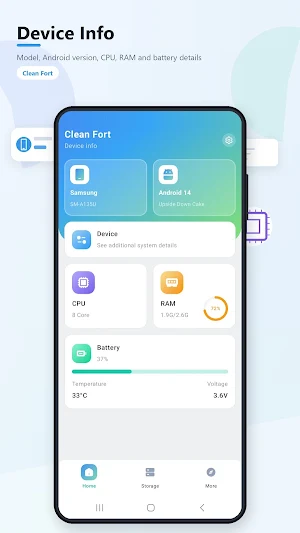
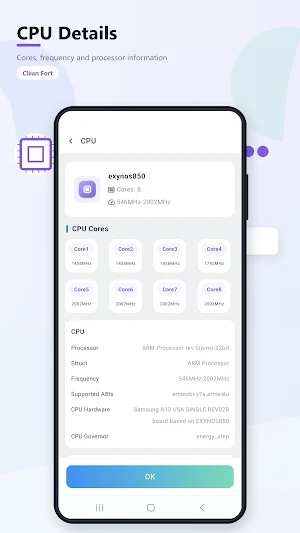
On the Device info screen, Clean Fort shows the device brand and model, Android version, CPU summary, RAM status and battery percentage. The CPU page displays processor information, core count, core frequencies, frequency range, supported ABIs, CPU hardware and governor information.
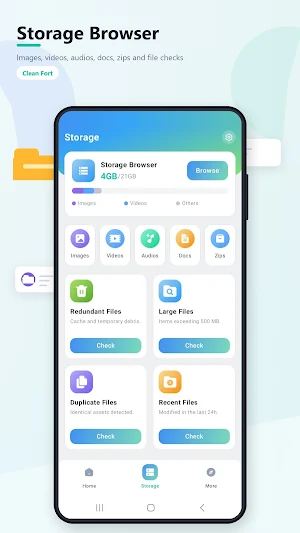
The Storage Browser section organizes storage into visible categories such as images, videos, audios, docs, zips and others. It also provides check entries for redundant files, large files, duplicate files and recent files, matching the storage tools shown in the interface.
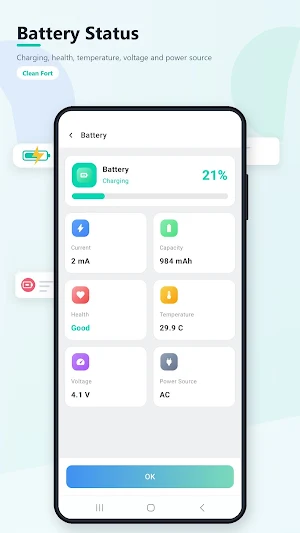
The Battery page presents charging status, battery percentage, current, capacity, health, temperature, voltage and power source. The More section includes additional entry points for display, app, network and network traffic details.
Clean Fort is designed for users who want a clear overview of device status, file categories and system information in one place. The app focuses on the information and check sections visible in its interface, including device details, CPU details, storage browsing, battery status and network-related sections.
Use Clean Fort to view:
1.Device brand, model and Android version
2.CPU cores, processor details and frequency range
3.RAM and battery status from the device overview
4.Storage categories including images, videos, audios, docs and zips
5.Redundant files, large files, duplicate files and recent files check sections
6.Battery charging, health, temperature, voltage and power source
7.Display, app, network and network traffic sections
On the Device info screen, Clean Fort shows the device brand and model, Android version, CPU summary, RAM status and battery percentage. The CPU page displays processor information, core count, core frequencies, frequency range, supported ABIs, CPU hardware and governor information.
The Storage Browser section organizes storage into visible categories such as images, videos, audios, docs, zips and others. It also provides check entries for redundant files, large files, duplicate files and recent files, matching the storage tools shown in the interface.
The Battery page presents charging status, battery percentage, current, capacity, health, temperature, voltage and power source. The More section includes additional entry points for display, app, network and network traffic details.
Clean Fort is designed for users who want a clear overview of device status, file categories and system information in one place. The app focuses on the information and check sections visible in its interface, including device details, CPU details, storage browsing, battery status and network-related sections.
Use Clean Fort to view:
1.Device brand, model and Android version
2.CPU cores, processor details and frequency range
3.RAM and battery status from the device overview
4.Storage categories including images, videos, audios, docs and zips
5.Redundant files, large files, duplicate files and recent files check sections
6.Battery charging, health, temperature, voltage and power source
7.Display, app, network and network traffic sections
Alternatives to Clean Fort - Device info
Looking for apps like Clean Fort - Device info? Here are 6 similar Android apps on Google Play. The highest rated is TAP Kiln Control Mobile (4.1/5), and 5 of the 6 are free to download.
-
Control+ 3.3
-
AppDash: App Manager & Backup
-
W18m: Test PR app 02
-
Robokiller - Spam Call Blocker 3.9
-
ASTRO File Manager & Cleaner 4.1
-
TAP Kiln Control Mobile 4.1
| App | Rating | Price | Installs | Last updated | Compare |
|---|---|---|---|---|---|
| Clean Fort - Device info | 4.6 / 5 | Free | 100,000+ | Jun 4, 2026 | |
| Control+ | 3.3 / 5 | Free | 10,000+ | Sep 7, 2026 | Compare |
| AppDash: App Manager & Backup | – | Free | 100,000+ | Oct 21, 2026 | Compare |
| W18m: Test PR app 02 | – | – | – | May 3, 2018 | Compare |
| Robokiller - Spam Call Blocker | 3.9 / 5 | Free | 5,000,000+ | May 28, 2026 | Compare |
| ASTRO File Manager & Cleaner | 4.1 / 5 | Free | 50,000,000+ | Sep 24, 2026 | Compare |
| TAP Kiln Control Mobile | 4.1 / 5 | Free | 5,000+ | Oct 22, 2026 | Compare |
Similar apps on Google Play
- Control+
- AT&T ActiveArmor®
- AppDash: App Manager & Backup
- W18m: Test PR app 02
- Robokiller - Spam Call Blocker
- ASTRO File Manager & Cleaner
- TAP Kiln Control Mobile
- Resonance - Vibration Analysis
- AVG Cleaner – Storage Cleaner
- AnyTracker - track anything!
- FilterBox Notification Manager
- Cold Shower
- Swift Backup
- Total Drive - Cloud Storage
- WhatisRemoved+
- MiraClean - File Manager
- Avast Cleanup – Phone Cleaner
- Norton Cleaner – Junk removal
- HyperClean AI
- One Key: password manager
- My Tracfone: Account Manager
- Castro Premium - system info
- pCloud Pass - Password manager
- Autosync - File Sync & Backup
- Anti Spy Detector - Spyware
- CSV File Viewer - Smart CSV
- Fortect Mobile Security
- 1Tap Cleaner (clear cache)
- Avast One: Antivirus, Security
- App Usage - Manage/Track Usage
- Deye Cloud
- Aegis Authenticator - 2FA App
- AVG Protection
- F-Secure Mobile Security
- Bitdefender Central
- IronVest - Security & Privacy
- Storage Analyzer & Disk Usage
- Thunderbird Beta for Testers
- Bitdefender Antivirus
- Infobric Field
- GlassWire Data Usage Monitor
- CyberTrophy
- Regula Document Reader
- F-Secure: Total Security & VPN
- Bitdefender Mobile Security
- Malwarebytes Mobile Security
- Bitwarden Password Manager
- DevCheck Device & System Info
- MobiDrive Cloud Storage & Sync
- Microsoft 365 Admin
- My Data Manager: Data Usage
- UltData: Photo & Data Recovery
- Avira Security Antivirus & VPN
- OONI Probe
- DAVx⁵ – CalDAV CardDAV WebDAV
- Super File Manager Explorer
- fooView - FV Float Viewer
- Nested Folder Notes - Folino
- WaiverForever - Online Waiver
- Building Tools
- Enpass Password Manager
- NETGEAR Orbi – WiFi System App
- Express Scripts
- Sesame Search & Shortcuts
- Orion Intelligence
- 1Password: Password Manager
- Nextcloud
- PDK Access by ProdataKey
- Oura
- Cleaner Antivirus VPN Cleaner
- Unknown Call & Contact Blocker
- G-CPU:Monitor CPU, RAM, Widget
- Mobile Hotel PMS by Hotel Sync
- Anti-virus Dr.Web Light
- Quick Settings app
- McAfee Security: Antivirus VPN
- Boosted Time Tracker