動画で着メロ - 好きな場面を着信音に
From the audio of your recorded video, select a 30-second clip while viewing the waveform and use it as your ringtone. Effect processing and export are all completed within your device.
About 動画で着メロ - 好きな場面を着信音に
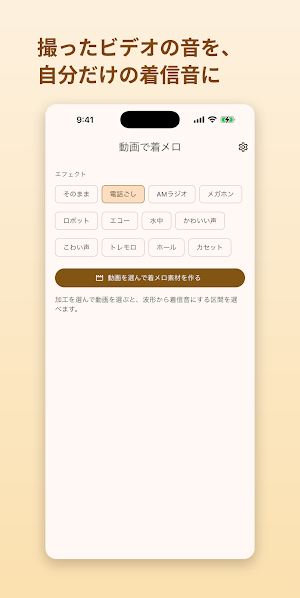
This app lets you extract audio from videos and recorded data taken with your smartphone, select a 30-second clip while viewing the waveform, and apply effects to create your own unique ringtone (melody).
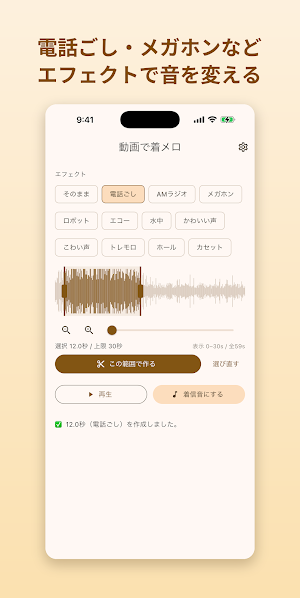
A phrase from a memorable video, sounds you recorded on the street, a tune you hummed—any sound from your recordings can be used as source material. Easily change the sound's character with effects such as "phone call," "AM radio," "megaphone," "robot," "echo," and "underwater."
◆ How to Use in 3 Steps
1. Select a video from your device (only audio will be extracted)
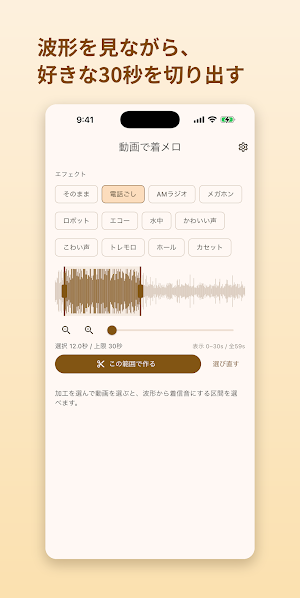
2. While viewing the waveform, cut out the desired 30 seconds or less
3. Apply effects and preview → Save as ringtone
◆ Features
・Can use the audio from recorded videos and video data as source material (not extracting from existing songs)
・Effects such as phone call / AM radio / megaphone / robot / echo / underwater / cute voice / scary voice
・Visually select the desired section while viewing the waveform
・Preview playback of the created sound on the spot
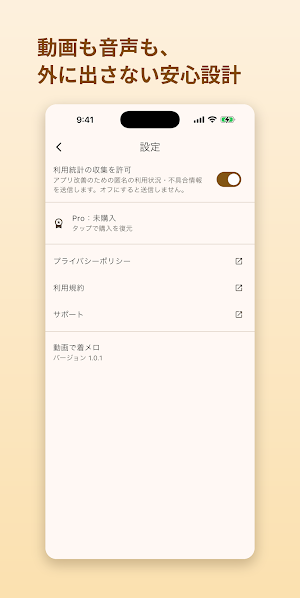
・Audio extraction, processing, and export are all completed within the device. The selected video and created audio are never sent externally.
◆ Setting as Ringtone
Pressing "Save as Ringtone" adds the created sound to your device's ringtone list (Android 10 or later; no additional permissions are required). Then, simply select it from "Sound & Vibration" → "Ringtone" in the Settings app (item names may vary slightly depending on the model). You can also share and save it as an audio file.
◆ Price
Basic use is free. "Normal," "Over the Phone," "Megaphone," "Cute Voice," and "Scary Voice" are free. Pro (one-time in-app purchase) unlocks "AM Radio," "Robot," "Echo," "Underwater," "Tremolo," "Hall," and "Cassette." There are no monthly fees.
◆ Regarding Sound Rights
Please use videos you have filmed or recorded yourself, or audio for which you hold the rights. Please refrain from using music or audio owned by third parties without permission.
* The procedure for setting ringtones may vary slightly depending on your device and Android version.
