

QuickTerminal - Multi-Shell
kakitiro Tools In-app purchases Contains ads
Terminal with SSH, SFTP, AI command assistance, snippets, and security policies.
- Downloads
- 103+
- on Google Play
- Price
- Free
- In-app purchases
- Updated
- Aug 24
- 2026 · v5.1.31
Screenshots
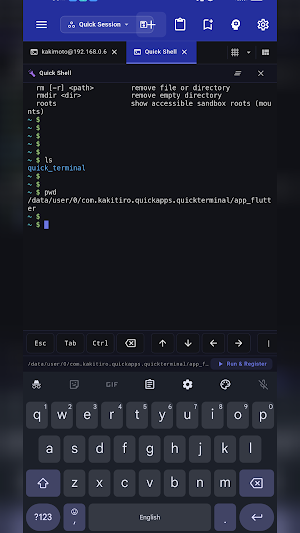
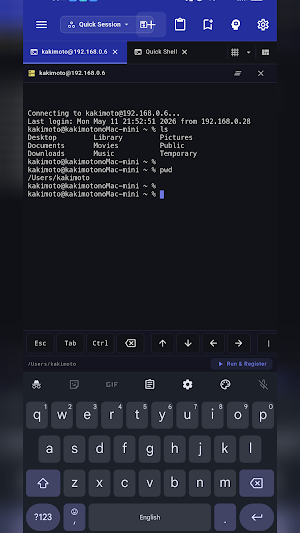
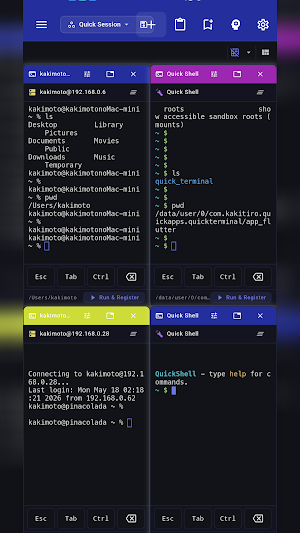
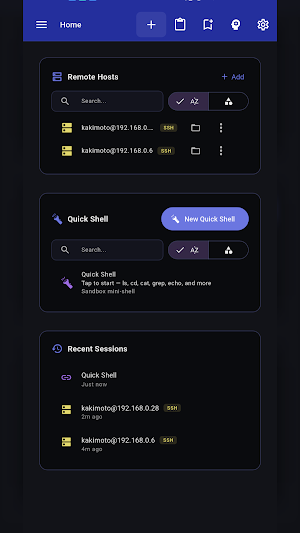


About QuickTerminal - Multi-Shell
QuickTerminal is a professional terminal emulator and SSH client designed for Android. It combines local shell access, remote SSH sessions, SFTP file browsing, and AI-powered command assistance in one workspace.
TERMINAL:
- Full xterm-256color terminal emulation
- Local shell support (bash, zsh, fish, sh, ksh)
- Multiple concurrent sessions with tabs
- Horizontal and vertical terminal splitting
- Customizable fonts: Fira Code, JetBrains Mono, Source Code Pro, Cascadia Code
- Adjustable font size (8–32px) and cursor styles (block, underline, bar)
- Scrollback buffer up to 50,000 lines
SSH & SFTP:
- SSH remote sessions with saved host profiles
- Key-based and password authentication
- SSH jump host / bastion support
- SFTP file browser for remote directories
- Connection pooling and session reuse
- Secure credential storage
AI ASSISTANT (Pro):
- Claude and Gemini AI integration
- Natural language command suggestions and explanations
- Command safety analysis before execution
- Context-aware help with working directory and git status
COMMAND TOOLS:
- Command snippets: save, categorize, search, and import/export as JSON
- Command history with search, favorites, and directory tracking (500 entries)
- Command palette for unified search across actions and snippets
SECURITY POLICIES:
- Command approval modes: None, Risky Only, Always
- Risky command detection (rm -rf, mkfs, dd, shutdown, etc.)
- Directory-based sandboxing with allowed paths
- Configurable safety levels
WORKSPACE:
- Dockable floating panels
- Integrated file browser
- Resizable sidebar with icon-only mode
- Grid and tabbed layout modes
CUSTOMIZATION:
- 20+ theme colors with dark/light mode
- Customizable keyboard shortcuts
- Responsive layout for mobile, tablet, and desktop
ADVANCED CONNECTIVITY:
- Mosh (Mobile Shell) for resilient connections over flaky networks
- Port forwarding with local and remote SSH tunnels
- GCP IAP tunneling for Google Cloud SSH access
QuickTerminal Pro unlocks:
- Unlimited AI agent execution
- Ad-free experience
- Advanced security policies
- Priority support
Terms of Use: https://kakitiro.com/quickapps/quickterminal/terms/
TERMINAL:
- Full xterm-256color terminal emulation
- Local shell support (bash, zsh, fish, sh, ksh)
- Multiple concurrent sessions with tabs
- Horizontal and vertical terminal splitting
- Customizable fonts: Fira Code, JetBrains Mono, Source Code Pro, Cascadia Code
- Adjustable font size (8–32px) and cursor styles (block, underline, bar)
- Scrollback buffer up to 50,000 lines
SSH & SFTP:
- SSH remote sessions with saved host profiles
- Key-based and password authentication
- SSH jump host / bastion support
- SFTP file browser for remote directories
- Connection pooling and session reuse
- Secure credential storage
AI ASSISTANT (Pro):
- Claude and Gemini AI integration
- Natural language command suggestions and explanations
- Command safety analysis before execution
- Context-aware help with working directory and git status
COMMAND TOOLS:
- Command snippets: save, categorize, search, and import/export as JSON
- Command history with search, favorites, and directory tracking (500 entries)
- Command palette for unified search across actions and snippets
SECURITY POLICIES:
- Command approval modes: None, Risky Only, Always
- Risky command detection (rm -rf, mkfs, dd, shutdown, etc.)
- Directory-based sandboxing with allowed paths
- Configurable safety levels
WORKSPACE:
- Dockable floating panels
- Integrated file browser
- Resizable sidebar with icon-only mode
- Grid and tabbed layout modes
CUSTOMIZATION:
- 20+ theme colors with dark/light mode
- Customizable keyboard shortcuts
- Responsive layout for mobile, tablet, and desktop
ADVANCED CONNECTIVITY:
- Mosh (Mobile Shell) for resilient connections over flaky networks
- Port forwarding with local and remote SSH tunnels
- GCP IAP tunneling for Google Cloud SSH access
QuickTerminal Pro unlocks:
- Unlimited AI agent execution
- Ad-free experience
- Advanced security policies
- Priority support
Terms of Use: https://kakitiro.com/quickapps/quickterminal/terms/
What’s new
Version 5.1.31 · Updated August 24, 2026
• Bug fixes and performance improvements. • UI and design improvements.
Alternatives to QuickTerminal - Multi-Shell
Looking for apps like QuickTerminal - Multi-Shell? Here are 6 similar Android apps on Google Play. All of them are free to download.
-
QuickDIY - Sketch & Build
-
Quick3DModeling - CAD & Sculpt
-
FortuneCalendar - Almanac
-
CursorSpot
-
QuickImage - Photo Layers
-
QuickLayout - Window Manager
| App | Rating | Price | Installs | Last updated | Compare |
|---|---|---|---|---|---|
| QuickTerminal - Multi-Shell | – | Free | 100+ | Aug 24, 2026 | |
| QuickDIY - Sketch & Build | – | Free | 1+ | Sep 23, 2026 | Compare |
| Quick3DModeling - CAD & Sculpt | – | Free | 10+ | Sep 21, 2026 | Compare |
| FortuneCalendar - Almanac | – | Free | 5+ | – | Compare |
| CursorSpot | – | Free | 100+ | Aug 27, 2026 | Compare |
| QuickImage - Photo Layers | – | Free | 100+ | Aug 18, 2026 | Compare |
| QuickLayout - Window Manager | – | Free | 1+ | Aug 23, 2026 | Compare |
Similar apps on Google Play
- QuickDIY - Sketch & Build
- Quick3DModeling - CAD & Sculpt
- FortuneCalendar - Almanac
- CursorSpot
- QuickImage - Photo Layers
- QuickLayout - Window Manager
- QuickClip - Copy Paste Manager
- QuickHumming - Melody Maker
- QuickSheet - Grid Editor
- QuickLLM - AI Model Manager
- QuickTask - Todo & Planner
- QuickRemote - Desktop Manager
- QuickPad - Touch & Control
- QuickScanner - OCR,QR,Barcode
- QuickPlayer - Music & Video
- QuickPedometer - Walk & Run
- QuickNote - Text Library
- QuickEditor - Text & Code
- QuickExplorer - File & Storage
- QuickCalculator - All-in-One
- QuickVideo - Cam & Edit
- QuickRecorder - Voice Library
- QuickVibrator - Vibration App