

CursorSpot
kakitiro Tools In-app purchases Contains ads
Control CursorSpot on your Mac or PC over the same local network.
- Downloads
- 107+
- on Google Play
- Price
- Free
- In-app purchases
- Updated
- Aug 27
- 2026 · v2.0.0
Screenshots


About CursorSpot
CursorSpot for Android is a companion controller.
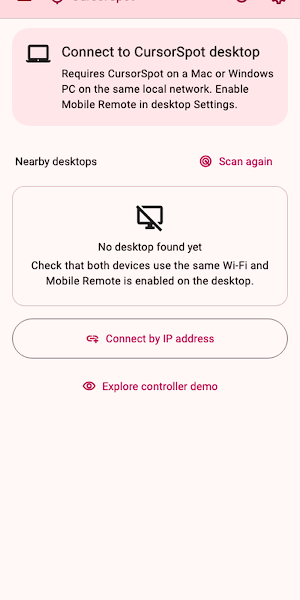
Requires CursorSpot running on a Mac or Windows PC on the same local network. Pointer effects run on the desktop.
CONTROL YOUR DESKTOP POINTER:
• Discover nearby CursorSpot desktops or connect by IP address and port.
• Compare a six-digit code and approve the phone on the desktop before control is enabled.
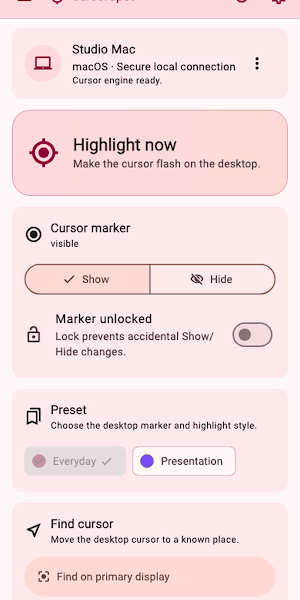
• Flash the pointer, show or hide its marker, lock marker changes and switch desktop presets.
• Move the pointer to approved display centers or saved jump locations, then return it briefly after a remote jump.
• Refresh desktop state, reconnect safely and forget a trusted desktop at any time.
CLEAR, RESPONSIVE CONTROLS:
• Phone-friendly controls with at least 48 dp targets and screen-reader labels.
• A two-pane tablet layout, large-text support, light and dark themes, and visible pending or error states.
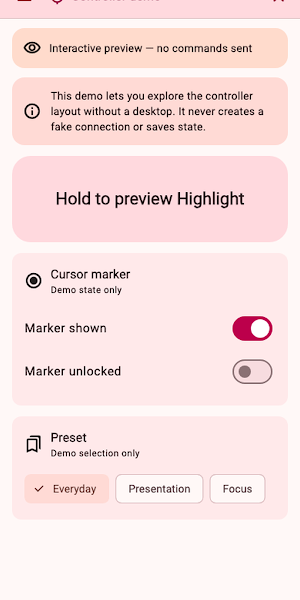
• An explicitly labeled demo lets you explore the controller without creating a fake connection.
PRIVATE LOCAL CONNECTION:
• Remote commands are authenticated and encrypted on your local network.
• Cursor coordinates, display geometry, active apps, windows and desktop logs are not sent to the mobile controller.
• The desktop can disconnect or revoke a controller. Only one controller is active at a time.
• CursorSpot does not provide internet or cloud remote access.
FREE AND PRO:
• Critical remote controls are never placed behind an upgrade gate.
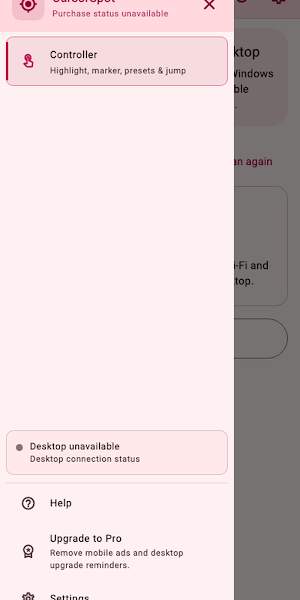
• After the trial, Mobile Free may show ads. Pro removes mobile ads and upgrade reminders.
Desktop setup: install CursorSpot on macOS or Windows, open Settings › Remote, enable Mobile Remote, then pair this device.
Requires CursorSpot running on a Mac or Windows PC on the same local network. Pointer effects run on the desktop.
CONTROL YOUR DESKTOP POINTER:
• Discover nearby CursorSpot desktops or connect by IP address and port.
• Compare a six-digit code and approve the phone on the desktop before control is enabled.
• Flash the pointer, show or hide its marker, lock marker changes and switch desktop presets.
• Move the pointer to approved display centers or saved jump locations, then return it briefly after a remote jump.
• Refresh desktop state, reconnect safely and forget a trusted desktop at any time.
CLEAR, RESPONSIVE CONTROLS:
• Phone-friendly controls with at least 48 dp targets and screen-reader labels.
• A two-pane tablet layout, large-text support, light and dark themes, and visible pending or error states.
• An explicitly labeled demo lets you explore the controller without creating a fake connection.
PRIVATE LOCAL CONNECTION:
• Remote commands are authenticated and encrypted on your local network.
• Cursor coordinates, display geometry, active apps, windows and desktop logs are not sent to the mobile controller.
• The desktop can disconnect or revoke a controller. Only one controller is active at a time.
• CursorSpot does not provide internet or cloud remote access.
FREE AND PRO:
• Critical remote controls are never placed behind an upgrade gate.
• After the trial, Mobile Free may show ads. Pro removes mobile ads and upgrade reminders.
Desktop setup: install CursorSpot on macOS or Windows, open Settings › Remote, enable Mobile Remote, then pair this device.
Alternatives to CursorSpot
Looking for apps like CursorSpot? Here are 6 similar Android apps on Google Play. All of them are free to download.
-
QuickDIY - Sketch & Build
-
Quick3DModeling - CAD & Sculpt
-
FortuneCalendar - Almanac
-
QuickImage - Photo Layers
-
QuickLayout - Window Manager
-
QuickClip - Copy Paste Manager
| App | Rating | Price | Installs | Last updated | Compare |
|---|---|---|---|---|---|
| CursorSpot | – | Free | 100+ | Aug 27, 2026 | |
| QuickDIY - Sketch & Build | – | Free | 1+ | Sep 23, 2026 | Compare |
| Quick3DModeling - CAD & Sculpt | – | Free | 10+ | Sep 21, 2026 | Compare |
| FortuneCalendar - Almanac | – | Free | 5+ | Sep 6, 2026 | Compare |
| QuickImage - Photo Layers | – | Free | 100+ | Aug 18, 2026 | Compare |
| QuickLayout - Window Manager | – | Free | 1+ | Aug 23, 2026 | Compare |
| QuickClip - Copy Paste Manager | – | Free | 5+ | – | Compare |
Compare CursorSpot with the top alternatives: ratings, updates, ASO score and keyword gaps →
Similar apps on Google Play
- QuickDIY - Sketch & Build
- Quick3DModeling - CAD & Sculpt
- FortuneCalendar - Almanac
- QuickImage - Photo Layers
- QuickLayout - Window Manager
- QuickClip - Copy Paste Manager
- QuickHumming - Melody Maker
- QuickSheet - Grid Editor
- QuickLLM - AI Model Manager
- QuickTask - Todo & Planner
- QuickTerminal - Multi-Shell
- QuickRemote - Desktop Manager
- QuickPad - Touch & Control
- QuickScanner - OCR,QR,Barcode
- QuickPlayer - Music & Video
- QuickPedometer - Walk & Run
- QuickNote - Text Library
- QuickEditor - Text & Code
- QuickExplorer - File & Storage
- QuickCalculator - All-in-One
- QuickVideo - Cam & Edit
- QuickRecorder - Voice Library
- QuickVibrator - Vibration App