
Quick3DModeling - CAD & Sculpt
kakitiro Art & Design In-app purchases Contains ads
Build printable 3D models with exact dimensions, checks, and mesh export.
- Downloads
- 35+
- on Google Play
- Price
- Free
- In-app purchases
- Updated
- Sep 21
- 2026 · v5.0.3
Screenshots
About Quick3DModeling - CAD & Sculpt
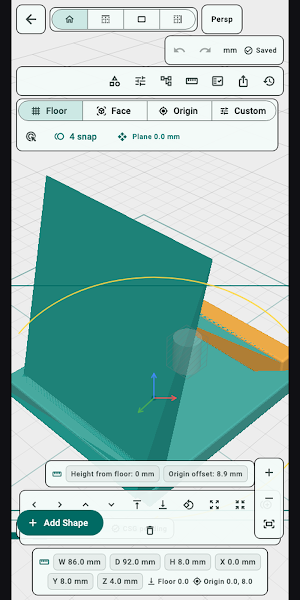
Quick3DModeling is a parametric 3D modeler for printable parts designed for Android. Quick3DModeling turns simple parametric shapes into editable, print-aware projects without hiding the solid-and-hole structure.
KEY FEATURES:
- Parametric primitives: Build with boxes, cylinders, spheres, cones, tubes, text, and other dimension-driven shapes.
- Solid and Hole CSG: Add and subtract material with an explicit, non-destructive Boolean tree.
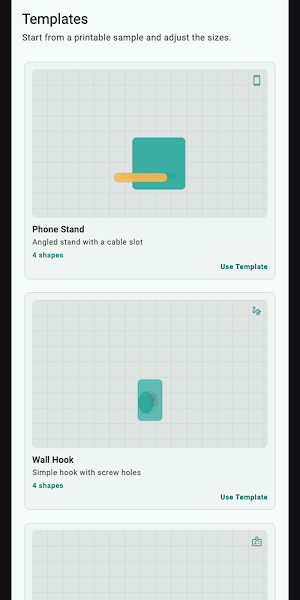
- Templates and helpers: Start with stands, hooks, plates, clips, brackets, holes, nut traps, spacers, and cable channels.
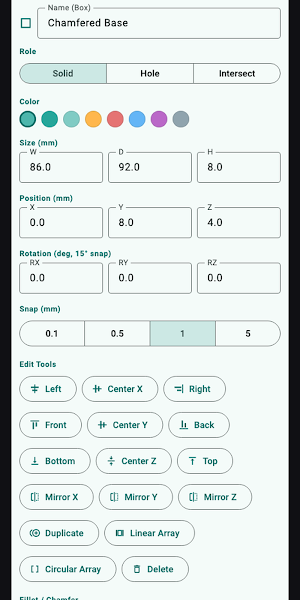
- Exact inspection: Edit size, position, rotation, color, clearance, fillet, chamfer, alignment, and workplanes.
- Print Check: Review mesh validity, bed fit, build-plate position, walls, details, and export scope.
- Project and mesh export: Keep editable .q3dm files and create 3MF, STL, or OBJ for downstream tools.
PERFECT FOR:
- Functional parts, brackets, holders, spacers, and simple enclosures
- 3D-printing beginners who prefer exact dimensions over free-form sculpting
- Reusable printable templates and hardware clearances
- Projects that need editable sources plus slicer-ready mesh files
GETTING STARTED:
- Create a project from the Library or choose a Template.
- Add a primitive or Print Helper from Shapes.
- Select it in the viewport or Outliner and enter exact values in Inspector.
- Use workplanes, snap, measurement, alignment, and Solid/Hole roles to assemble the model.
- Run Print Check, resolve blocking findings, then export 3MF, STL, or OBJ.
PRIVACY & SECURITY:
- Projects and geometry are processed locally.
- QuickLibrary accesses only locations you add.
- Editable .q3dm projects, version snapshots, and exports remain under your control.
- No account is required for core modeling.
FREE AND PRO:
- Start with a seven-day ad-free trial.
- Free keeps the full feature set and may show mobile advertising or a daily desktop support reminder.
- Quick3DModeling Pro removes ads and reminders through a yearly subscription or a one-time lifetime purchase.
Terms of Use: https://kakitiro.com/quickapps/quick3dmodeling/terms/
KEY FEATURES:
- Parametric primitives: Build with boxes, cylinders, spheres, cones, tubes, text, and other dimension-driven shapes.
- Solid and Hole CSG: Add and subtract material with an explicit, non-destructive Boolean tree.
- Templates and helpers: Start with stands, hooks, plates, clips, brackets, holes, nut traps, spacers, and cable channels.
- Exact inspection: Edit size, position, rotation, color, clearance, fillet, chamfer, alignment, and workplanes.
- Print Check: Review mesh validity, bed fit, build-plate position, walls, details, and export scope.
- Project and mesh export: Keep editable .q3dm files and create 3MF, STL, or OBJ for downstream tools.
PERFECT FOR:
- Functional parts, brackets, holders, spacers, and simple enclosures
- 3D-printing beginners who prefer exact dimensions over free-form sculpting
- Reusable printable templates and hardware clearances
- Projects that need editable sources plus slicer-ready mesh files
GETTING STARTED:
- Create a project from the Library or choose a Template.
- Add a primitive or Print Helper from Shapes.
- Select it in the viewport or Outliner and enter exact values in Inspector.
- Use workplanes, snap, measurement, alignment, and Solid/Hole roles to assemble the model.
- Run Print Check, resolve blocking findings, then export 3MF, STL, or OBJ.
PRIVACY & SECURITY:
- Projects and geometry are processed locally.
- QuickLibrary accesses only locations you add.
- Editable .q3dm projects, version snapshots, and exports remain under your control.
- No account is required for core modeling.
FREE AND PRO:
- Start with a seven-day ad-free trial.
- Free keeps the full feature set and may show mobile advertising or a daily desktop support reminder.
- Quick3DModeling Pro removes ads and reminders through a yearly subscription or a one-time lifetime purchase.
Terms of Use: https://kakitiro.com/quickapps/quick3dmodeling/terms/
Alternatives to Quick3DModeling - CAD & Sculpt
Looking for apps like Quick3DModeling - CAD & Sculpt? Here are 6 similar Android apps on Google Play. All of them are free to download.
-
QuickDIY - Sketch & Build
-
FortuneCalendar - Almanac
-
CursorSpot
-
QuickImage - Photo Layers
-
QuickLayout - Window Manager
-
QuickClip - Copy Paste Manager
| App | Rating | Price | Installs | Last updated | Compare |
|---|---|---|---|---|---|
| Quick3DModeling - CAD & Sculpt | – | Free | 10+ | Sep 21, 2026 | |
| QuickDIY - Sketch & Build | – | Free | 1+ | Sep 23, 2026 | Compare |
| FortuneCalendar - Almanac | – | Free | 5+ | – | Compare |
| CursorSpot | – | Free | 100+ | Aug 27, 2026 | Compare |
| QuickImage - Photo Layers | – | Free | 100+ | Aug 18, 2026 | Compare |
| QuickLayout - Window Manager | – | Free | 1+ | Aug 23, 2026 | Compare |
| QuickClip - Copy Paste Manager | – | Free | 5+ | – | Compare |
Similar apps on Google Play
- QuickDIY - Sketch & Build
- FortuneCalendar - Almanac
- CursorSpot
- QuickImage - Photo Layers
- QuickLayout - Window Manager
- QuickClip - Copy Paste Manager
- QuickHumming - Melody Maker
- QuickSheet - Grid Editor
- QuickLLM - AI Model Manager
- QuickTask - Todo & Planner
- QuickTerminal - Multi-Shell
- QuickRemote - Desktop Manager
- QuickPad - Touch & Control
- QuickScanner - OCR,QR,Barcode
- QuickPlayer - Music & Video
- QuickPedometer - Walk & Run
- QuickNote - Text Library
- QuickEditor - Text & Code
- QuickExplorer - File & Storage
- QuickCalculator - All-in-One
- QuickVideo - Cam & Edit
- QuickRecorder - Voice Library
- QuickVibrator - Vibration App