
QuickTask - Todo & Planner
kakitiro Productivity In-app purchases Contains ads
Plan Markdown tasks in eight synced views with timers, reviews, and reports.
- Downloads
- 9+
- on Google Play
- Price
- Free
- In-app purchases
- Updated
- Aug 24
- 2026 · v5.0.5
Screenshots

About QuickTask - Todo & Planner
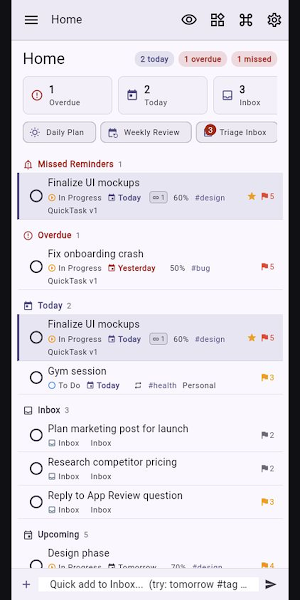
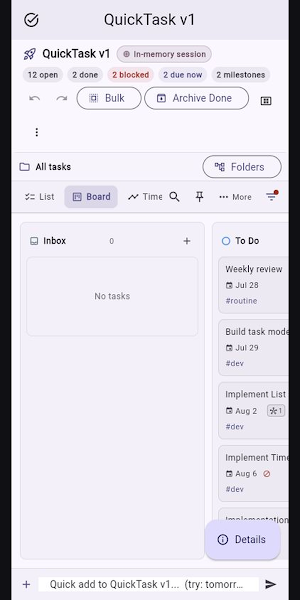
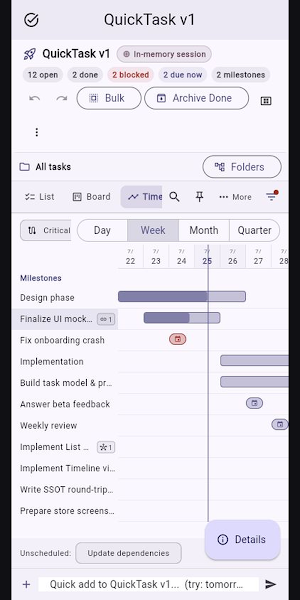
QuickTask is an Android task manager that stores each task as a portable Markdown file. Organize the same task data in eight synchronized views: List, Board, Timeline, Tree, Calendar, Matrix, Table, and Mind Map.
KEY FEATURES
• Create tasks with a title, due date, priority, project, tags, notes, and checklists.
• Switch views without duplicating tasks; changes appear across every view.
• Use Quick Add, timers, Pomodoro focus sessions, work logs, dependencies, and bulk editing.
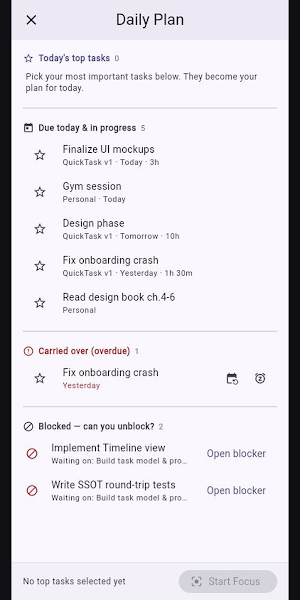
• Plan with Today, Calendar, Daily Plan, Weekly Review, Inbox, Reports, Archive, and Trash.
• Keep task files in a location you choose, including supported local, cloud, or remote storage.
• Preview AI Assist suggestions and changes before applying them.
GETTING STARTED
1. Launch QuickTask and add a task with Quick Add or New Task.
2. Choose the view that fits your work: a list, board, schedule, hierarchy, table, matrix, or mind map.
3. Tap a task to edit its details, checklist, relationships, and time tracking.
4. Optionally add a Task Location in Settings to use another supported storage location.
No QuickTask account, registration, login, demo credentials, or sample file is required.
PRIVACY AND SECURITY
• Tasks stay in storage locations you select.
• Privacy Shield hides sensitive on-screen previews without changing the underlying task data.
• AI Assist generates reviewable proposals on the device and does not send task data to a third-party AI service.
FREE AND PRO
• Start with a seven-day ad-free trial.
• After the trial, the free Android version may display ads. Task-management features remain available.
• QuickTask Pro removes ads through an annual subscription or a one-time lifetime purchase.
Terms of Use: https://kakitiro.com/quickapps/quicktask/terms/
KEY FEATURES
• Create tasks with a title, due date, priority, project, tags, notes, and checklists.
• Switch views without duplicating tasks; changes appear across every view.
• Use Quick Add, timers, Pomodoro focus sessions, work logs, dependencies, and bulk editing.
• Plan with Today, Calendar, Daily Plan, Weekly Review, Inbox, Reports, Archive, and Trash.
• Keep task files in a location you choose, including supported local, cloud, or remote storage.
• Preview AI Assist suggestions and changes before applying them.
GETTING STARTED
1. Launch QuickTask and add a task with Quick Add or New Task.
2. Choose the view that fits your work: a list, board, schedule, hierarchy, table, matrix, or mind map.
3. Tap a task to edit its details, checklist, relationships, and time tracking.
4. Optionally add a Task Location in Settings to use another supported storage location.
No QuickTask account, registration, login, demo credentials, or sample file is required.
PRIVACY AND SECURITY
• Tasks stay in storage locations you select.
• Privacy Shield hides sensitive on-screen previews without changing the underlying task data.
• AI Assist generates reviewable proposals on the device and does not send task data to a third-party AI service.
FREE AND PRO
• Start with a seven-day ad-free trial.
• After the trial, the free Android version may display ads. Task-management features remain available.
• QuickTask Pro removes ads through an annual subscription or a one-time lifetime purchase.
Terms of Use: https://kakitiro.com/quickapps/quicktask/terms/
What’s new
Version 5.0.5 · Updated August 24, 2026
• Initial release with portable Markdown-backed tasks. • Use List, Board, Timeline, Tree, Calendar, Matrix, Table, and Mind Map views. • Capture tasks quickly and track timers, focus sessions, and work logs. • Review Inbox, reports, archive, trash, bulk edit, and reviewed AI proposals.
Alternatives to QuickTask - Todo & Planner
Looking for apps like QuickTask - Todo & Planner? Here are 4 similar Android apps on Google Play. The highest rated is LiveIt Journal, Planner, Notes (4.4/5), and all 4 are free to download.
-
2Do - To do List & Reminders 4.1
-
LiveIt Journal, Planner, Notes 4.4
-
To-Do List & Planner: Taskito 4.2
-
Listok: To do list & Notes 4.1
| App | Rating | Price | Installs | Last updated | Compare |
|---|---|---|---|---|---|
| QuickTask - Todo & Planner | – | Free | 5+ | Aug 24, 2026 | |
| 2Do - To do List & Reminders | 4.1 / 5 | Free | 100,000+ | Sep 16, 2026 | Compare |
| LiveIt Journal, Planner, Notes | 4.4 / 5 | Free | 1,000,000+ | Aug 6, 2026 | Compare |
| To-Do List & Planner: Taskito | 4.2 / 5 | Free | 1,000,000+ | Oct 21, 2026 | Compare |
| Listok: To do list & Notes | 4.1 / 5 | Free | 100,000+ | Aug 18, 2026 | Compare |