

QuickSheet - Grid Editor
kakitiro Productivity In-app purchases Contains ads
Edit CSV, TSV, XLSX, JSON, YAML, TOML, XML, and configuration files safely.
- Downloads
- 7+
- on Google Play
- Price
- Free
- In-app purchases
- Updated
- Oct 4
- 2026 · v5.0.6
Screenshots
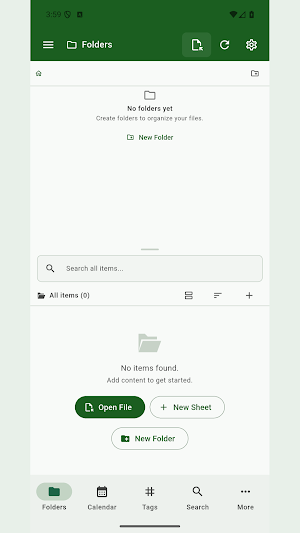
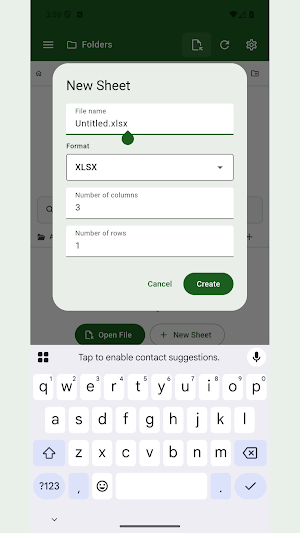
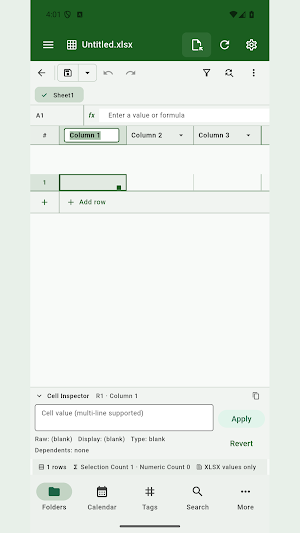
About QuickSheet - Grid Editor
QuickSheet is a local-first universal grid editor for CSV, TSV, delimited text, value-focused XLSX, structured data, and configuration files on Android. It prioritizes data fidelity: values remain literal unless you calculate, format mappings are shown before import, and save or export behavior is explicit.
KEY FEATURES:
- Delimited-text fidelity: Preserve leading zeros, long identifiers, date-like strings, encoding, delimiter, newline, BOM, quote, and escape style.
- 14 grid formats: Work with CSV, TSV, DSV, XLSX, JSON, JSON Lines, Properties, INI/CFG, .env, XML, YAML, TOML, Markdown tables, and text tables.
- Structured mappings: Review how records, trees, properties, attributes, comments, and tables map into the grid before editing.
- Large-file workflow: Stream rows into temporary local storage so search, filter, sort, and scrolling remain practical; open sensitive or large files Read-Only first.
- Import Preview and profiles: Confirm encoding, delimiter, quote, header, skipped rows, mapping, and save fidelity, then reuse trusted choices per file.
- Value-focused XLSX: Open multiple sheets as values and formula text with clear compatibility limits instead of claiming full presentation fidelity.
- Grid tools: Edit formulas, inspect dependencies and problems, find and replace, filter, sort, fill series, preview paste, manage rows and columns, and undo or redo changes.
- Safer file workflows: Detect external changes, keep recovery data, preserve optional backups, and verify supported copy or move operations before removing a source.
- VFS Library: Organize supported local, cloud, NAS, and remote locations with folders, search, tags, favorites, Recent, and Trash.
PERFECT FOR:
- CSV and TSV cleanup, review, migration, and handoff
- JSON, YAML, TOML, XML, .env, and configuration-file maintenance
- Identifiers, codes, phone numbers, dates, and values that must stay literal
- Large delimited files that exceed conventional spreadsheet row limits
- Value-level XLSX inspection without unsupported formatting claims
GETTING STARTED:
- Open a supported file from QuickSheet, the system file picker, or a configured location.
- Review Import Preview for the detected dialect or structured mapping.
- Search, filter, sort, inspect problems, and edit values or formulas.
- Turn off Read-Only only when you are ready to change a large or sensitive file.
- Save in place to preserve the current format, save a copy in another supported format, or export selected data.
PRIVACY & SECURITY:
- File contents are processed on-device.
- QuickSheet does not provide hosted sync or shared editing.
- Cloud and NAS locations are accessed directly with credentials you configure.
- Tags, favorites, import profiles, view state, and recovery data are stored outside source files.
FREE AND PRO:
- Start with a seven-day ad-free trial.
- Free keeps the full feature set and may show mobile advertising or a daily desktop support reminder.
- QuickSheet Pro removes ads and reminders through a yearly subscription or a one-time lifetime purchase.
Terms of Use: https://kakitiro.com/quickapps/quicksheet/terms/
KEY FEATURES:
- Delimited-text fidelity: Preserve leading zeros, long identifiers, date-like strings, encoding, delimiter, newline, BOM, quote, and escape style.
- 14 grid formats: Work with CSV, TSV, DSV, XLSX, JSON, JSON Lines, Properties, INI/CFG, .env, XML, YAML, TOML, Markdown tables, and text tables.
- Structured mappings: Review how records, trees, properties, attributes, comments, and tables map into the grid before editing.
- Large-file workflow: Stream rows into temporary local storage so search, filter, sort, and scrolling remain practical; open sensitive or large files Read-Only first.
- Import Preview and profiles: Confirm encoding, delimiter, quote, header, skipped rows, mapping, and save fidelity, then reuse trusted choices per file.
- Value-focused XLSX: Open multiple sheets as values and formula text with clear compatibility limits instead of claiming full presentation fidelity.
- Grid tools: Edit formulas, inspect dependencies and problems, find and replace, filter, sort, fill series, preview paste, manage rows and columns, and undo or redo changes.
- Safer file workflows: Detect external changes, keep recovery data, preserve optional backups, and verify supported copy or move operations before removing a source.
- VFS Library: Organize supported local, cloud, NAS, and remote locations with folders, search, tags, favorites, Recent, and Trash.
PERFECT FOR:
- CSV and TSV cleanup, review, migration, and handoff
- JSON, YAML, TOML, XML, .env, and configuration-file maintenance
- Identifiers, codes, phone numbers, dates, and values that must stay literal
- Large delimited files that exceed conventional spreadsheet row limits
- Value-level XLSX inspection without unsupported formatting claims
GETTING STARTED:
- Open a supported file from QuickSheet, the system file picker, or a configured location.
- Review Import Preview for the detected dialect or structured mapping.
- Search, filter, sort, inspect problems, and edit values or formulas.
- Turn off Read-Only only when you are ready to change a large or sensitive file.
- Save in place to preserve the current format, save a copy in another supported format, or export selected data.
PRIVACY & SECURITY:
- File contents are processed on-device.
- QuickSheet does not provide hosted sync or shared editing.
- Cloud and NAS locations are accessed directly with credentials you configure.
- Tags, favorites, import profiles, view state, and recovery data are stored outside source files.
FREE AND PRO:
- Start with a seven-day ad-free trial.
- Free keeps the full feature set and may show mobile advertising or a daily desktop support reminder.
- QuickSheet Pro removes ads and reminders through a yearly subscription or a one-time lifetime purchase.
Terms of Use: https://kakitiro.com/quickapps/quicksheet/terms/
What’s new
Version 5.0.6 · Updated October 4, 2026
• Fixed saving changes back to original files. • Improved Save As reliability. • Resolved delays when saving edits.
Alternatives to QuickSheet - Grid Editor
Looking for apps like QuickSheet - Grid Editor? Here are 6 similar Android apps on Google Play. All of them are free to download.
-
QuickDIY - Sketch & Build
-
Quick3DModeling - CAD & Sculpt
-
FortuneCalendar - Almanac
-
CursorSpot
-
QuickImage - Photo Layers
-
QuickLayout - Window Manager
| App | Rating | Price | Installs | Last updated | Compare |
|---|---|---|---|---|---|
| QuickSheet - Grid Editor | – | Free | 5+ | Oct 4, 2026 | |
| QuickDIY - Sketch & Build | – | Free | 1+ | Sep 23, 2026 | Compare |
| Quick3DModeling - CAD & Sculpt | – | Free | 10+ | Sep 21, 2026 | Compare |
| FortuneCalendar - Almanac | – | Free | 5+ | – | Compare |
| CursorSpot | – | Free | 100+ | Aug 27, 2026 | Compare |
| QuickImage - Photo Layers | – | Free | 100+ | Aug 18, 2026 | Compare |
| QuickLayout - Window Manager | – | Free | 1+ | Aug 23, 2026 | Compare |
Similar apps on Google Play
- QuickDIY - Sketch & Build
- Quick3DModeling - CAD & Sculpt
- FortuneCalendar - Almanac
- CursorSpot
- QuickImage - Photo Layers
- QuickLayout - Window Manager
- QuickClip - Copy Paste Manager
- QuickHumming - Melody Maker
- QuickLLM - AI Model Manager
- QuickTask - Todo & Planner
- QuickTerminal - Multi-Shell
- QuickRemote - Desktop Manager
- QuickPad - Touch & Control
- QuickScanner - OCR,QR,Barcode
- QuickPlayer - Music & Video
- QuickPedometer - Walk & Run
- QuickNote - Text Library
- QuickEditor - Text & Code
- QuickExplorer - File & Storage
- QuickCalculator - All-in-One
- QuickVideo - Cam & Edit
- QuickRecorder - Voice Library
- QuickVibrator - Vibration App