

QuickDIY - Sketch & Build
kakitiro House & Home In-app purchases Contains ads
Plan woodworking parts, cut layouts, materials, costs, labels, and exports.
- Downloads
- 4+
- on Google Play
- Price
- Free
- In-app purchases
- Updated
- Sep 23
- 2026 · v5.0.4
Screenshots
About QuickDIY - Sketch & Build
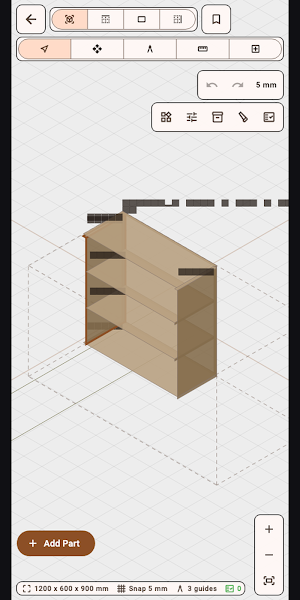
QuickDIY is a woodworking project and cut-planning tool designed for Android. QuickDIY connects a simple dimension-driven project canvas to stock-aware cut planning and workshop-ready information.
KEY FEATURES:
- Dimensioned design: Create rectangular parts and place them in Top, Front, Side, or ISO views.
- Material presets: Assign sheet goods, lumber, colors, grain direction, cost, and edge treatment.
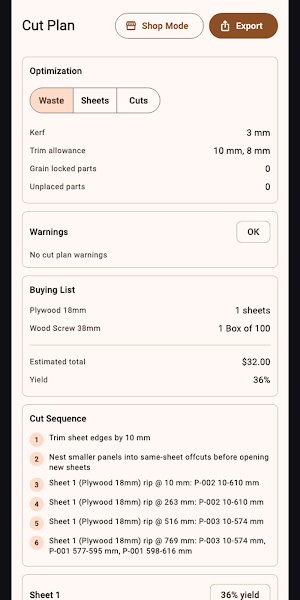
- Cut Plan: Account for stock size, kerf, trim allowance, grain lock, edge banding, and unplaced parts.
- Parts and hardware: Track part labels, quantities, hardware, cost, and buying-list requirements.
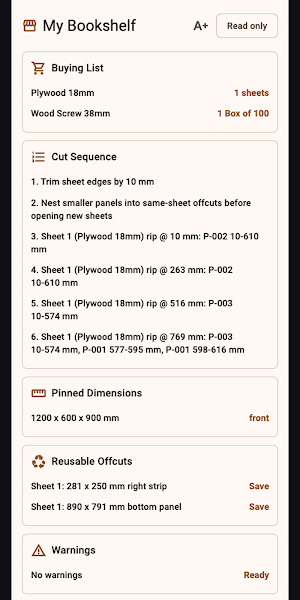
- Shop Mode: Use a read-only, larger-text view for the store or workshop.
- Project export: Create shop-ready cut, label, assembly, and buying outputs while preserving .qdiy projects.
PERFECT FOR:
- Shelves, cabinets, boxes, workbenches, and simple furniture
- Woodworkers planning sheet goods and dimensional lumber
- Estimating stock, hardware, edge banding, and project cost
- Taking a clear cut sequence and buying list into the shop
GETTING STARTED:
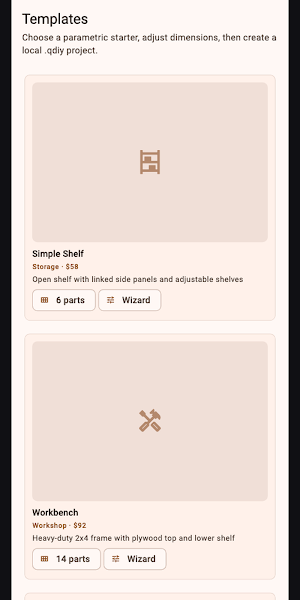
- Create a .qdiy project or begin with a template.
- Add rectangular parts and enter exact width, depth, thickness, and position.
- Assign materials, grain, labels, edge banding, and hardware.
- Open Cut Plan and resolve unplaced parts or stock warnings.
- Review Shop Mode, then export the cut, label, buying, or assembly output you need.
PRIVACY & SECURITY:
- Projects and calculations are processed locally.
- The Library scans only locations you configure.
- Project metadata and exports stay in user-selected storage.
- No account is required for core design work.
FREE AND PRO:
- Start with a seven-day ad-free trial.
- Free keeps the full feature set and may show mobile advertising or a daily desktop support reminder.
- QuickDIY Pro removes ads and reminders through a yearly subscription or a one-time lifetime purchase.
Terms of Use: https://kakitiro.com/quickapps/quickdiy/terms/
KEY FEATURES:
- Dimensioned design: Create rectangular parts and place them in Top, Front, Side, or ISO views.
- Material presets: Assign sheet goods, lumber, colors, grain direction, cost, and edge treatment.
- Cut Plan: Account for stock size, kerf, trim allowance, grain lock, edge banding, and unplaced parts.
- Parts and hardware: Track part labels, quantities, hardware, cost, and buying-list requirements.
- Shop Mode: Use a read-only, larger-text view for the store or workshop.
- Project export: Create shop-ready cut, label, assembly, and buying outputs while preserving .qdiy projects.
PERFECT FOR:
- Shelves, cabinets, boxes, workbenches, and simple furniture
- Woodworkers planning sheet goods and dimensional lumber
- Estimating stock, hardware, edge banding, and project cost
- Taking a clear cut sequence and buying list into the shop
GETTING STARTED:
- Create a .qdiy project or begin with a template.
- Add rectangular parts and enter exact width, depth, thickness, and position.
- Assign materials, grain, labels, edge banding, and hardware.
- Open Cut Plan and resolve unplaced parts or stock warnings.
- Review Shop Mode, then export the cut, label, buying, or assembly output you need.
PRIVACY & SECURITY:
- Projects and calculations are processed locally.
- The Library scans only locations you configure.
- Project metadata and exports stay in user-selected storage.
- No account is required for core design work.
FREE AND PRO:
- Start with a seven-day ad-free trial.
- Free keeps the full feature set and may show mobile advertising or a daily desktop support reminder.
- QuickDIY Pro removes ads and reminders through a yearly subscription or a one-time lifetime purchase.
Terms of Use: https://kakitiro.com/quickapps/quickdiy/terms/
What’s new
Version 5.0.4 · Updated September 23, 2026
• Initial release with editable .qdiy projects. • Design dimensioned rectangular parts in four project views. • Create stock-aware cut plans, labels, buying lists, and cost summaries. • Use templates, material presets, Design Check, and Shop Mode.
Alternatives to QuickDIY - Sketch & Build
Looking for apps like QuickDIY - Sketch & Build? Here are 6 similar Android apps on Google Play. All of them are free to download.
-
Quick3DModeling - CAD & Sculpt
-
FortuneCalendar - Almanac
-
CursorSpot
-
QuickImage - Photo Layers
-
QuickLayout - Window Manager
-
QuickClip - Copy Paste Manager
| App | Rating | Price | Installs | Last updated | Compare |
|---|---|---|---|---|---|
| QuickDIY - Sketch & Build | – | Free | 1+ | Sep 23, 2026 | |
| Quick3DModeling - CAD & Sculpt | – | Free | 10+ | Sep 21, 2026 | Compare |
| FortuneCalendar - Almanac | – | Free | 5+ | – | Compare |
| CursorSpot | – | Free | 100+ | Aug 27, 2026 | Compare |
| QuickImage - Photo Layers | – | Free | 100+ | Aug 18, 2026 | Compare |
| QuickLayout - Window Manager | – | Free | 1+ | Aug 23, 2026 | Compare |
| QuickClip - Copy Paste Manager | – | Free | 5+ | – | Compare |
Similar apps on Google Play
- Quick3DModeling - CAD & Sculpt
- FortuneCalendar - Almanac
- CursorSpot
- QuickImage - Photo Layers
- QuickLayout - Window Manager
- QuickClip - Copy Paste Manager
- QuickHumming - Melody Maker
- QuickSheet - Grid Editor
- QuickLLM - AI Model Manager
- QuickTask - Todo & Planner
- QuickTerminal - Multi-Shell
- QuickRemote - Desktop Manager
- QuickPad - Touch & Control
- QuickScanner - OCR,QR,Barcode
- QuickPlayer - Music & Video
- QuickPedometer - Walk & Run
- QuickNote - Text Library
- QuickEditor - Text & Code
- QuickExplorer - File & Storage
- QuickCalculator - All-in-One
- QuickVideo - Cam & Edit
- QuickRecorder - Voice Library
- QuickVibrator - Vibration App