
QuickClip - Copy Paste Manager
kakitiro Productivity In-app purchases Contains ads
Save, search, expand, and paste reusable clips, templates, files, and links.
- Downloads
- 5+
- on Google Play
- Price
- Free
- In-app purchases
- Updated
- Aug 24
- 2026 · v1.1.5
Screenshots
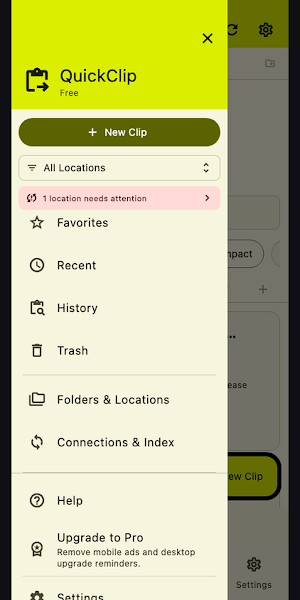

About QuickClip - Copy Paste Manager
QuickClip is a reusable clip, template, and clipboard workspace designed for Android. QuickClip turns frequently reused content into searchable, structured Clips while keeping clipboard history, template expansion, and insertion behavior explicit.
KEY FEATURES:
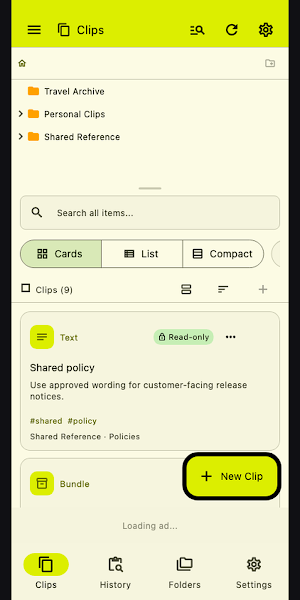
- Eight Clip types: Manage plain text, rich templates, links, images, files, and other supported reusable content.
- Clipboard History: Keep a configurable local history and promote selected entries into durable Clips.
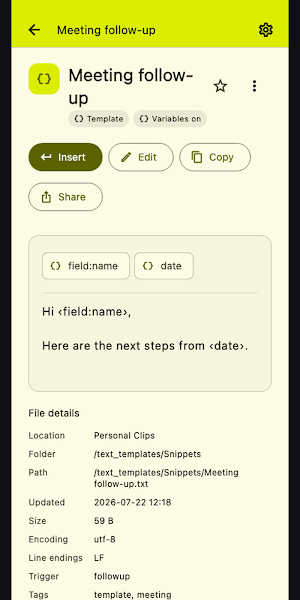
- Template variables: Expand dates, UUIDs, clipboard values, fields, choices, checks, calculations, and cursor placement.
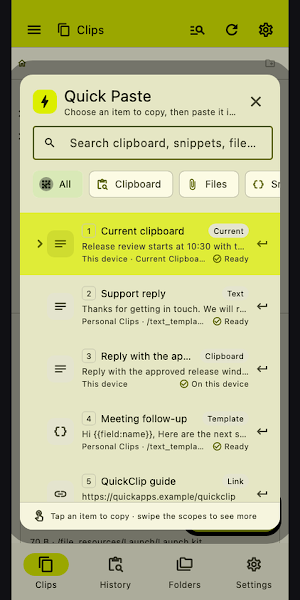
- Quick Paste: Search, preview, expand, and insert quickly; when direct insert is unavailable, copy with honest fallback feedback.
- Desktop and mobile productivity: Use abbreviations, quick find, global shortcuts where supported, and a configurable mobile keyboard.
- Multi-location Library: Search and manage Clips across capable local, cloud, remote, offline, conflict, trash, and recovery workflows.
PERFECT FOR:
- Email replies, addresses, code fragments, checklists, and form text
- Structured templates that ask for values at insertion time
- Quick Paste and keyboard-driven retrieval on desktop
- A favorites-first snippet keyboard on mobile
GETTING STARTED:
- Add a Library location or open the existing Clip collection.
- Create a Clip or promote an item from local Clipboard History.
- Choose its type, name, tags, trigger, content, and optional variables.
- Search it from the Library, Quick Find, Quick Paste, or mobile keyboard.
- Preview expansion, provide required fields, then insert or copy the result.
PRIVACY & SECURITY:
- Clipboard History is local and configurable.
- Sensitive previews and location capabilities are shown explicitly.
- Remote or cloud locations are accessed only when you add and authorize them.
- Insert fallback copies content and tells you what happened instead of claiming direct control.
FREE AND PRO:
- Start with a seven-day ad-free trial.
- Free keeps the full feature set and may show mobile advertising or a daily desktop support reminder.
- QuickClip Pro removes ads and reminders through a yearly subscription or a one-time lifetime purchase.
Terms of Use: https://kakitiro.com/quickapps/quickclip/terms/
KEY FEATURES:
- Eight Clip types: Manage plain text, rich templates, links, images, files, and other supported reusable content.
- Clipboard History: Keep a configurable local history and promote selected entries into durable Clips.
- Template variables: Expand dates, UUIDs, clipboard values, fields, choices, checks, calculations, and cursor placement.
- Quick Paste: Search, preview, expand, and insert quickly; when direct insert is unavailable, copy with honest fallback feedback.
- Desktop and mobile productivity: Use abbreviations, quick find, global shortcuts where supported, and a configurable mobile keyboard.
- Multi-location Library: Search and manage Clips across capable local, cloud, remote, offline, conflict, trash, and recovery workflows.
PERFECT FOR:
- Email replies, addresses, code fragments, checklists, and form text
- Structured templates that ask for values at insertion time
- Quick Paste and keyboard-driven retrieval on desktop
- A favorites-first snippet keyboard on mobile
GETTING STARTED:
- Add a Library location or open the existing Clip collection.
- Create a Clip or promote an item from local Clipboard History.
- Choose its type, name, tags, trigger, content, and optional variables.
- Search it from the Library, Quick Find, Quick Paste, or mobile keyboard.
- Preview expansion, provide required fields, then insert or copy the result.
PRIVACY & SECURITY:
- Clipboard History is local and configurable.
- Sensitive previews and location capabilities are shown explicitly.
- Remote or cloud locations are accessed only when you add and authorize them.
- Insert fallback copies content and tells you what happened instead of claiming direct control.
FREE AND PRO:
- Start with a seven-day ad-free trial.
- Free keeps the full feature set and may show mobile advertising or a daily desktop support reminder.
- QuickClip Pro removes ads and reminders through a yearly subscription or a one-time lifetime purchase.
Terms of Use: https://kakitiro.com/quickapps/quickclip/terms/
What’s new
Version 1.1.5 · Updated August 24, 2026
• Initial release with reusable Clips and local Clipboard History. • Expand templates with fields, dates, choices, checks, calculations, and cursor placement. • Search and insert through Library, Quick Find, Quick Paste, and mobile keyboard. • Manage capable local, cloud, remote, offline, conflict, trash, and recovery locations.
Alternatives to QuickClip - Copy Paste Manager
Looking for apps like QuickClip - Copy Paste Manager? Here are 3 similar Android apps on Google Play. The highest rated is Quotation Maker (4.8/5), and all 3 are free to download.



| App | Rating | Price | Installs | Last updated | Compare |
|---|---|---|---|---|---|
| QuickClip - Copy Paste Manager | – | Free | 5+ | Aug 24, 2026 | |
| Plankpad | 3.3 / 5 | Free | 100,000+ | Sep 7, 2026 | Compare |
| Quotation Maker | 4.8 / 5 | Free | 500,000+ | Aug 26, 2026 | Compare |
| Rocketbook | 4.6 / 5 | Free | 1,000,000+ | Aug 7, 2026 | Compare |