
QuickLayout - Window Manager
kakitiro Productivity In-app purchases Contains ads
Switch saved desktop window Layouts securely over your local network.
- Downloads
- 2+
- on Google Play
- Price
- Free
- In-app purchases
- Updated
- Aug 23
- 2026 · v0.1.5
Screenshots


About QuickLayout - Window Manager
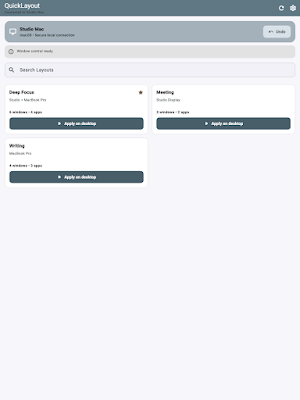
QuickLayout saves and restores desktop window workspaces. On Android phones and tablets, it becomes a secure local-network remote for the Mac you approve. Preview every change, keep an Undo point, and switch workspaces without sending your Layout details to a cloud service.
DESKTOP WORKSPACES:
- Save Current: Capture selected app windows as private schematic Layouts without taking screenshots.
- Preview before Apply: Inspect moves, resizes, launches, skips, display changes, and unsupported windows.
- Transactional Undo: Save affected window positions before every arrangement and restore only what QuickLayout changed.
- Quick Placement: Move or resize the selected window with presets, arrow controls, adjustable steps, and aspect ratios.
- Target switching: Change the window you are arranging without leaving Quick Placement.
- Gather and Grid: Recover off-screen windows or place the frontmost window into a chosen display region.
- Menu Bar and shortcuts: Reach Save, Layout Chooser, favorites, recent Layouts, Gather, Grid, Undo, automation, and Settings.
ANDROID PHONE AND TABLET REMOTE:
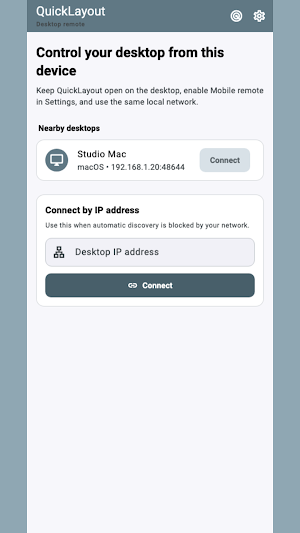
- Discover nearby QuickLayout desktops on the same local network.
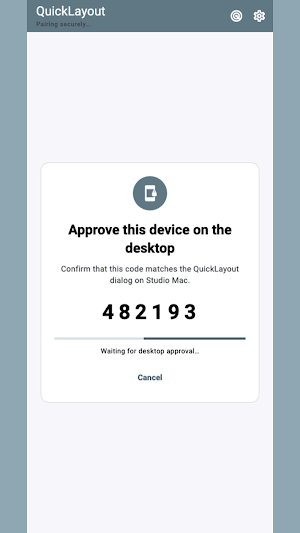
- Verify a six-digit pairing code on both devices before connecting.
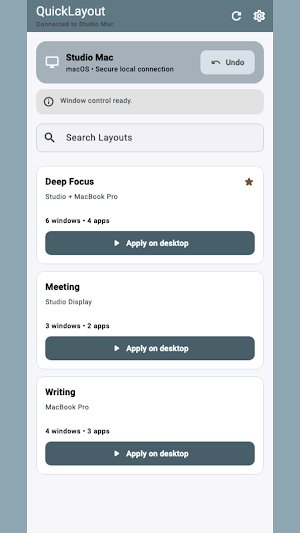
- Search saved Layouts, apply one on the desktop, refresh status, or trigger Undo.
- Keep the desktop in control: hosting is off by default and every new device requires approval.
PRIVACY & SECURITY:
- Desktop Layout details remain on the desktop.
- The mobile remote receives Layout summaries, not document contents, window titles, or window coordinates.
- Paired commands are protected with an encrypted authenticated session.
- No QuickLayout account or cloud relay is required.
GETTING STARTED:
- On Mac, install the bundled companion Apple Shortcut once when prompted.
- Save a Layout, review the proposed window changes, and choose Apply.
- To use the remote, enable Mobile remote in desktop Settings, keep both devices on the same LAN, and approve the pairing code.
FREE AND PRO:
- Start with a seven-day trial.
- After the trial, mobile may show advertising and some settings or automation controls require Pro. Desktop builds do not show ads and may show a daily support reminder.
- QuickLayout Pro removes ads and reminders through a yearly subscription or a one-time lifetime purchase.
Terms of Use: https://kakitiro.com/quickapps/quicklayout/terms/
DESKTOP WORKSPACES:
- Save Current: Capture selected app windows as private schematic Layouts without taking screenshots.
- Preview before Apply: Inspect moves, resizes, launches, skips, display changes, and unsupported windows.
- Transactional Undo: Save affected window positions before every arrangement and restore only what QuickLayout changed.
- Quick Placement: Move or resize the selected window with presets, arrow controls, adjustable steps, and aspect ratios.
- Target switching: Change the window you are arranging without leaving Quick Placement.
- Gather and Grid: Recover off-screen windows or place the frontmost window into a chosen display region.
- Menu Bar and shortcuts: Reach Save, Layout Chooser, favorites, recent Layouts, Gather, Grid, Undo, automation, and Settings.
ANDROID PHONE AND TABLET REMOTE:
- Discover nearby QuickLayout desktops on the same local network.
- Verify a six-digit pairing code on both devices before connecting.
- Search saved Layouts, apply one on the desktop, refresh status, or trigger Undo.
- Keep the desktop in control: hosting is off by default and every new device requires approval.
PRIVACY & SECURITY:
- Desktop Layout details remain on the desktop.
- The mobile remote receives Layout summaries, not document contents, window titles, or window coordinates.
- Paired commands are protected with an encrypted authenticated session.
- No QuickLayout account or cloud relay is required.
GETTING STARTED:
- On Mac, install the bundled companion Apple Shortcut once when prompted.
- Save a Layout, review the proposed window changes, and choose Apply.
- To use the remote, enable Mobile remote in desktop Settings, keep both devices on the same LAN, and approve the pairing code.
FREE AND PRO:
- Start with a seven-day trial.
- After the trial, mobile may show advertising and some settings or automation controls require Pro. Desktop builds do not show ads and may show a daily support reminder.
- QuickLayout Pro removes ads and reminders through a yearly subscription or a one-time lifetime purchase.
Terms of Use: https://kakitiro.com/quickapps/quicklayout/terms/
What’s new
Version 0.1.5 · Updated August 23, 2026
Fixed an Android startup crash in Store builds. QuickLayout for Android is a LAN remote for the macOS or Windows desktop app, with clearer desktop setup, discovery, manual IP connection, and demo guidance.
Alternatives to QuickLayout - Window Manager
Looking for apps like QuickLayout - Window Manager? Here are 6 similar Android apps on Google Play. All of them are free to download.
-
QuickDIY - Sketch & Build
-
Quick3DModeling - CAD & Sculpt
-
FortuneCalendar - Almanac
-
CursorSpot
-
QuickImage - Photo Layers
-
QuickClip - Copy Paste Manager
| App | Rating | Price | Installs | Last updated | Compare |
|---|---|---|---|---|---|
| QuickLayout - Window Manager | – | Free | 1+ | Aug 23, 2026 | |
| QuickDIY - Sketch & Build | – | Free | 1+ | Sep 23, 2026 | Compare |
| Quick3DModeling - CAD & Sculpt | – | Free | 10+ | Sep 21, 2026 | Compare |
| FortuneCalendar - Almanac | – | Free | 5+ | – | Compare |
| CursorSpot | – | Free | 100+ | Aug 27, 2026 | Compare |
| QuickImage - Photo Layers | – | Free | 100+ | Aug 18, 2026 | Compare |
| QuickClip - Copy Paste Manager | – | Free | 5+ | – | Compare |
Similar apps on Google Play
- QuickDIY - Sketch & Build
- Quick3DModeling - CAD & Sculpt
- FortuneCalendar - Almanac
- CursorSpot
- QuickImage - Photo Layers
- QuickClip - Copy Paste Manager
- QuickHumming - Melody Maker
- QuickSheet - Grid Editor
- QuickLLM - AI Model Manager
- QuickTask - Todo & Planner
- QuickTerminal - Multi-Shell
- QuickRemote - Desktop Manager
- QuickPad - Touch & Control
- QuickScanner - OCR,QR,Barcode
- QuickPlayer - Music & Video
- QuickPedometer - Walk & Run
- QuickNote - Text Library
- QuickEditor - Text & Code
- QuickExplorer - File & Storage
- QuickCalculator - All-in-One
- QuickVideo - Cam & Edit
- QuickRecorder - Voice Library
- QuickVibrator - Vibration App