

Amazon Shopping - Search, Find, Ship, and Save
Amazon Mobile LLC Shopping In-app purchases Contains ads
Browse, search & buy millions of products right from your Android device.
- Rating
- 4.4
- 4.7M ratings
- Downloads
- 1.1B+
- on Google Play
- Price
- Free
- In-app purchases
- Updated
- Sep 16
- 2026 · v32.18.0.100
Screenshots


About Amazon Shopping - Search, Find, Ship, and Save
Product Features
* Customers are able to shop millions of products on any of Amazon's sites around the world from a single app
*Use Alexa to help you shop—just use your voice to search for products on Amazon, track your orders, and reorder your favorite items. Tap the microphone icon and say “where’s my stuff?” to access open orders. Reorder products by saying “reorder paper towels” or “buy more batteries”.
* Take advantage of 1-Click ordering, customer support, Wish Lists, create or find a baby or wedding registry, order tracking, and more
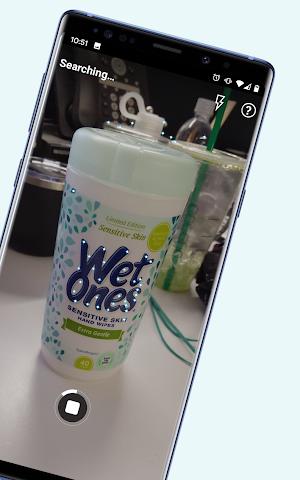
* Scan product barcodes and images to compare prices and check availability using Scan It
* Check out Gold Box Deals - including the Deal of the Day and Lightning Deals, and get automatically notified when new deals become available
* Send and share links to products via email, SMS, Facebook, Twitter, and more
* Sign-up for automatic shipment notifications to know when your order ships and arrives
* Buy with confidence, knowing that all transactions are securely processed
Product Description
The Amazon Shopping app lets you shop millions of products and manage your Amazon orders from anywhere. Browse, shop by department, compare prices, read reviews, share products with friends, and check the status of your orders.
Compare prices and availability by typing in your search, scanning a barcode or an image with your camera, or using your voice. Never miss a deal with easy access to Lightning Deals and the Deal of the Day. You can also sign-up for shipment notifications to know when your order ships and arrives. You have full access to your Shopping Cart, Wish Lists, payment and Prime shipping options, Subscribe & Save order history, and 1-Click settings, just like on the full Amazon.com site. All Amazon Shopping app purchases are routed through Amazon's secure servers to encrypt and safeguard your personal information.
Important Note Regarding Permissions
Please note that the Amazon Shopping app requires access to the following services to operate properly:
* Contacts: Allows you to send Amazon gift cards to your contacts or invitation to install the Amazon app.
* Camera: Allows the Amazon app to access your camera on the device. You can use your camera to find products by scanning the cover or its barcode, to add gift cards and credit cards, or to add pictures in the product reviews.
* Flashlight: Allows the Amazon app to turn on the flashlight. You can use the flashlight to find products with the camera feature even in low-light or dark conditions.
* Microphone: Allows the Amazon app to access your microphone to use your voice to search and interact with your Assistant.
* Location: Allows the Amazon app to access your location to help you discover local offers and select addresses fast.
* Account: Allows you to share products on Amazon with your friends and families through Facebook or other social networks.
* Phone: Allows the Amazon app to pre-populate the Amazon Customer Service number on your phone’s keypad.
* Storage: Allows the Amazon app to store your preferences so that some features can load and run faster on the device.
* Wi-Fi: This permissions is used when setting up either a Dash Button or Dash Wand using the Amazon Shopping app.
OS Requirements: Requires Android OS 5.0 or higher and a rear-facing camera. The Amazon App for Tablets is available on Google Play. Search for "Amazon Tablet" to install the app and begin shopping.
* Customers are able to shop millions of products on any of Amazon's sites around the world from a single app
*Use Alexa to help you shop—just use your voice to search for products on Amazon, track your orders, and reorder your favorite items. Tap the microphone icon and say “where’s my stuff?” to access open orders. Reorder products by saying “reorder paper towels” or “buy more batteries”.
* Take advantage of 1-Click ordering, customer support, Wish Lists, create or find a baby or wedding registry, order tracking, and more
* Scan product barcodes and images to compare prices and check availability using Scan It
* Check out Gold Box Deals - including the Deal of the Day and Lightning Deals, and get automatically notified when new deals become available
* Send and share links to products via email, SMS, Facebook, Twitter, and more
* Sign-up for automatic shipment notifications to know when your order ships and arrives
* Buy with confidence, knowing that all transactions are securely processed
Product Description
The Amazon Shopping app lets you shop millions of products and manage your Amazon orders from anywhere. Browse, shop by department, compare prices, read reviews, share products with friends, and check the status of your orders.
Compare prices and availability by typing in your search, scanning a barcode or an image with your camera, or using your voice. Never miss a deal with easy access to Lightning Deals and the Deal of the Day. You can also sign-up for shipment notifications to know when your order ships and arrives. You have full access to your Shopping Cart, Wish Lists, payment and Prime shipping options, Subscribe & Save order history, and 1-Click settings, just like on the full Amazon.com site. All Amazon Shopping app purchases are routed through Amazon's secure servers to encrypt and safeguard your personal information.
Important Note Regarding Permissions
Please note that the Amazon Shopping app requires access to the following services to operate properly:
* Contacts: Allows you to send Amazon gift cards to your contacts or invitation to install the Amazon app.
* Camera: Allows the Amazon app to access your camera on the device. You can use your camera to find products by scanning the cover or its barcode, to add gift cards and credit cards, or to add pictures in the product reviews.
* Flashlight: Allows the Amazon app to turn on the flashlight. You can use the flashlight to find products with the camera feature even in low-light or dark conditions.
* Microphone: Allows the Amazon app to access your microphone to use your voice to search and interact with your Assistant.
* Location: Allows the Amazon app to access your location to help you discover local offers and select addresses fast.
* Account: Allows you to share products on Amazon with your friends and families through Facebook or other social networks.
* Phone: Allows the Amazon app to pre-populate the Amazon Customer Service number on your phone’s keypad.
* Storage: Allows the Amazon app to store your preferences so that some features can load and run faster on the device.
* Wi-Fi: This permissions is used when setting up either a Dash Button or Dash Wand using the Amazon Shopping app.
OS Requirements: Requires Android OS 5.0 or higher and a rear-facing camera. The Amazon App for Tablets is available on Google Play. Search for "Amazon Tablet" to install the app and begin shopping.
What’s new
Version 32.18.0.100 · Updated September 16, 2026
Access popular pages quickly with our new shortcuts. Tap and hold the Amazon app icon to access your Orders, Daily Deals, Shopping Cart, and Search. Enjoy our latest update where we have fixed some bugs and improved our app to provide you a seamless shopping experience
User reviews

messi

Good app

O Kay!

Excellent app for my needs!!!!!!!

Wouldnt shop anywhere else!

Delivered to 3331 across the street from me at 3326. I recognized the house, walkedacross the street, brought it home
Frequently asked questions
What can I do with the Amazon Shopping app?
You can shop millions of products, manage your Amazon orders, compare prices, read reviews, share products with friends, and check the status of your orders.
Can I use my voice to search for products on Amazon?
Yes, you can use Alexa to search for products on Amazon, track your orders, and reorder your favorite items. Just tap the microphone icon and say “where’s my stuff?” to access open orders.
Is it safe to make purchases on the Amazon Shopping app?
Yes, all transactions are securely processed through Amazon's secure servers to encrypt and safeguard your personal information.
Can I compare prices and availability using the Amazon Shopping app?
Yes, you can compare prices and availability by typing in your search, scanning a barcode or an image with your camera, or using your voice.
Can I receive notifications when my order ships and arrives?
Yes, you can sign up for automatic shipment notifications to know when your order ships and arrives.
What permissions does the Amazon Shopping app require?
The Amazon Shopping app requires access to services such as contacts, camera, flashlight, microphone, location, account, phone, and storage to operate properly.
What are Gold Box Deals?
Gold Box Deals include the Deal of the Day and Lightning Deals, and you can get automatically notified when new deals become available.
What are the OS requirements for the Amazon Shopping app?
The Amazon Shopping app requires Android OS 5.0 or higher and a rear-facing camera. The Amazon App for Tablets is available on Google Play. Search for "Amazon Tablet" to install the app and begin shopping.
Alternatives to Amazon Shopping - Search, Find, Ship, and Save
Looking for apps like Amazon Shopping - Search, Find, Ship, and Save? Here are 6 similar Android apps on Google Play. The highest rated is SHEIN-Fashion Shopping Online (4.7/5), and all 6 are free to download.
-
eBay Shop: Buying & Selling 4.7
-
AliExpress 4.5
-
Wish: Shop And Save 4.7
-
SHEIN-Fashion Shopping Online 4.7
-
Walmart Shopping & Grocery 4.7
-
Alibaba.com - B2B marketplace 4.5
| App | Rating | Price | Installs | Last updated | Compare |
|---|---|---|---|---|---|
| Amazon Shopping - Search, Find, Ship, and Save | 4.4 / 5 | Free | 1,000,000,000+ | Sep 16, 2026 | |
| eBay Shop: Buying & Selling | 4.7 / 5 | Free | 100,000,000+ | – | Compare |
| AliExpress | 4.5 / 5 | Free | 500,000,000+ | Oct 20, 2026 | Compare |
| Wish: Shop And Save | 4.7 / 5 | Free | 500,000,000+ | – | Compare |
| SHEIN-Fashion Shopping Online | 4.7 / 5 | Free | 1,000,000,000+ | Oct 21, 2026 | Compare |
| Walmart Shopping & Grocery | 4.7 / 5 | Free | 100,000,000+ | – | Compare |
| Alibaba.com - B2B marketplace | 4.5 / 5 | Free | 500,000,000+ | Oct 21, 2026 | Compare |
Similar apps on Google Play
- eBay Shop: Buying & Selling
- AliExpress
- Wish: Shop And Save
- SHEIN-Fashion Shopping Online
- Walmart Shopping & Grocery
- Alibaba.com - B2B marketplace
- Mercado Libre: Compras Online
- Amazon Seller
- LightInTheBox Online Shopping
- Amazon Alexa
- Disney+
- Yahoo Mail – Organized Email
- Vinted - Second-hand clothing
- Waze Navigation & Live Traffic
- PayPal - Send, Shop, Manage
- OfferUp: Buy. Sell. Letgo.
- Netflix
- HBO Max: Stream TV & Movies
- Klarna | Shop now. Pay later.
- Amazon Prime Video
- Etsy: Buy & Sell Unique Items
- Nike: Shoes, Apparel & Stories
- eBay Kleinanzeigen Marketplace
- Uber - Request a ride
- Yuka - Food & cosmetic scan
- noon shopping
- LinkedIn: Jobs & Business News
- DHgate-online wholesale stores
- Pandora - Music & Podcasts
- Microsoft Outlook
- adidas CONFIRMED
- iHerb
- adidas
- Airbnb
- Joom. Shopping for every day
- IKEA
- Fasting - Intermittent Fasting
- Adobe Acrobat Reader: Edit PDF
- Groupon – Deals & Coupons
- Fordeal - فورديل سوق الانترنت
- Zalando – online fashion store
- Credit Karma
- Tubi - Movies & TV Shows
- Zara
- Too Good To Go: End Food Waste
- MAF Carrefour Online Shopping
- Uber Eats: Food Delivery
- Aosom.com Home. Done. Easy.
- McDonald's
- Mercari: Your Marketplace
- Starbucks
- Hulu: Watch TV shows & movies
- Indeed Job Search
- Target
- Instacart: Grocery delivery
- JCPenney – Shopping & Deals
- JUMIA Online Shopping
- Pluto TV - Live TV and Movies
- The Home Depot
- Fetch: Have Fun, Save Money
- DiDi Rider: Affordable rides
- Amazon Photos
- Amazon A to Z
- Wholee - Online Shopping App
- ROMWE - Ultimate Cyber Mall
- Geekbuying - Shop Smart & Easy
- Amazon WorkDocs
- McDonald's
- Uber - Driver: Drive & Deliver
- Amazon Kindle
- Wayfair - Shop All Things Home
- LetyShops cashback service
- Namshi - Shop Fashion & Beauty
- PatPat - Kids & Baby Clothing
- Rakuten: Cash Back & Deals
- Mercado Pago: cuenta digital
- Macy's
- Shopify - Your Ecommerce Store
- Coolblue
- H&M - we love fashion
- ChicPoint
- My Bath & Body Works
- Step Tracker - Pedometer
- bol.com
- Carousell: Sell and Buy
- Amazon Music: Songs & Podcasts
- Venmo
- The Weather Channel - Radar
- Afterpay - Buy Now. Pay Later
- hibobi-Kids Fashion Online
- Wish Local for Partner Stores
- ABOUT YOU Online Fashion Shop
- KiKUU: Online Shopping Mall
- adidas Running: Sports Tracker
- Peacock TV: Stream TV & Movies
- SoundCloud: Play Music & Songs
- Dollar General
- Booking.com: Hotels and more
- Chime – Mobile Banking
- Amazon Fire TV
- Spotify: Music, Podcasts, Lit
- ShopBack - Shop, Earn & Pay
- Daraz Online Shopping App
- Revolut: Spend, Save, Trade
- Flipp - Weekly Shopping
- Amazon Shopper Panel
- Audible: audiobooks & podcasts
- DoorDash - Dasher
- Kohl's - Shopping & Discounts
- foodpanda: Food & Groceries
- Ria Money Transfer: Send Money
- Temu
- FedEx Mobile
- Google Wallet