
WigglyPaint's Fork:JigglyPaint
KunLun.Co Productivity
Doodle. Watch it wiggle. Export an animated GIF. That's it, that's the app.
- Rating
- 4.1
- 307 ratings
- Downloads
- 7.3K+
- on Google Play
- Price
- $4.99
- No in-app purchases
- Updated
- Oct 12
- 2026 · v2026.10.12
Screenshots
About WigglyPaint's Fork:JigglyPaint
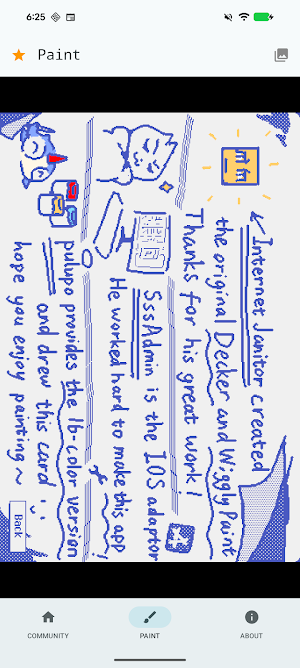
Disclaimer: JigglyPaint is a fork of WigglyPaint, the open-source (MIT) drawing tool made by Internet Janitor. We are not Internet Janitor. The original lives here: internet-janitor.itch.io/wigglypaint
▣ Doodle Something. Watch It Wiggle. Export the GIF. ▣
JigglyPaint is a drawing app where the lines refuse to sit still. Every stroke you put down starts squirming on its own, forever, whether you asked for it or not. It's like your drawings are vibing to invisible music.
It's fine. It's just like that. That's on purpose.
You draw. It wiggles. You export an animated GIF. That is the entire app. There is no tutorial, because there is nothing to learn. If you ever lost an afternoon to WigglyPaint in a browser tab, you already know how this ends. \(°Д°)/
▣ WHAT'S IN IT ▣
• THE WIGGLE ENGINE
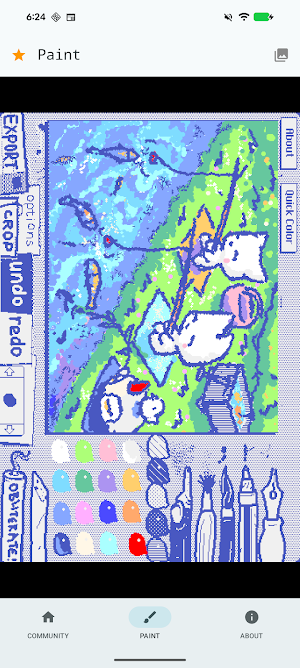
Every line animates itself the moment you draw it. No timeline, no keyframes, no rigging, no weekend course. A dead doodle becomes a living, breathing, jiggly mess in exactly zero clicks. The line has made up its mind and it isn't really listening.
• THE INFINITE REGRET MACHINE
Otherwise known as undo and redo. Made a mistake? Go back in time. Regret going back in time? Go forward again. Nobody has ever reached the end of it. (っ-_-ς)
• UNLIMITED COLORS
WigglyPaint ran on one small fixed palette. JigglyPaint hands over the whole spectrum, plus named palettes you can save and reuse. Pick any shade you can imagine, then deliberately pick a worse one.
• ANIMATED GIF EXPORT
Export your wiggly drawing as a clean, looping animated GIF. Straight into Photos, into Discord, into a group chat where nobody asked for it.
• 10,000+ DOODLERS IN ONE FEED
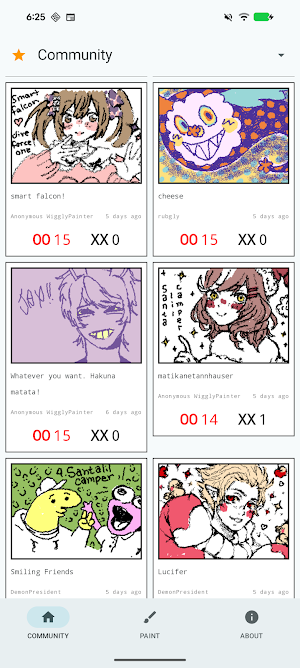
Browse wiggly art from people all over the world without leaving the app. Some of it is genuinely beautiful. Some of it is a cursed frog. Both count.
• A PILE OF BRUSHES
Dynamic brushes and tools that each wiggle in their own way. Half the fun is working out which one does the thing you had in mind.
• SHARE IN ONE TAP
Save the GIF, send the GIF, post the GIF. Nothing leaves your device unless you decide to send it.
▣ WHY PEOPLE KEEP JIGGLYPAINT INSTALLED ▣
+ NO ACCOUNT — Open it and draw. No email, no password, no "confirm you are a human"
+ NO ADS — Not one. Not even a tasteful one
+ WORKS OFFLINE — Planes, tunnels and long car rides are prime wiggling conditions
+ EASY ON PURPOSE — Nothing to learn, which is the entire point
+ FREE UPDATES — New tools land regularly and cost nothing
Chunky pixel styling, big buttons, and a canvas that behaves like a toy instead of a workstation. Serious art software exists elsewhere and we wish it well. (⊙_⊙)
▣ ABOUT THE ORIGINAL ▣
JigglyPaint is a fork of WigglyPaint, the open-source (MIT) drawing tool made by Internet Janitor. It was renamed with the author's consent and has been developed independently since, adding unlimited colors, undo and redo, animated GIF export and the in-app community.
WigglyPaint came first and it is still out there: internet-janitor.itch.io/wigglypaint. Go play that too. Everything good about the wiggle came from there. The bugs we added are ours.
▣ GO MAKE SOMETHING THAT MOVES ▣
Your canvas is empty and quietly judging you. Draw one bad line and it will start dancing anyway.
If JigglyPaint made you laugh even once, leave a review. It genuinely decides whether anybody else ever finds this thing. (;ω;)
Questions, bugs, or a drawing you are weirdly proud of? https://wigglypaint.io
▣ Make art wiggle. Make art move. Make art yours. ▣
Searched for wiggly paint or wpaint and ended up here? Yes — this is the fork.
▣ Doodle Something. Watch It Wiggle. Export the GIF. ▣
JigglyPaint is a drawing app where the lines refuse to sit still. Every stroke you put down starts squirming on its own, forever, whether you asked for it or not. It's like your drawings are vibing to invisible music.
It's fine. It's just like that. That's on purpose.
You draw. It wiggles. You export an animated GIF. That is the entire app. There is no tutorial, because there is nothing to learn. If you ever lost an afternoon to WigglyPaint in a browser tab, you already know how this ends. \(°Д°)/
▣ WHAT'S IN IT ▣
• THE WIGGLE ENGINE
Every line animates itself the moment you draw it. No timeline, no keyframes, no rigging, no weekend course. A dead doodle becomes a living, breathing, jiggly mess in exactly zero clicks. The line has made up its mind and it isn't really listening.
• THE INFINITE REGRET MACHINE
Otherwise known as undo and redo. Made a mistake? Go back in time. Regret going back in time? Go forward again. Nobody has ever reached the end of it. (っ-_-ς)
• UNLIMITED COLORS
WigglyPaint ran on one small fixed palette. JigglyPaint hands over the whole spectrum, plus named palettes you can save and reuse. Pick any shade you can imagine, then deliberately pick a worse one.
• ANIMATED GIF EXPORT
Export your wiggly drawing as a clean, looping animated GIF. Straight into Photos, into Discord, into a group chat where nobody asked for it.
• 10,000+ DOODLERS IN ONE FEED
Browse wiggly art from people all over the world without leaving the app. Some of it is genuinely beautiful. Some of it is a cursed frog. Both count.
• A PILE OF BRUSHES
Dynamic brushes and tools that each wiggle in their own way. Half the fun is working out which one does the thing you had in mind.
• SHARE IN ONE TAP
Save the GIF, send the GIF, post the GIF. Nothing leaves your device unless you decide to send it.
▣ WHY PEOPLE KEEP JIGGLYPAINT INSTALLED ▣
+ NO ACCOUNT — Open it and draw. No email, no password, no "confirm you are a human"
+ NO ADS — Not one. Not even a tasteful one
+ WORKS OFFLINE — Planes, tunnels and long car rides are prime wiggling conditions
+ EASY ON PURPOSE — Nothing to learn, which is the entire point
+ FREE UPDATES — New tools land regularly and cost nothing
Chunky pixel styling, big buttons, and a canvas that behaves like a toy instead of a workstation. Serious art software exists elsewhere and we wish it well. (⊙_⊙)
▣ ABOUT THE ORIGINAL ▣
JigglyPaint is a fork of WigglyPaint, the open-source (MIT) drawing tool made by Internet Janitor. It was renamed with the author's consent and has been developed independently since, adding unlimited colors, undo and redo, animated GIF export and the in-app community.
WigglyPaint came first and it is still out there: internet-janitor.itch.io/wigglypaint. Go play that too. Everything good about the wiggle came from there. The bugs we added are ours.
▣ GO MAKE SOMETHING THAT MOVES ▣
Your canvas is empty and quietly judging you. Draw one bad line and it will start dancing anyway.
If JigglyPaint made you laugh even once, leave a review. It genuinely decides whether anybody else ever finds this thing. (;ω;)
Questions, bugs, or a drawing you are weirdly proud of? https://wigglypaint.io
▣ Make art wiggle. Make art move. Make art yours. ▣
Searched for wiggly paint or wpaint and ended up here? Yes — this is the fork.
What’s new
Version 2026.10.12 · Updated October 12, 2026
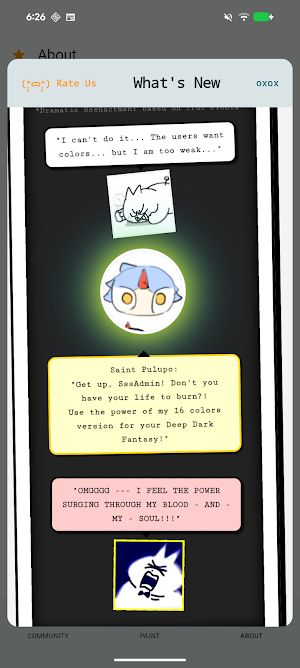
- Animation export now follows the Export scale you set, so GIFs and videos come out at full resolution. - New text effects: layered outlines, hollow fill and glow. - New Canvas Music: play your drawing as sound. - Choose how many colours to keep when importing an image palette. - Small fixes and polish.
User reviews

I loved it it was amazing would recommend

يجننننننننننننننننننننن

so cute!!! I love the layering on the brushes, & interface is super simple :)
App is good.. brushes are cool ...and I love the wiggle
most beeauautiful app i have ever seen. this is so awesome i hope this becomes famous so i can be happy and jolly. as someone called emily i give this a 11/10 BUT PLZ WHERE CAN I CHANGE MY USERNAME !!! or is that only in the iOS version :p
Very easy to use, basically an upgraded version of the browser wigglypaint with more colors and marker options. Edit: Omg I can edit the art now, including my old saved versions from before the updates. Amazing!
Alternatives to WigglyPaint's Fork:JigglyPaint
Looking for apps like WigglyPaint's Fork:JigglyPaint? Here are 6 similar Android apps on Google Play. The highest rated is Pixel Studio: pixel art editor (4.6/5), and all 6 are free to download.
-
FlipaClip: Draw 2D Animation 4.3
-
PixAI: AI Anime Art Generator 4.3
-
Clip Studio Paint 4.4
-
HiPaint: Sketch, Draw & Paint 4.3
-
Miuu Note: Cute Diary Journal 4.2
-
Pixel Studio: pixel art editor 4.6
| App | Rating | Price | Installs | Last updated | Compare |
|---|---|---|---|---|---|
| WigglyPaint's Fork:JigglyPaint | 4.1 / 5 | $4.99 | 5,000+ | Oct 12, 2026 | |
| FlipaClip: Draw 2D Animation | 4.3 / 5 | Free | 50,000,000+ | Sep 28, 2026 | Compare |
| PixAI: AI Anime Art Generator | 4.3 / 5 | Free | 1,000,000+ | Sep 29, 2026 | Compare |
| Clip Studio Paint | 4.4 / 5 | Free | 10,000,000+ | Sep 3, 2026 | Compare |
| HiPaint: Sketch, Draw & Paint | 4.3 / 5 | Free | 5,000,000+ | Oct 13, 2026 | Compare |
| Miuu Note: Cute Diary Journal | 4.2 / 5 | Free | 1,000,000+ | Oct 22, 2026 | Compare |
| Pixel Studio: pixel art editor | 4.6 / 5 | Free | 5,000,000+ | Oct 24, 2026 | Compare |
Similar apps on Google Play
- FlipaClip: Draw 2D Animation
- PixAI: AI Anime Art Generator
- Clip Studio Paint
- HiPaint: Sketch, Draw & Paint
- Miuu Note: Cute Diary Journal
- Pixel Studio: pixel art editor
- Widgetable: Besties & Couples
- gogh - Focus with Your Avatar
- OctoStudio: Coding for Kids
- Sketchar AR Drawing Sketchpad
- ibis Paint X
- May: Beautiful Bullet Journal
- Design Keyboard - Fonts, Emoji
- Brother Artspira
- Kilonotes-Notes & Mark up PDF
- Floating Apps (multitasking)
- Airbuds Widget
- Microsoft Whiteboard
- Sketch Pro: Draw & Create Art
- Picsart Color - Painting, Draw
- Infinite Painter
- Pixilart - Make Pixel Art
- Tayasui Sketches
- Nomad Sculpt
- PENUP – Drawing-sharing SNS
- BlackNote: Dark Notes, Notepad
- EdrawMind: AI Mind map & Note
- KRUU
- Concepts: Sketch, Note, Draw
- SCRIBZEE®
- MediBang Paint:Draw Art, Comic
- BasicNote: Simple Notes
- KIRI Engine: 3D Scanner App
- UpNote - notes, diary, journal
- Noteshelf 3: Digital Notes
- DrawNote: Drawing Notepad Memo
- Nelko
- FreePrints
- Shuffles by Pinterest
- StarNote: Handwritten Notes
- Miro: your visual workspace
- PenCake: Minimal Writing App
- Widgify - DIY Phone Screen
- ibis Paint
- Milkshake — Website Builder
- Vivisticker: Carousel & Story
- MyScript Notes: AI Note Taking
- Handy Art Reference Tool
- Mind Notes: Note-Taking Apps
- QuickEdit Text Editor Pro
- Wondr Note: Fun Notes & Tools
- Your Diary: Journal with Lock
- GeoGebra Geometry
- IFTTT - Automate work and home
- niji・journey - AI Anime Art
- Shortcut Maker
- Hypelist: Lists for Everything
- LoFi Cam: Film Digital Camera
- Dots Memories: your story
- Morse Code Translator
- repov: A Mini Blog for Moments
- Sponge - Gallery Cleaner
- GeoGebra Calculator Suite
- Retro Mode - Icon Pack (Neon)
- Knowunity: AI Study & Homework
- TouchNote: Gifts & Cards
- PULSEpx - Photography
- Jnotes: AI Note-taking & PDF
- Add Text & Story Font - Hitext
- touchnotes
- Widget Lab:Wallpapers & Themes
- Flexcil Notes & PDF Reader
- Sticker.ly - Sticker Maker
- Bitmoji
- Squid: Take Notes, Markup PDFs
- Fonty - Draw and Make Fonts
- Story Plotter
- Notes : Color Folders & To-dos
- GOGH: Animated Drawings
- Couple Tree: For Relationship
- Solid Explorer File Manager
- Thingiverse MakerWorld | 3Drop
- SumOne: For Relationships
- Dollify
- Facemoji AI Emoji Keyboard
- Likcut
- ScreenMaster:Screenshot Markup
- Desmos Graphing Calculator
- Polarr: Photo Filters & Editor
- Vintify : Vintage Photo Editor
- Flat: Music Score & Tab Editor
- Fabric: your second brain
- ArtFlow: Paint Draw Sketchbook
- DailyArt - Daily Dose of Art
- CUSTOM CAST
- Cozy Social World : Cocomine
- Lite Writer: Writing/Note/Memo
- TextingStory Chat Story Maker
- ACNH Pocket Guide
- Teleprompter.com
- Rocketbook
- Phomemo
- D&D Beyond