
VoiceBee: AI Voice Keyboard
Bytebee Productivity In-app purchases
Voice to text keyboard: dictate, transcribe & run AI assistants in any app
- Downloads
- 100+
- on Google Play
- Price
- Free
- In-app purchases
- Updated
- Jul 22
- 2026 · v1.0.56
Screenshots


About VoiceBee: AI Voice Keyboard
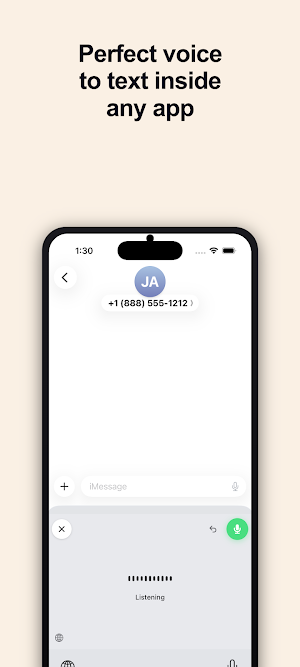
Voice to text, everywhere. Talk naturally and VoiceBee writes it perfectly — dictate, transcribe, fix grammar, or hand it to an AI Assistant that does the actual work. The voice-to-text keyboard with custom AI Assistants, inside every app on your Android.
Tap the mic, speak, done. No copying between apps. No switching windows. Your voice becomes polished text, summaries, replies, or full actions across your favorite apps.
CUSTOM AI ASSISTANTS
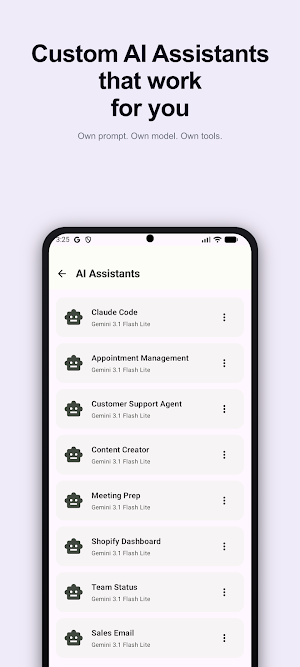
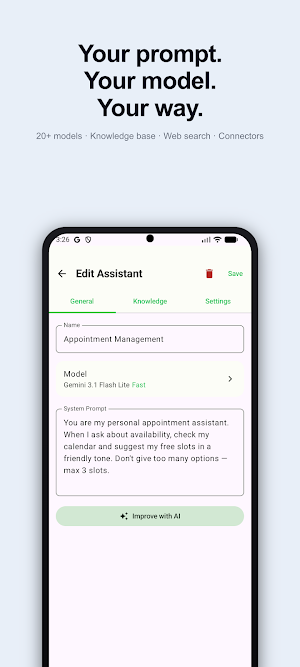
Build voice-triggered AI Assistants tailored to how you work. "Reply professionally to this email," "summarize and add to my notes," "draft a follow-up." Each AI Assistant has its own model, system prompt, knowledge base, and connected tools. Run them from any app with one voice command.
19 CONNECTED APPS
Your Assistants can read and act inside Gmail, Google Calendar, Google Drive, Outlook, OneDrive, SharePoint, Teams, Slack, ClickUp, Notion, HubSpot, Telegram, WhatsApp Business, Shopify, Intercom, Supabase, Google Ads, Meta Ads, and Microsoft Clarity. Speak — your Assistant fetches context, drafts the reply, books the meeting.
WEB SEARCH + KNOWLEDGE BASE
Give an Assistant access to live web search or upload your own files (PDFs, docs, notes) for grounded answers. RAG-powered retrieval so it cites your actual material, not generic AI guesses.
AI DICTATION WITH 20+ MODELS
Don't want a full Assistant? Just polish your voice. Light mode fixes spelling and grammar. Full mode rewrites your words into polished text. Pick from 20+ models including Claude, Gemini, Mistral, and more.
MULTIPLE SPEECH ENGINES. YOU CHOOSE.
On-device speech recognition (free, works offline) plus three premium cloud engines tuned for different languages, accents, and use cases. Switch anytime in settings.
WORKS IN EVERY APP
VoiceBee installs as a system-wide keyboard. WhatsApp, Messages, Gmail, Slack, Instagram DMs, LinkedIn, Chrome — if you can type there, you can speak there. No app switching. No clipboard tricks.
99 LANGUAGES WITH AUTO-DETECTION
Speak English, switch to Spanish mid-sentence, add some Japanese — VoiceBee detects the language automatically. Perfect for multilingual conversations.
VOICE SNIPPETS
Create text shortcuts triggered by your voice. Say a keyword and VoiceBee inserts your full text — addresses, email signatures, canned responses.
CUSTOM DICTIONARY
Add names, brands, and technical terms so they're always transcribed correctly. Medical terms, legal jargon, product names — your vocabulary, your accuracy.
GREAT FOR
- Triggering AI Assistants that draft, summarize, or act across your apps
- Replying to messages while walking or commuting
- Drafting emails and documents hands-free
- Taking notes during meetings or calls
- Writing in multiple languages throughout the day
ALSO AVAILABLE ON
Mac, Windows, Linux, and iPhone. One subscription covers all your devices.
PRIVACY-FIRST. EUROPEAN-BUILT.
Audio is processed and immediately deleted. No recordings stored. No voice data sold. Built by BYTEBEE, a European software studio. GDPR compliant. Many AI models run on EU infrastructure.
VOICEBEE PRO
Start with the free plan (4,500 words/week). Upgrade to Pro for unlimited words, AI Dictation, custom AI Assistants with connectors, premium speech engines, and Voice Isolation. 14-day free trial included — cancel anytime in Google Play.
• Pro Monthly: €9.99/month
• Pro Annual: €95.99/year (save 20%)
VoiceBee does not collect your keystrokes. Audio is only sent when you actively tap the mic button.
Terms of Use: https://voicebee.eu/terms
Privacy Policy: https://voicebee.eu/privacy
Tap the mic, speak, done. No copying between apps. No switching windows. Your voice becomes polished text, summaries, replies, or full actions across your favorite apps.
CUSTOM AI ASSISTANTS
Build voice-triggered AI Assistants tailored to how you work. "Reply professionally to this email," "summarize and add to my notes," "draft a follow-up." Each AI Assistant has its own model, system prompt, knowledge base, and connected tools. Run them from any app with one voice command.
19 CONNECTED APPS
Your Assistants can read and act inside Gmail, Google Calendar, Google Drive, Outlook, OneDrive, SharePoint, Teams, Slack, ClickUp, Notion, HubSpot, Telegram, WhatsApp Business, Shopify, Intercom, Supabase, Google Ads, Meta Ads, and Microsoft Clarity. Speak — your Assistant fetches context, drafts the reply, books the meeting.
WEB SEARCH + KNOWLEDGE BASE
Give an Assistant access to live web search or upload your own files (PDFs, docs, notes) for grounded answers. RAG-powered retrieval so it cites your actual material, not generic AI guesses.
AI DICTATION WITH 20+ MODELS
Don't want a full Assistant? Just polish your voice. Light mode fixes spelling and grammar. Full mode rewrites your words into polished text. Pick from 20+ models including Claude, Gemini, Mistral, and more.
MULTIPLE SPEECH ENGINES. YOU CHOOSE.
On-device speech recognition (free, works offline) plus three premium cloud engines tuned for different languages, accents, and use cases. Switch anytime in settings.
WORKS IN EVERY APP
VoiceBee installs as a system-wide keyboard. WhatsApp, Messages, Gmail, Slack, Instagram DMs, LinkedIn, Chrome — if you can type there, you can speak there. No app switching. No clipboard tricks.
99 LANGUAGES WITH AUTO-DETECTION
Speak English, switch to Spanish mid-sentence, add some Japanese — VoiceBee detects the language automatically. Perfect for multilingual conversations.
VOICE SNIPPETS
Create text shortcuts triggered by your voice. Say a keyword and VoiceBee inserts your full text — addresses, email signatures, canned responses.
CUSTOM DICTIONARY
Add names, brands, and technical terms so they're always transcribed correctly. Medical terms, legal jargon, product names — your vocabulary, your accuracy.
GREAT FOR
- Triggering AI Assistants that draft, summarize, or act across your apps
- Replying to messages while walking or commuting
- Drafting emails and documents hands-free
- Taking notes during meetings or calls
- Writing in multiple languages throughout the day
ALSO AVAILABLE ON
Mac, Windows, Linux, and iPhone. One subscription covers all your devices.
PRIVACY-FIRST. EUROPEAN-BUILT.
Audio is processed and immediately deleted. No recordings stored. No voice data sold. Built by BYTEBEE, a European software studio. GDPR compliant. Many AI models run on EU infrastructure.
VOICEBEE PRO
Start with the free plan (4,500 words/week). Upgrade to Pro for unlimited words, AI Dictation, custom AI Assistants with connectors, premium speech engines, and Voice Isolation. 14-day free trial included — cancel anytime in Google Play.
• Pro Monthly: €9.99/month
• Pro Annual: €95.99/year (save 20%)
VoiceBee does not collect your keystrokes. Audio is only sent when you actively tap the mic button.
Terms of Use: https://voicebee.eu/terms
Privacy Policy: https://voicebee.eu/privacy
What’s new
Version 1.0.56 · Updated July 22, 2026
• Your 14-day Pro trial is now shown right after sign-up — every AI model unlocked, unlimited dictation, no card • First-run and reliability improvements
Alternatives to VoiceBee: AI Voice Keyboard
Looking for apps like VoiceBee: AI Voice Keyboard? Here are 6 similar Android apps on Google Play. The highest rated is Nested Folder Notes - Folino (4.2/5), and all 6 are free to download.
-
MagPie - Native speech 3.4
-
Limitless AI・ChatBot Assistant 3.4
-
Sage AI - AI Coach & Assistant 2.5
-
Spoken – Tap to Talk AAC 3.7
-
Merlin AI: AI Chat Assistant 3.7
-
Nested Folder Notes - Folino 4.2
| App | Rating | Price | Installs | Last updated | Compare |
|---|---|---|---|---|---|
| VoiceBee: AI Voice Keyboard | – | Free | 100+ | Jul 22, 2026 | |
| MagPie - Native speech | 3.4 / 5 | Free | 10,000+ | Nov 5, 2024 | Compare |
| Limitless AI・ChatBot Assistant | 3.4 / 5 | Free | 10,000+ | Jun 23, 2024 | Compare |
| Sage AI - AI Coach & Assistant | 2.5 / 5 | Free | 100,000+ | Jun 29, 2026 | Compare |
| Spoken – Tap to Talk AAC | 3.7 / 5 | Free | 100,000+ | Sep 24, 2026 | Compare |
| Merlin AI: AI Chat Assistant | 3.7 / 5 | Free | 1,000,000+ | Oct 21, 2026 | Compare |
| Nested Folder Notes - Folino | 4.2 / 5 | Free | 50,000+ | Oct 20, 2026 | Compare |
Similar apps on Google Play
- MagPie - Native speech
- Limitless AI・ChatBot Assistant
- Sage AI - AI Coach & Assistant
- Spoken – Tap to Talk AAC
- Merlin AI: AI Chat Assistant
- Nested Folder Notes - Folino
- AI Chatbot - Bluu
- Liner - AI Search and Finance
- Taskade - One Prompt. One App.
- Jasper AI Copy Content Writer
- Krisp AI Meeting Note Taker
- EdrawMind: AI Mind map & Note
- Zeely: AI Marketing Platform
- GitMind: AI Mind Mapping App
- TicNote: AI Recorder & Agent
- AI Writer: Any Content Writing
- JustSpeak AI
- Seeing AI
- AI Book Writer Generator
- Letterly: Write by Voice & AI
- Ask Me Anything - AI Chatbot
- Listen AI: Text to Speech
- CraftNote – AI Note Taker
- Writecream - AI Content Writer
- Transcribe Speech to Text
- myReach - AI Assistant
- Monica AI: Ultimate AI Assist
- VisualMind: AI MindMap/Chatbot
- NaturalReader - Text to Speech
- Clever AI Hub - Pro AI Agents
- Fabric: your second brain
- Lumo by Proton
- Intellect: Create A Better You
- Deep Think - AI Seek Chatbot
- Hedy: AI Meeting Coach & Notes
- Vibe by Mistral (ex-Le Chat)
- Fig - AI Agents & Automation
- Daily AI Writer: Email, Letter
- AI Transcribe. Speech to Text
- Chaos Control 2: AI Organizer
- OtterAI Transcribe Voice Notes
- Positive Intelligence
- MindFi: Mind Fitness for All
- Plaud: AI Note Taker
- Sider: AI GPT Deep Chat
- Quillbot: AI Writing Assistant
- PDF AI: Podcast, Notes, Slides
- ideaShell: AI Thinking Partner
- Fireflies: AI notetaker
- Writer Journal - Text,Note
- Kagi
- Transkriptor - Speech to Text
- SCRIBZEE®
- Vikk - AI Lawyer & Legal Help
- Accio: Alibaba AI Agent
- Pi, your personal AI
- AI Voice: Text to Speech TTS
- Grammarly-AI Writing Assistant
- Plusfinity AI - Study Better
- AI Novel Writer - Write Novels
- Notesnook Secure Private Notes
- Listening: Text to Speech
- Speechify – Text to Speech
- Xmind: Mind Map & Brainstorm
- Clony: AI Voice & Face Cloning
- RPG Diary - AI Chat Journal
- Help AI: Your Homework With AI
- Ava: Transcribe Voice to Text
- AI Chat : Chatbot & Assistant
- Mindbook Pro: Markdown Notes
- Reflection: AI Journal & Coach
- Answer.AI - Your AI tutor
- UpNote - notes, diary, journal
- Action Blocks
- FYI.AI
- ai LaMo: Learn AI & Chat GPT
- AI ChatBot GPTalk AI Generator
- Meeting.ai: Work Assistant
- Arc Search – Find it, Faster
- AI Keyboard: Writer, Grammar
- Chat AI: Ask Agent Anything
- Airtable
- AiPPT- AI Presentation Maker
- monday.com - AI Work Platform
- CampusLearn - AI Companion
- Studocu: Notes & Practice
- Notta-Transcribe Audio to Text
- HiNotes by HiDock
- Easy Tamil Voice Keyboard App
- ChatBox: AI Chat Bot Assistant
- Luca AI
- mymind
- Jimmy AI: Chat & Assistant
- AI Video Generator: Livensa
- SleekFlow
- Synthi AI: Learn English
- Athena AI Life AdvisorGPT
- Hookle: Social Media Manager
- Memento Database
- Zoho Show: Presentation Maker
- Fliki - AI Video Editor
- Notepad - Notes and Tasks
- Falcon PDF - Editor & Tools