

App Permission Privacy Guide
MSTok Education Contains ads
Review app permissions with offline guides, privacy checkups and quizzes.
- Downloads
- 6+
- on Google Play
- Price
- Free
- No in-app purchases
- Updated
- Aug 10
- 2026 · v1.0.0
Screenshots


About App Permission Privacy Guide
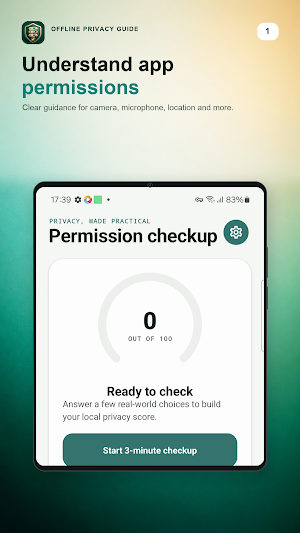
Make smarter choices about app permissions with a clear, interactive privacy guide built for everyday Android users.
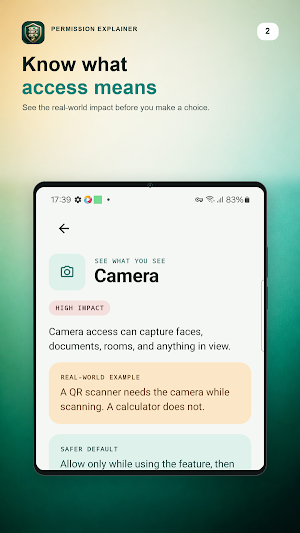
App Permission Privacy Guide explains what common Android permissions can reveal and when access makes sense. Learn about camera permission, microphone permission, location privacy, photo access, contact permissions, notification privacy, nearby devices, and accessibility services through practical examples—not technical jargon.
OFFLINE APP PERMISSION GUIDE
• Explore eight important permission topics at your own pace.
• See the real-world impact of each permission.
• Learn a safer default for common permission settings.
• Use the core privacy guide without an internet connection.
INTERACTIVE PRIVACY CHECKUP
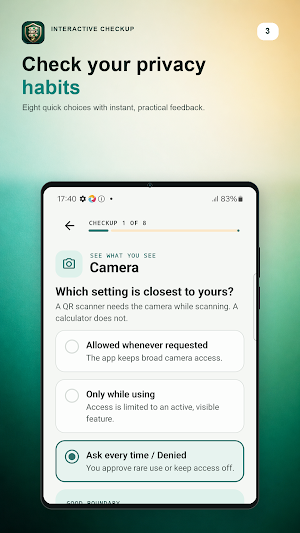
• Review your current privacy habits with eight guided questions.
• Get instant, practical feedback after each choice.
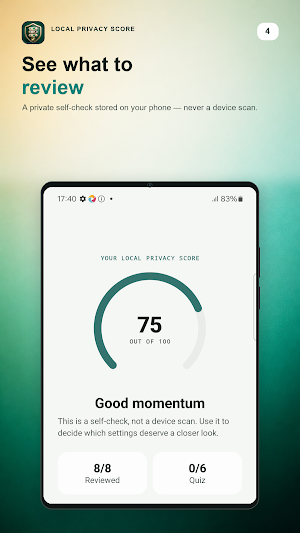
• Build a local privacy score to spot settings worth reviewing.
• Continue later with progress stored on your device.
PRIVACY QUIZ AND REAL-WORLD SCENARIOS
Practice six everyday permission decisions. Decide whether a request is reasonable, optional, or risky, then learn why. The permission quiz helps turn Android privacy settings into habits you can use with any app.
PRIVATE BY DESIGN
• No account or sign-in.
• No cloud sync.
• No device permission scan.
• Checkup answers, quiz progress, and scores stay locally on your device.
• Reset your local progress at any time in Settings.
OPEN THE RIGHT ANDROID SETTINGS
When you are ready to make a change, the guide can open the relevant Android privacy or permission settings. You stay in control: the app never grants, denies, or changes app permissions automatically.
The core offline privacy guide, privacy checkup, and permission quiz work without a connection. Internet access is used for Google-served ads and consent messages where required.
Whether you want to understand camera access, check location settings, improve notification privacy, or learn safer Android permission choices, App Permission Privacy Guide gives you a simple place to learn, check, and practice.
Important: This app is an educational self-check and reference. It is not a security scanner, antivirus product, or automatic permission manager.
App Permission Privacy Guide explains what common Android permissions can reveal and when access makes sense. Learn about camera permission, microphone permission, location privacy, photo access, contact permissions, notification privacy, nearby devices, and accessibility services through practical examples—not technical jargon.
OFFLINE APP PERMISSION GUIDE
• Explore eight important permission topics at your own pace.
• See the real-world impact of each permission.
• Learn a safer default for common permission settings.
• Use the core privacy guide without an internet connection.
INTERACTIVE PRIVACY CHECKUP
• Review your current privacy habits with eight guided questions.
• Get instant, practical feedback after each choice.
• Build a local privacy score to spot settings worth reviewing.
• Continue later with progress stored on your device.
PRIVACY QUIZ AND REAL-WORLD SCENARIOS
Practice six everyday permission decisions. Decide whether a request is reasonable, optional, or risky, then learn why. The permission quiz helps turn Android privacy settings into habits you can use with any app.
PRIVATE BY DESIGN
• No account or sign-in.
• No cloud sync.
• No device permission scan.
• Checkup answers, quiz progress, and scores stay locally on your device.
• Reset your local progress at any time in Settings.
OPEN THE RIGHT ANDROID SETTINGS
When you are ready to make a change, the guide can open the relevant Android privacy or permission settings. You stay in control: the app never grants, denies, or changes app permissions automatically.
The core offline privacy guide, privacy checkup, and permission quiz work without a connection. Internet access is used for Google-served ads and consent messages where required.
Whether you want to understand camera access, check location settings, improve notification privacy, or learn safer Android permission choices, App Permission Privacy Guide gives you a simple place to learn, check, and practice.
Important: This app is an educational self-check and reference. It is not a security scanner, antivirus product, or automatic permission manager.
Alternatives to App Permission Privacy Guide
Looking for apps like App Permission Privacy Guide? Here are 6 similar Android apps on Google Play. The highest rated is Simple App Launcher (4.5/5), and all 6 are free to download.
-
Computer Launcher Pro 4.4
-
G-CPU:Monitor CPU, RAM, Widget 4.3
-
Notisave - Notification Log 4.5
-
blockit | stop phone addiction 4.4
-
Simple App Launcher 4.5
-
Xiaomi Community 4.3
| App | Rating | Price | Installs | Last updated | Compare |
|---|---|---|---|---|---|
| App Permission Privacy Guide | – | Free | 5+ | Aug 10, 2026 | |
| Computer Launcher Pro | 4.4 / 5 | Free | 1,000,000+ | Oct 13, 2026 | Compare |
| G-CPU:Monitor CPU, RAM, Widget | 4.3 / 5 | Free | 1,000,000+ | Oct 30, 2026 | Compare |
| Notisave - Notification Log | 4.5 / 5 | Free | 10,000,000+ | Jan 14, 2026 | Compare |
| blockit | stop phone addiction | 4.4 / 5 | Free | 500,000+ | Oct 20, 2026 | Compare |
| Simple App Launcher | 4.5 / 5 | Free | 1,000,000+ | Jan 30, 2024 | Compare |
| Xiaomi Community | 4.3 / 5 | Free | 10,000,000+ | Aug 31, 2026 | Compare |
Similar apps on Google Play
- Computer Launcher Pro
- G-CPU:Monitor CPU, RAM, Widget
- Notisave - Notification Log
- blockit | stop phone addiction
- Simple App Launcher
- Xiaomi Community
- Startpage
- Control+
- Automatic Scroll
- Quick Settings app
- 1Tap Cleaner (clear cache)
- AdGuard: Content Blocker
- File Manager
- MobiDrive Cloud Storage & Sync
- One Hand Operation +
- CPU Monitor - temperature
- DevCheck Device & System Info
- Building Tools
- App Usage - Manage/Track Usage
- OONI Probe
- Uninstaller
- Super File Manager Explorer
- Automate
- HyperClean AI
- CCleaner – Phone Cleaner
- Tooly Toolbox All Tools In One
- Accessibility Scanner
- Cleanfox: Spam & Email Cleaner
- AVG AntiVirus & Security
- Bitwarden Password Manager
- Google Tasks
- MiraClean - File Manager
- Device Care
- Phone Cleaner – Junk Files
- Malwarebytes - Mobile Security
- To Do List
- Swift Backup
- StayFree - Screen Time
- One Key: password manager
- AppDash: App Manager & Backup
- Action Blocks
- P Launcher
- IFTTT - Automate work and home
- fooView - FV Float Viewer
- Zenze- Block Apps,Stay Focused
- Storage Analyzer & Disk Usage
- NetGuard - no-root firewall
- MEGA VPN - Privacy Online
- Mobile Security & Antivirus
- Google Admin
- Material Files
- Password Manager: Safe
- GlassWire Data Usage Monitor
- Folder Widget - Large Folders
- Floating Apps (multitasking)
- Orion Intelligence
- AppBlock - Block Apps & Sites
- Lookout - Assisted vision
- MacroDroid - Device Automation
- AppLock - Fingerprint
- DNA Launcher ‧ Home Screen
- realme Community
- Authenticator App
- Explorer
- Nuki Smart Lock
- My Data Manager: Data Usage
- Norton360 Antivirus & Security
- HiOS Launcher - Fast
- Taskbar
- Termius - Modern SSH Client
- Antivirus AI - Virus Scanner
- OnePlus Community
- Rise: Habit List
- File Manager
- Android Accessibility Suite
- Ad Blocker VPN & DNS – Blokada
- Digital Detox: Focus & Live
- SafeInCloud 1
- TAP Kiln Control Mobile
- Shortcut Maker
- Cloaked: Protect your privacy
- Total Drive - Cloud Storage
- Smart Tutor for SAMSUNG Mobile
- Anti Spy Detector - Spyware
- Anti-virus Dr.Web Light
- Action Launcher: Pixel Edition
- Crowdsource
- Microsoft Defender: Antivirus
- Carrier Services
- BlockerHero - Content Blocker
- Android System WebView Dev
- Good Lock
- ASTRO File Manager & Cleaner
- Signal Detector
- Smart Launcher 6 ‧ Home Screen
- Cool Mi Launcher - CC Launcher
- App Lock: Fingerprint, Pattern
- Linksys
- IronVest - Security & Privacy
- Memento Database
- Keeper Password Manager
- My Folder : Safe Secure Hidden
- Microsoft 365 Admin
- Any.do - To do list & Calendar
- Qustodio Parental Control App
- Avast One: Antivirus, Security
- Samsung Members
- Touch Screen Test
- Onoff Numbers
- Simpro Mobile
- Niagara Launcher ‧ Home Screen
- PRIVARY Secure Photo Vault
- CrookCatcher: Who Touched?
- GSMArena
- Bitdefender Antivirus
- Dropbox: Secure Cloud Storage
- Aegis Authenticator - 2FA App
- AppLock Master
- Google Cloud
- Avast Secure Browser
- Chaos Control 2: AI Organizer
- Call Recorder - Talker ACR
- ExitLag: Fix Ping Mobile & Lag
- Bitdefender Mobile Security
- phyphox
- Virtual SIM
- Enpass Password Manager
- RoboForm Password Manager
- Stay Focused: Site/App Blocker
- AccuBattery
- Banana Browser: No Ads, Secure
- Cure VPN: Private & Secure VPN