

CoreClean: Phone Cleaner
Tools In-app purchases Contains ads
Clean junk, compress photos & videos, review apps with ads & monitor CPU, RAM.
- Rating
- 4.7
- 1.3K ratings
- Downloads
- 30.1K+
- on Google Play
- Price
- Free
- In-app purchases
- Updated
- Sep 14
- 2026 · v1.2.5
Screenshots


About CoreClean: Phone Cleaner
CoreClean is a phone cleaner and storage analyzer that helps you find junk files, review large media, compress photos and videos, and understand what is using space on your Android device.
When storage gets messy, CoreClean gives you a clear way to scan, review, and clean. You decide what to remove before anything is deleted.
Key features
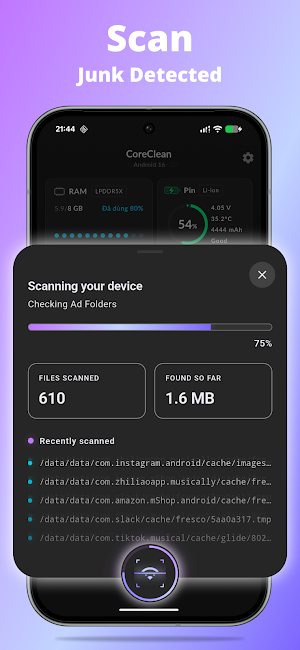
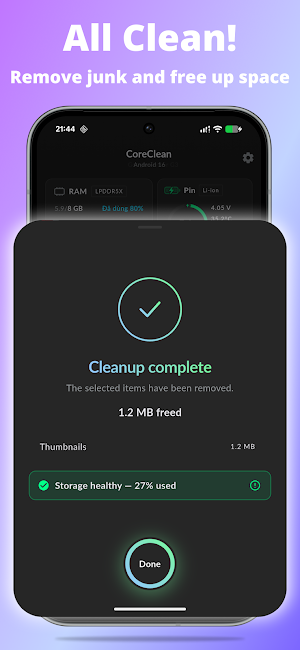
Junk Cleaner
Scan cache, temporary files, leftover APK files, old downloads, logs, thumbnails, empty folders, residual files, duplicate files, and large files. Review results first, then remove the junk files you choose.
Storage Analyzer
See what takes up space by category: apps, photos, videos, audio, documents, downloads, APK files, and system files. Find large files faster and manage storage with a simple dashboard.
Photo & Video Compressor
Compress large photos and videos to reduce file size while keeping the content you want to save. Choose files, compare quality options, and make more room without deleting every memory.
App Ads & Permission Review
Review installed apps that may contain known ad SDKs or tracking SDKs. CoreClean also helps you check sensitive or unusual app permissions so you can make better decisions about apps on your phone.
Large App Finder
Find apps that use more storage, memory, or battery resources. Use the app list to decide what to keep, open, manage, or uninstall from system settings.
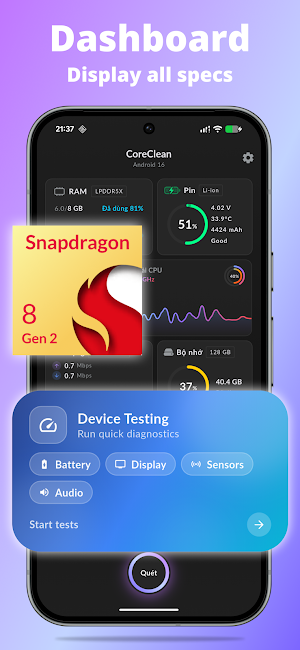
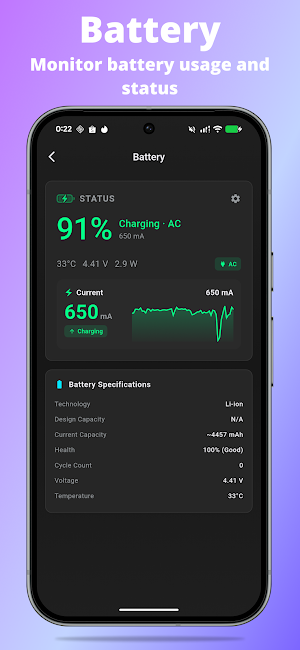
Device Monitor
Check RAM usage, CPU usage, CPU temperature, battery level, charging status, network speed, and chipset information in one clean dashboard. CoreClean shows device health signals at a glance.
Smart Cleanup Suggestions
Get practical suggestions based on your scan results, such as large videos, duplicate photos, old downloads, unused APK files, and other files that may be safe to review.
Why choose CoreClean?
• Phone cleaner for junk files, cache, downloads, APKs, duplicates, and large files
• Storage cleaner and storage analyzer for photos, videos, apps, audio, and documents
• Photo compressor and video compressor to reduce media size
• App review for known ad SDKs, tracking SDKs, and sensitive permissions
• RAM, CPU, battery, temperature, and network monitor
• Clear preview before deleting selected files
• Simple interface with dark mode
• Works on phones, tablets, and foldable devices
Privacy-first cleanup
CoreClean is designed to scan your files on your device. Your photos, videos, documents, and file names are not uploaded to a cloud server by CoreClean. The app asks for permissions only when needed for features such as storage scan, media compression, installed app review, and optional usage insights.
Clean your phone with more control
CoreClean helps you understand storage, remove junk files, compress large photos and videos, review apps with ads or unusual permissions, and monitor device information from one simple app.
No account required.
Need help?
If you have feedback, questions, or experience any issue while using CoreClean, please contact us at [email protected]. We are always working to improve the app.
When storage gets messy, CoreClean gives you a clear way to scan, review, and clean. You decide what to remove before anything is deleted.
Key features
Junk Cleaner
Scan cache, temporary files, leftover APK files, old downloads, logs, thumbnails, empty folders, residual files, duplicate files, and large files. Review results first, then remove the junk files you choose.
Storage Analyzer
See what takes up space by category: apps, photos, videos, audio, documents, downloads, APK files, and system files. Find large files faster and manage storage with a simple dashboard.
Photo & Video Compressor
Compress large photos and videos to reduce file size while keeping the content you want to save. Choose files, compare quality options, and make more room without deleting every memory.
App Ads & Permission Review
Review installed apps that may contain known ad SDKs or tracking SDKs. CoreClean also helps you check sensitive or unusual app permissions so you can make better decisions about apps on your phone.
Large App Finder
Find apps that use more storage, memory, or battery resources. Use the app list to decide what to keep, open, manage, or uninstall from system settings.
Device Monitor
Check RAM usage, CPU usage, CPU temperature, battery level, charging status, network speed, and chipset information in one clean dashboard. CoreClean shows device health signals at a glance.
Smart Cleanup Suggestions
Get practical suggestions based on your scan results, such as large videos, duplicate photos, old downloads, unused APK files, and other files that may be safe to review.
Why choose CoreClean?
• Phone cleaner for junk files, cache, downloads, APKs, duplicates, and large files
• Storage cleaner and storage analyzer for photos, videos, apps, audio, and documents
• Photo compressor and video compressor to reduce media size
• App review for known ad SDKs, tracking SDKs, and sensitive permissions
• RAM, CPU, battery, temperature, and network monitor
• Clear preview before deleting selected files
• Simple interface with dark mode
• Works on phones, tablets, and foldable devices
Privacy-first cleanup
CoreClean is designed to scan your files on your device. Your photos, videos, documents, and file names are not uploaded to a cloud server by CoreClean. The app asks for permissions only when needed for features such as storage scan, media compression, installed app review, and optional usage insights.
Clean your phone with more control
CoreClean helps you understand storage, remove junk files, compress large photos and videos, review apps with ads or unusual permissions, and monitor device information from one simple app.
No account required.
Need help?
If you have feedback, questions, or experience any issue while using CoreClean, please contact us at [email protected]. We are always working to improve the app.
What’s new
Version 1.2.5 · Updated September 14, 2026
- Fix bugs reported by users. - Update the screenshots.
User reviews

excellent 👍

good

nice app

good

CoreClean has become my favorite cleaner/multifunctional app, Iam so impressed with the features and all the useful information that this app provides. This is by far the best cleaner app that I have ever tried and includes device health ,cpu, sensors, battery, wifi, hardware plus security scanner for Free and that ...

I just cleaned my phone with the core clean phone cleaner and I Love it, very thorough and fast to clean up the phone***** I give it 5 🤩
Alternatives to CoreClean: Phone Cleaner
Looking for apps like CoreClean: Phone Cleaner? Here are 6 similar Android apps on Google Play. The highest rated is Speedtest by Ookla (4.6/5), and all 6 are free to download.
-
Building Tools 4.0
-
ScreenStream 4.4
-
G-CPU:Monitor CPU, RAM, Widget 4.2
-
App Usage - Manage/Track Usage 4.4
-
Malwarebytes - Mobile Security 4.4
-
Speedtest by Ookla 4.6
| App | Rating | Price | Installs | Last updated | Compare |
|---|---|---|---|---|---|
| CoreClean: Phone Cleaner | 4.7 / 5 | Free | 10,000+ | Sep 14, 2026 | |
| Building Tools | 4.0 / 5 | Free | 10,000+ | Jul 3, 2026 | Compare |
| ScreenStream | 4.4 / 5 | Free | 5,000,000+ | Jul 13, 2026 | Compare |
| G-CPU:Monitor CPU, RAM, Widget | 4.2 / 5 | Free | 1,000,000+ | Oct 30, 2026 | Compare |
| App Usage - Manage/Track Usage | 4.4 / 5 | Free | 1,000,000+ | Oct 5, 2026 | Compare |
| Malwarebytes - Mobile Security | 4.4 / 5 | Free | 50,000,000+ | Oct 22, 2026 | Compare |
| Speedtest by Ookla | 4.6 / 5 | Free | 100,000,000+ | Oct 10, 2026 | Compare |
Similar apps on Google Play
- Building Tools
- ScreenStream
- G-CPU:Monitor CPU, RAM, Widget
- App Usage - Manage/Track Usage
- Malwarebytes - Mobile Security
- Speedtest by Ookla
- Hermit — Lite Apps Browser
- Castro Premium - system info
- One Key: password manager
- Warzone Meta & Loadout - BO7
- HyperClean AI
- Doodle: Live Wallpapers
- Cleanfox: Spam & Email Cleaner
- CPU Monitor - temperature
- Cloaked: Protect your privacy
- DNA Launcher ‧ Home Screen
- Mobile Security & Antivirus
- My Data Manager: Data Usage
- Cold Shower
- Smart Launcher 6 ‧ Home Screen
- 1Tap Cleaner (clear cache)
- IronVest - Security & Privacy
- 3DMark — The Gamer's Benchmark
- Super File Manager Explorer
- Norton Cleaner – Junk removal
- Quikshort: Shortcut Creator
- Orion Intelligence
- Phone Cleaner – Junk Files
- CCleaner – Phone Cleaner
- Strip Hi-tech Launcher 2025
- Razer Cortex Games: Rewards
- AIO Launcher
- AccuBattery
- Charge Meter
- Ascent: screen time & offtime
- Storage Analyzer & Disk Usage
- Niagara Launcher ‧ Home Screen
- Sesame Search & Shortcuts
- DevCheck Device & System Info
- MacroDroid - Device Automation
- ExitLag: Fix Ping Mobile & Lag
- Taskbar
- AppDash: App Manager & Backup
- blockit | stop phone addiction
- Proton Pass: Password Manager
- SoundID™ Headphone Equalizer
- Accessibility Scanner
- Game Booster 4x Faster Pro
- Automate
- LagoFast Game Booster: Low Lag
- dynamicSpot - Dynamic Island
- RDTunnel.Pro- Super fast Net
- Folder Widget - Large Folders
- Sentry Pro for Tesla
- Spatial Touch™ - Touchless
- A Launcher : Galaxy A Launcher
- Speediance - Home Workout
- myReach - AI Assistant
- Anti Spy Detector - Spyware
- OONI Probe
- Loudplay — PC games on Android
- Tooly Toolbox All Tools In One
- AppLock Master
- Signal Detector
- Alpha Hybrid Launcher 4D theme
- NetGuard - no-root firewall
- Cool Mi Launcher - CC Launcher
- Switch Access
- Trend Micro ID Protection
- X Live Wallpaper - HD 3D/4D
- Touch Screen Test
- Muviz Edge: AOD & Edge Lights
- Action Blocks
- Computer Launcher Pro
- NetSpeed Indicator
- Next Spaceflight
- Chaos Control 2: AI Organizer
- GGDROP – Top CS2 Items!
- UserLAnd - Linux on Android
- Android System WebView Canary
- Keeper Password Manager
- Startpage
- AmpMe - Speaker Booster
- G Band
- Bitdefender Antivirus
- One Deep Breath: Breathwork
- Digital Detox: Focus & Live
- IFTTT - Automate work and home
- MiraClean - File Manager
- Ratio: Productivity Homescreen
- Fortect Mobile Security
- SPYPOINT
- MediaFire
- Freedom Street Garage
- Linksys
- Simple App Launcher
- hypnu™: Sleep & Relax Hypnosis
- Swift Backup
- Norton360 Antivirus & Security
- Opensignal - 5G, 4G Speed Test
- F-Secure Mobile Security
- Smart Connect
- Elgato Stream Deck Mobile
- Volume Styles - Custom control
- Fireflies: AI notetaker
- MySudo - Identity Protection
- Rise: Habit List
- Android System WebView Dev
- Intra
- Probuilds for LoL & Wild Rift
- App Lock - AppLock VIP
- ASTRO File Manager & Cleaner
- Endel: Focus, Relax & Sleep
- Action Launcher: Pixel Edition
- Virtual Master - Android Clone
- MEGA VPN - Privacy Online
- Super S9 Launcher for Galaxy S
- AppBlock - Block Apps & Sites
- HiOS Launcher - Fast
- Motivated: Habit Tracker
- Quetta - Video Private Browser
- Zenze- Block Apps,Stay Focused
- Device Care
- Nokia WiFi
- Nova Launcher: Home Screen
- Borealis - Icon Pack
- Learn Ethical Hacking
- Autosync - File Sync & Backup
- tricount: Split & Settle Bills