
PrintVault: 3D Print Manager
ClearStack Apps Tools In-app purchases Contains ads
Track filament spools, log every 3D print, and know your true cost-per-print.
- Downloads
- 39+
- on Google Play
- Price
- Free
- In-app purchases
- Updated
- Sep 24
- 2026 · v1.0.6
Screenshots
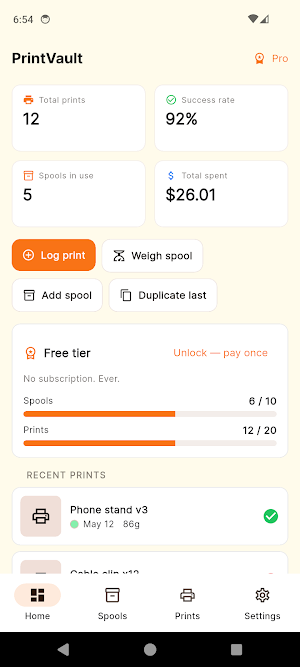
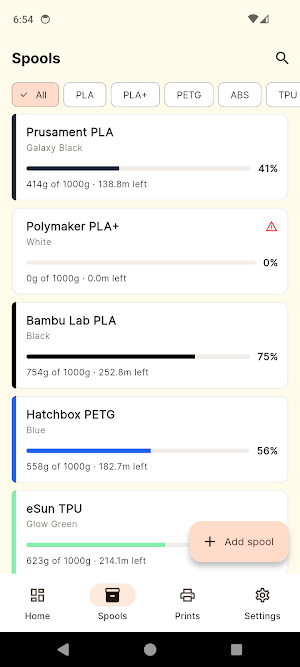
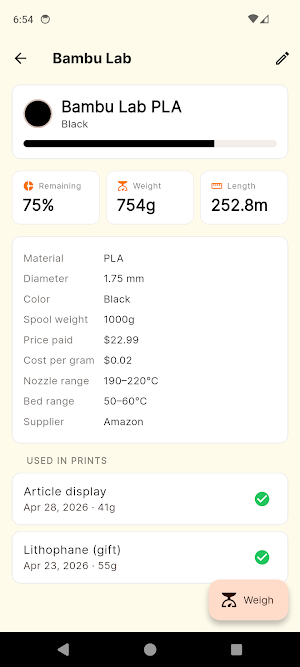


About PrintVault: 3D Print Manager
PrintVault is a filament inventory and print log for 3D printing makers. All data is stored locally on your device.
Track every spool. Log every print. Calculate cost-per-print from filament and electricity usage.
WHAT IT DOES
• Filament spool inventory — Add spools with brand, material, color, weight, and price. 30 brands pre-loaded (Bambu Lab, Hatchbox, Overture, Polymaker, eSun, Prusament, SUNLU, and more). 11 materials. 30 curated color swatches. Add a custom color in two taps.
• Smart weight tracking — Weigh your spool, enter the new weight, and PrintVault auto-calculates the percentage and meters of filament left.
• Barcode scanner — Scan the spool's barcode to identify it next time. Works offline.
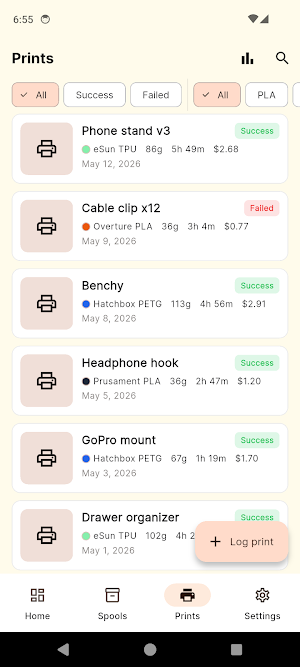
• 2-screen print log — 6 required fields on screen 1, optional slicer settings on screen 2. Logging a print takes under 60 seconds.
• Duplicate last print — One-tap clone of your previous print for repeat batches.
• Slicer presets — Save common slicer profiles (PLA Standard, PETG High Detail) and load them with one tap.
• Cost-per-print — Filament cost (from spool price) + electricity (your kWh rate × printer wattage × duration). See the full breakdown.
• Statistics dashboard — Success rate, filament consumed by material, cost over time, prints per month. Filter by 7/30/90/all-time.
• Multi-printer support — Track per-printer success rates and total hours.
• Print notes — Add notes per print to record what worked and what to change next time.
• Photo gallery per print — Snap photos as you log; tap to zoom.
• Offline-first — Every feature works without internet.
• CSV + JSON export — Export your data to a spreadsheet at any time.
• Dark mode — Easy on the eyes when you're checking on a print at night.
WHO IT'S FOR
• FDM hobbyists with one or more printers and a growing spool collection
• Sellers who need cost-per-print for pricing decisions
• Maker spaces and fab labs sharing printers
• Anyone who prefers a one-time purchase model
Contact: [email protected]
Track every spool. Log every print. Calculate cost-per-print from filament and electricity usage.
WHAT IT DOES
• Filament spool inventory — Add spools with brand, material, color, weight, and price. 30 brands pre-loaded (Bambu Lab, Hatchbox, Overture, Polymaker, eSun, Prusament, SUNLU, and more). 11 materials. 30 curated color swatches. Add a custom color in two taps.
• Smart weight tracking — Weigh your spool, enter the new weight, and PrintVault auto-calculates the percentage and meters of filament left.
• Barcode scanner — Scan the spool's barcode to identify it next time. Works offline.
• 2-screen print log — 6 required fields on screen 1, optional slicer settings on screen 2. Logging a print takes under 60 seconds.
• Duplicate last print — One-tap clone of your previous print for repeat batches.
• Slicer presets — Save common slicer profiles (PLA Standard, PETG High Detail) and load them with one tap.
• Cost-per-print — Filament cost (from spool price) + electricity (your kWh rate × printer wattage × duration). See the full breakdown.
• Statistics dashboard — Success rate, filament consumed by material, cost over time, prints per month. Filter by 7/30/90/all-time.
• Multi-printer support — Track per-printer success rates and total hours.
• Print notes — Add notes per print to record what worked and what to change next time.
• Photo gallery per print — Snap photos as you log; tap to zoom.
• Offline-first — Every feature works without internet.
• CSV + JSON export — Export your data to a spreadsheet at any time.
• Dark mode — Easy on the eyes when you're checking on a print at night.
WHO IT'S FOR
• FDM hobbyists with one or more printers and a growing spool collection
• Sellers who need cost-per-print for pricing decisions
• Maker spaces and fab labs sharing printers
• Anyone who prefers a one-time purchase model
Contact: [email protected]
What’s new
Version 1.0.6 · Updated September 24, 2026
Maintenance update: under the hood fixes and improvements.
Alternatives to PrintVault: 3D Print Manager
Looking for apps like PrintVault: 3D Print Manager? Here are 6 similar Android apps on Google Play. All of them are free to download.
-
Paint Calculator & Estimator
-
Sourdough Calculator & Journal
-
Volume Booster - Sound Control
-
ShoeMile: Shoe Mileage Tracker
-
LumiCheck: Emergency Lighting
-
AquaProof: Commercial Pool Log
| App | Rating | Price | Installs | Last updated | Compare |
|---|---|---|---|---|---|
| PrintVault: 3D Print Manager | – | Free | 10+ | Sep 24, 2026 | |
| Paint Calculator & Estimator | – | Free | 500+ | Sep 21, 2026 | Compare |
| Sourdough Calculator & Journal | – | Free | 100+ | Sep 23, 2026 | Compare |
| Volume Booster - Sound Control | – | Free | 1,000+ | – | Compare |
| ShoeMile: Shoe Mileage Tracker | – | Free | 100+ | Oct 3, 2026 | Compare |
| LumiCheck: Emergency Lighting | – | Free | 0+ | Sep 24, 2026 | Compare |
| AquaProof: Commercial Pool Log | – | Free | 1+ | Sep 23, 2026 | Compare |
Similar apps on Google Play
- Paint Calculator & Estimator
- Sourdough Calculator & Journal
- Volume Booster - Sound Control
- ShoeMile: Shoe Mileage Tracker
- LumiCheck: Emergency Lighting
- AquaProof: Commercial Pool Log
- SteriProof: Autoclave Logbook
- Scaffold Inspection Register
- ArborProof: Tree Risk Survey
- DoorProof Fire Door Inspection
- VoltLog: EV Charging Cost Log
- MileProof: Mileage Log
- GroupCam: Self Timer Camera
- DiveKit: Scuba Gear & Service
- BoatLog: Boat Maintenance Log
- Fire Safety Logbook: FireBook
- DailyStack: Supplement Tracker
- Harness Inspection Log QR
- Tinnitus Diary & Tracker
- SynthPatch: Patch + Chain Log
- KitchenProof: HACCP Temp Log
- PromptVault: AI Prompt Manager
- SiteInspect: Snag & Punch List
- RV Maintenance Log & Tracker
- HadithPal: Bukhari Muslim
- PlotKeeper: Garden Plot Rents
- BenchPass: Makerspace Manager
- AfterBell: After-School Clubs
- PackDesk: Daycare & Boarding
- Postage Expense Tracker
- DojoDues: Dojo Fees & Belts
- ClubDues: Team Fees & Rosters
- Knitting & Crochet Counter
- Tend: Self-Care Companion
- Storyshelf: EPUB Reader
- Bouncy Castle Safety Log
- PAT Testing Log & Cert
- Legionella Monitoring Log
- Private Investigator Log
- Backflow Test Report Log
- Extinguisher Inspection Log
- DVIR: Truck & DOT Inspection
- BonsaiLog: Bonsai Care Log
- ServeLog: Process Server Log
- PDHLogbook: PE CE Hours Log
- HomeStead: Goat Keeper
- SepticProof: Inspection Log
- WardLog: Guardian Records
- InkProof: Tattoo Log
- TurfLog: Pesticide Spray Log
- Word Nest: Word Puzzle Game
- RepairProof: Phone Repair Log
- DetailProof: Car Detailing Log
- WealthLog: Portfolio Tracker
- HomeStock: Insurance Inventory
- Migraine & Headache Journal
- CatColony: Cat & TNR Tracker
- NeckReset: Neck Pain Stretches
- HomeKeep: Home Maintenance
- FireCalc: FIRE Calculator
- HolidayStack: PTO Optimizer
- SleepRight: Sleep Journal
- SmokeFree: Quit Smoking Log
- MoodPulse: Anxiety Tracker
- IcePlunge: Cold Shower Timer
- LumberList
- Sober Days: Quit Tracker
- DriveSchool: Instructor App
- TurnSnap: Turnover Photos
- CarRestore: Car Build Log
- WatchLog: Service & Winder Log
- CharcuterieLog: Salami Tracker
- GeneratorLog: Service & Hours
- MotoGarage: Motorcycle Log
- ChickKeep: Flock & Egg Tracker
- BendPro — Conduit Bender Calc
- NotaryLog: Notary Journal App
- HomeschoolBook: Hours & PDF
- StringerPro: Stair Calculator
- PetCare: Pet Health Tracker
- CraftCost: Candle Soap Resin
- ClearPool — Pool Calculator
- Private Camera - Auto Delete
- SiteProof: GPS Photo Reports