

buenEditor
Productivity
Professional note editor.
- Downloads
- 18+
- on Google Play
- Price
- Free
- No in-app purchases
- Updated
- Aug 12
- 2026 · v1.0.4
Screenshots
Save to Pinterest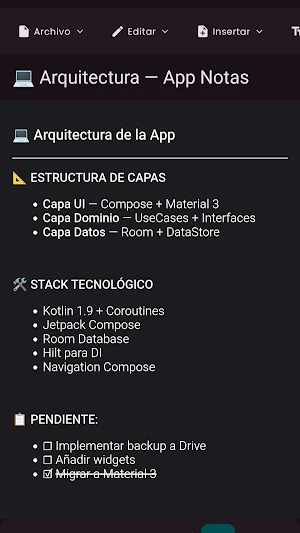


About buenEditor
buenEditor: Your Professional Creative Space
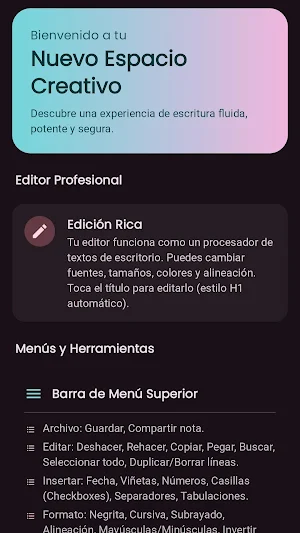
Transform your device into a powerful writing tool with buenEditor. More than just a notepad, it's an environment designed for writers, students, and professionals who need to format, organize, and visualize their ideas with clarity and style.
Whether you're writing the next chapter of your novel, taking class notes, or simply organizing your daily to-do list, buenEditor offers you the necessary tools without complications.
✨ Main Features:
📝 Rich Text Editor: Forget plain text. Write like you would in a desktop word processor:
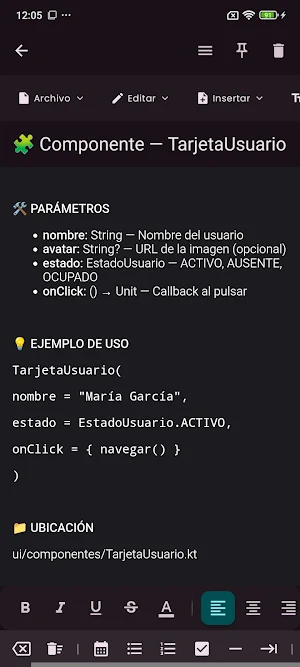
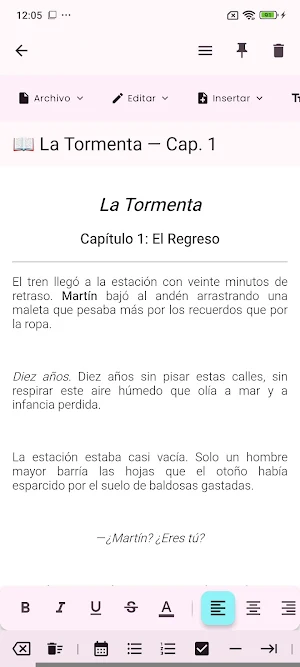
Full Formatting: Bold, italic, underline, strikethrough.
Smart Lists: Bullets, numbering, and interactive checkboxes for your tasks.
Alignment: Adjust text to the left, center, or right.
Headings: Turn any line into a heading with a single tap.
🎨 Total Customization: Your space, your rules.
Light and Dark Themes: Instantly switch between modes to rest your eyes or work in sunlight.
Adjustable Typography: Choose your font type (Serif, Sans-serif, Monospace) and adjust the text size for perfect readability.
⌨️ Extended Toolbar & Symbols: Access advanced features directly from your keyboard:
Symbol Library: Hundreds of special characters at your fingertips (Math, Currency, Arrows, Greek, Shapes, and more).
Quick Editing: Unlimited Undo/Redo, move lines up/down, and duplicate lines with a single tap.
Navigation: Precise selection and cursor movement buttons.
📊 Real-Time Statistics: For data lovers and professional writers:
Character counter (with and without spaces).
Word counter.
Line and paragraph count.
Estimated reading time: Know how long it will take someone to read your note.
🧘 Distraction-Free Reading Mode: Review your writing in peace. Reading Mode hides toolbars and protects your notes from accidental edits, allowing you to focus solely on the content.
💾 Security and Organization
Smart Auto-Save: Never lose an idea. The app automatically saves every change when you exit or pause.
Pin Notes: Keep your most important notes at the top of the list.
Powerful Search: Instantly find any note by title or content.
🚀 Extra Features
Export notes as a text file (.txt).
Share content with other apps.
Clean, modern, and easy-to-use interface.
Fully optimized for smooth performance.
Multilingual: Available in Spanish, English, Arabic, Hindi, and Chinese.
Download buenEditor now and discover the joy of writing in an app tailored to your needs. Your ideas deserve the best!
Transform your device into a powerful writing tool with buenEditor. More than just a notepad, it's an environment designed for writers, students, and professionals who need to format, organize, and visualize their ideas with clarity and style.
Whether you're writing the next chapter of your novel, taking class notes, or simply organizing your daily to-do list, buenEditor offers you the necessary tools without complications.
✨ Main Features:
📝 Rich Text Editor: Forget plain text. Write like you would in a desktop word processor:
Full Formatting: Bold, italic, underline, strikethrough.
Smart Lists: Bullets, numbering, and interactive checkboxes for your tasks.
Alignment: Adjust text to the left, center, or right.
Headings: Turn any line into a heading with a single tap.
🎨 Total Customization: Your space, your rules.
Light and Dark Themes: Instantly switch between modes to rest your eyes or work in sunlight.
Adjustable Typography: Choose your font type (Serif, Sans-serif, Monospace) and adjust the text size for perfect readability.
⌨️ Extended Toolbar & Symbols: Access advanced features directly from your keyboard:
Symbol Library: Hundreds of special characters at your fingertips (Math, Currency, Arrows, Greek, Shapes, and more).
Quick Editing: Unlimited Undo/Redo, move lines up/down, and duplicate lines with a single tap.
Navigation: Precise selection and cursor movement buttons.
📊 Real-Time Statistics: For data lovers and professional writers:
Character counter (with and without spaces).
Word counter.
Line and paragraph count.
Estimated reading time: Know how long it will take someone to read your note.
🧘 Distraction-Free Reading Mode: Review your writing in peace. Reading Mode hides toolbars and protects your notes from accidental edits, allowing you to focus solely on the content.
💾 Security and Organization
Smart Auto-Save: Never lose an idea. The app automatically saves every change when you exit or pause.
Pin Notes: Keep your most important notes at the top of the list.
Powerful Search: Instantly find any note by title or content.
🚀 Extra Features
Export notes as a text file (.txt).
Share content with other apps.
Clean, modern, and easy-to-use interface.
Fully optimized for smooth performance.
Multilingual: Available in Spanish, English, Arabic, Hindi, and Chinese.
Download buenEditor now and discover the joy of writing in an app tailored to your needs. Your ideas deserve the best!
What’s new
Version 1.0.4 · Updated August 12, 2026
Actualizada API Android para mayor estabilidad.
Alternatives to buenEditor
Looking for apps like buenEditor? Here are 6 similar Android apps on Google Play. The highest rated is Notepad - Notes and Tasks (4.6/5), and all 6 are free to download.
-
Office Reader - PDF,Word,Excel 3.9
-
Notesnook Secure Private Notes 4.5
-
Wondr Note: Fun Notes & Tools 4.6
-
Notepad Notes 4.4
-
Notepad - Notes and Tasks 4.6
-
Nested Folder Notes - Folino 4.2
| App | Rating | Price | Installs | Last updated | Compare |
|---|---|---|---|---|---|
| buenEditor | – | Free | 10+ | Aug 12, 2026 | |
| Office Reader - PDF,Word,Excel | 3.9 / 5 | Free | 1,000,000+ | Oct 25, 2026 | Compare |
| Notesnook Secure Private Notes | 4.5 / 5 | Free | 100,000+ | Oct 20, 2026 | Compare |
| Wondr Note: Fun Notes & Tools | 4.6 / 5 | Free | 100,000+ | – | Compare |
| Notepad Notes | 4.4 / 5 | Free | 5,000,000+ | Oct 14, 2026 | Compare |
| Notepad - Notes and Tasks | 4.6 / 5 | Free | 5,000,000+ | Oct 19, 2026 | Compare |
| Nested Folder Notes - Folino | 4.2 / 5 | Free | 50,000+ | Oct 20, 2026 | Compare |
Compare buenEditor with the top alternatives: ratings, updates, ASO score and keyword gaps →
Similar apps on Google Play
- Office Reader - PDF,Word,Excel
- Notesnook Secure Private Notes
- Wondr Note: Fun Notes & Tools
- Notepad Notes
- Notepad - Notes and Tasks
- Nested Folder Notes - Folino
- PenCake: Minimal Writing App
- Color Notes, Notebook, Notepad
- DrawNote: Drawing Notepad Memo
- YesWriter - Writing, Notes
- Pure Writer - Writing & Notes
- BlackNote: Dark Notes, Notepad
- UPDF - AI-Powered PDF Editor
- Huion Note : Easy note-taking
- Table Notes - Mobile Excel
- HiNotes by HiDock
- AI Grammar Checker App
- LiveIt Journal, Planner, Notes
- Squid: Take Notes, Markup PDFs
- Easy Diary
- Writer Journal - Text,Note
- JotterPad - Writer, Screenplay
- touchnotes
- MyScript Notes: AI Note Taking
- Notes : Color Folders & To-dos
- Zoho Sheet: Spreadsheet App
- Flexcil Notes & PDF Reader
- Mind Notes: Note-Taking Apps
- SCRIBZEE®
- PDFelement-PDF Editor & Reader
- Rocketbook
- QuickEdit Text Editor Pro
- UpNote - notes, diary, journal