

Anyshelf: Comic, Book & Video
Yuma Satoi Book iPhoneiPadiPod touchApple Watch
Anyshelf: Comic, Book & Video is a free Book app for iPhone and iPad by Yuma Satoi. Rated 3.0/5 from 2 ratings. Requires iOS 26.0. Updated November 23, 2026.
- Rating
- 3.0
- 2 ratings
- Price
- Free
- on the App Store
- Size
- 69 MB
- Age 4+
- Updated
- Nov 23
- 2026 · v2.0.0
Screenshots
Save to Pinterest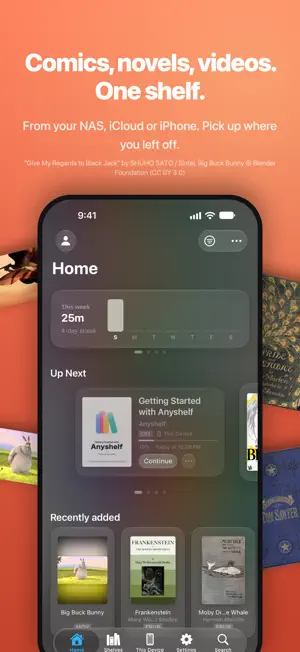


About Anyshelf: Comic, Book & Video
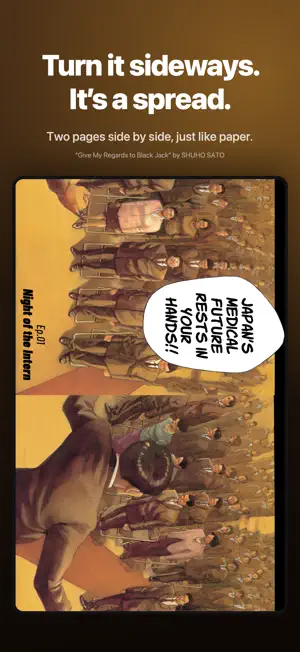
Last night’s manga on the train. A classic novel before bed. Anyshelf gathers every book you own onto one shelf and opens it right where it lives — on your NAS, in iCloud Drive, on your iPhone. No importing, no converting, no ads. Just open the book. And since 2.0, your videos play from the same shelf, and your files can be organized right in the app. VIDEOS ON THE SAME SHELF • Stream videos from your NAS or iCloud Drive — no downloading • MP4, MOV, MKV, WebM, TS and FLV; switch MKV audio and subtitles as you watch • Your place syncs through iCloud; Up Next, history and favorites work as for books • Bookmark favorite scenes with notes, then jump back in one tap. Picture in Picture too ORGANIZE YOUR FILES HERE TOO • Move and copy between your iPhone, iCloud Drive and your NAS, by menu or drag and drop • Upload to your NAS; extract ZIP, RAR and 7z; pack a folder into ZIP or CBZ • Rename, new folder, delete and share; Replace or Keep Both when a name is taken • Per-server access: Read Only, Write, or Write and Delete READ IT WHERE IT IS • Open books on your NAS (SMB and WebDAV) without downloading them — servers on your network are found automatically • Only the pages you open are fetched, so even a huge comic starts right away — and opens instantly next time • Books on your iPhone and iPad sit in This Device, and books in iCloud Drive on your shelf, covers first • Google Drive, OneDrive, Dropbox, Box and more: import through the Files app (the service’s app must be installed) • Thousands of free classics from Project Gutenberg and Aozora Bunko, built in — plus any OPDS catalog TURN IT SIDEWAYS. IT’S A SPREAD • Turn your phone sideways and pages become a two-page spread, like paper • Spreads scanned as one image are split automatically on a tall screen • Right-to-left or left-to-right, set once or per book • Page thumbnails and a slider take you anywhere in a volume • The next volume is waiting when you reach the last page A NOVEL BEFORE BED, SET LIKE PRINT • Vertical Japanese text with ruby and emphasis dots, set like a printed book • Highlight the lines that stay with you, and find them all again on Home • Your choice of typeface, size, spacing and background • EPUB (reflowable and fixed layout), plain text and Markdown, with a table of contents built from the headings PICK UP WHERE YOU LEFT OFF • Up Next, history, favorites and bookmarks on the Home tab • Your place syncs through iCloud across iPhone and iPad • Widgets for the book you’re in the middle of • Send a book to Apple Watch and read on your wrist, even without your iPhone • Opens on iPhone Duo as a two-page spread the moment you unfold it THEIR SHELF. YOUR SHELF. Everyone gets their own shelves, servers, history, favorites and bookmarks. • Lock any profile with Face ID or Touch ID — it can lock itself when you leave the app • Restricted profiles for kids: no settings, no new servers, no new shelves — only the books you put there FORMATS • Comics: ZIP, CBZ, RAR, CBR, 7z, CB7, TAR, CBT, plain image folders and PDF • Books: EPUB, plain text and Markdown • Videos: MP4, M4V, MOV, MKV, WebM, TS, M2TS and FLV • Every format opens straight from your NAS. ZIP, CBZ, image folders and vertical EPUB stream page by page; the others are read once, then open from the cache FREE TO TRY Start with a 7-day free trial of Anyshelf Pro. Without Pro you can still open one file a day — a book or a video — from every place, in every format. Nothing is locked away from your library. Anyshelf Pro removes the daily limit and adds folder compression, theme colors, extra profiles, custom file-name rules and Apple Watch. Choose a yearly subscription or a one-time purchase. The subscription renews automatically unless cancelled at least 24 hours before the end of the current period, and can be managed in your App Store account settings. Terms of Use: https://www.apple.com/legal/internet-services/itunes/dev/stdeula/ Privacy Policy: https://nogism.com/anyshelf/en/privacy/
What’s new
Version 2.0.0 · Updated November 23, 2026
• Video: play the videos on your NAS, in iCloud Drive and on your device from the same shelf as your books. MP4 and MOV, plus MKV, WebM, TS and FLV, with MKV audio and subtitle tracks you can switch as you watch. Your place syncs across devices and waits in Up Next on Home. Bookmark your favorite scenes and jump back in one tap • Organize your files right in the app: move and copy files and folders between your device, iCloud Drive and your NAS, including by drag and drop • Upload files from your device to your NAS • Extract archives, and compress a folder into ZIP or CBZ (Pro). Your place and favorites carry over to the new book • Share books and folders from the long-press menu, Home and the reader • Choose Read Only, Write, or Write and Delete for each server • New This Device tab: the books, videos and folders on your device in one place, with Shared at the top. Downloads, imports and exports land here • With videos on the shelf, places that list both now say Up Next, Recently opened and Viewing status • Other fixes and stability improvements
App privacy
The developer, Yuma Satoi, reported these privacy practices to Apple.
Data Linked to You
The following data, which may be collected and linked to your identity, may be used for the following purposes:
- Contact Info: Email Address
Used for: App Functionality
Data Not Linked to You
The following data, which may be collected but is not linked to your identity, may be used for the following purposes:
- User Content: Customer Support
- Diagnostics: Crash Data, Performance Data, Other Diagnostic Data
Used for: App Functionality
Alternatives to Anyshelf: Comic, Book & Video
Looking for apps like Anyshelf: Comic, Book & Video? Here are 6 similar apps on the App Store. The highest rated is shelff – PDF Book Reader (5.0/5), and 5 of the 6 are free to download.
-
 Versa: Comic & Manga Reader
-
 Manga Folio: NAS Comic Viewer
-
 shelff – PDF Book Reader
5.0
-
 Anyview - Comic & Book Reader
-
 Emaki - Manga & Image Viewer
-
 ComiNAS - NAS Comics & Video
| App | Rating | Price | Last updated | Compare |
|---|---|---|---|---|
| Anyshelf: Comic, Book & Video | 3.0 / 5 (2 ratings) | Free | November 23, 2026 | |
| Versa: Comic & Manga Reader | – | Free | Oct 31, 2026 | Compare |
| Manga Folio: NAS Comic Viewer | – | Free | Nov 21, 2026 | Compare |
| shelff – PDF Book Reader | 5.0 / 5 (1) | 6.99 USD | Oct 29, 2026 | Compare |
| Anyview - Comic & Book Reader | – | Free | Nov 20, 2026 | Compare |
| Emaki - Manga & Image Viewer | – | Free | Nov 24, 2026 | Compare |
| ComiNAS - NAS Comics & Video | – | Free | Nov 23, 2026 | Compare |