

Anyview - Comic & Book Reader
Jaehyun Shin Book iPhoneiPadiPod touch
Anyview - Comic & Book Reader is a free Book app for iPhone and iPad by Jaehyun Shin. Requires iOS 17.4. Updated October 17, 2026.
- Price
- Free
- on the App Store
- Size
- 55 MB
- Age 4+
- Updated
- Oct 17
- 2026 · v1.2
Screenshots

About Anyview - Comic & Book Reader
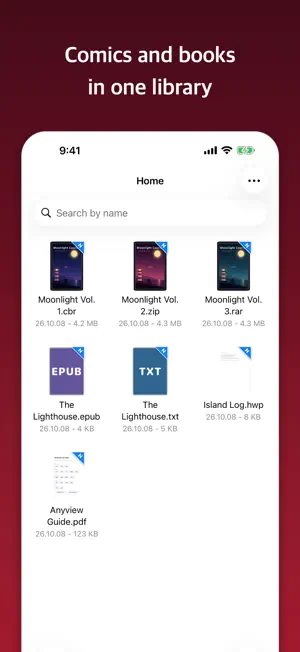
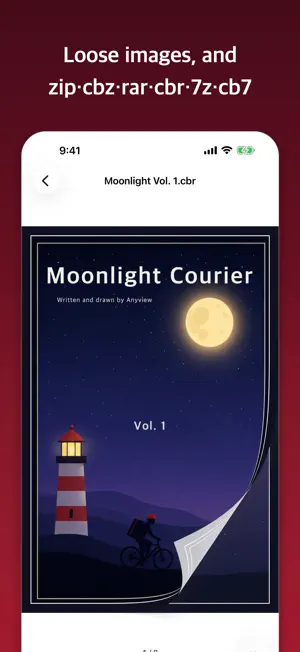
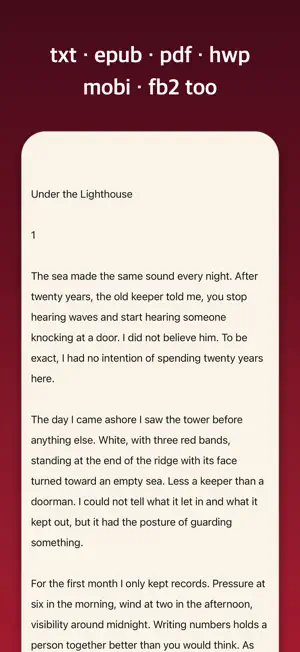
Comics and books in one app. Free, with no ads. Open archives without unzipping, and read books on a server without downloading. Start on your iPhone and pick up where you left off on your iPad or Mac. ■ FREE, ALWAYS · Every feature is free. Nothing is locked · No ads, no subscription, no trial period · No in-app purchases of any kind ■ FORMATS · Archives — zip, cbz, rar, cbr, 7z, cb7, tar, cbt · Images — png, jpg, gif, webp, heic and more · E-books — epub, mobi, azw3, fb2 · Text — txt, html · Documents — pdf, hwp, hwpx ■ READING COMICS · Page turn — Page Curl, Slide, Instant, or Continuous Scroll · Left-to-right or right-to-left reading · Two pages, split wide pages, trim edges · Invert colors · Auto-Turn at an interval you choose · Carry on into the next volume when one ends ■ READING TEXT · Three themes (White, Ivory, Night) with Light, Dark or Match Screen Mode · Adjust typeface, text size, line, letter and word spacing, and side margins · Add your own font files · Auto-format paragraphs in text with broken line breaks · Contents, bookmarks, and search within the book (with recent searches) · Jump back with ↶ after moving by contents or search ■ READ ALOUD (TTS) · Text is read aloud · Speed from 0.5x to 2x · Sleep timer — 15, 30 or 60 minutes · Keeps reading with the screen off or in another app, with Lock Screen controls ■ ADDING FILES · Wi-Fi Transfer — open the address shown on screen in your computer's browser and drop files in. No cable needed · Files app, share sheet from other apps, or paste · Drag and drop on iPad ■ BOOK SERVERS · Connect to OPDS, SMB and WebDAV servers — a NAS, a shared folder on your PC, or an OPDS catalog such as Komga or Calibre · Tap a book to read it right away, without downloading · Save books to your library, or a whole folder at once ■ HIDDEN FOLDER · Hide books and folders you would rather not show, and bring them back with Face ID ■ WHERE YOU LEFT OFF · Every book reopens at the page you stopped on · Syncs your place across your iPhone, iPad and Mac through your own iCloud ■ NO ACCOUNT, NOTHING COLLECTED · No sign-up · Your books stay on your device. Nothing is collected · Works without an internet connection (Wi-Fi Transfer stays within your own network, and book servers are only the ones you add)
What’s new
Version 1.2 · Updated October 17, 2026
• Book servers — connect to OPDS, SMB and WebDAV servers, read books right away without downloading, or save them (even whole folders) to your library • Stability improvements and bug fixes
App privacy
The developer, Jaehyun Shin, reported these privacy practices to Apple.
Data Not Collected
The developer does not collect any data from this app.
Alternatives to Anyview - Comic & Book Reader
Looking for apps like Anyview - Comic & Book Reader? Here are 6 similar apps on the App Store. The highest rated is encircled - books (5.0/5), and all 6 are free to download.
-
 fwordward
-
 Idyllic Reader
-
 encircled - books
5.0
encircled - books
5.0
-
 BookSavr Comic & Manga Reader
5.0
BookSavr Comic & Manga Reader
5.0
-
 Tsundoku: Manga & Book Reader
-
 QuiverBooks
| App | Rating | Price | Last updated | Compare |
|---|---|---|---|---|
| Anyview - Comic & Book Reader | – | Free | October 17, 2026 | |
| fwordward | – | Free | Jan 29, 2026 | Compare |
| Idyllic Reader | – | Free | Oct 15, 2026 | Compare |
| encircled - books | 5.0 / 5 (1) | Free | May 16, 2026 | Compare |
| BookSavr Comic & Manga Reader | 5.0 / 5 (1) | Free | Jul 10, 2026 | Compare |
| Tsundoku: Manga & Book Reader | – | Free | Oct 2, 2026 | Compare |
| QuiverBooks | – | Free | Aug 18, 2026 | Compare |