

Versa: Comic & Manga Reader
yuya takahara Book iPhoneiPadiPod touchMacApple Watch
Versa: Comic & Manga Reader is a free Book app for iPhone and iPad by yuya takahara. Requires iOS 17.0. Updated October 31, 2026.
- Price
- Free
- on the App Store
- Size
- 59 MB
- Age 4+
- Updated
- Oct 31
- 2026 · v1.12
Screenshots


About Versa: Comic & Manga Reader
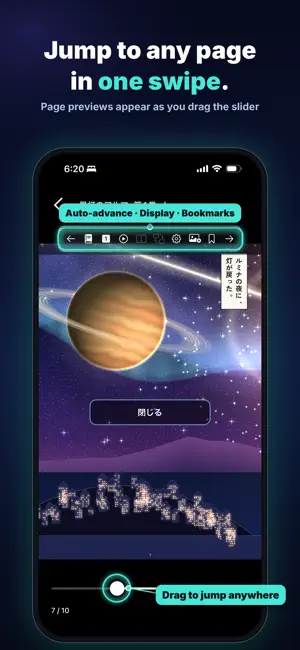
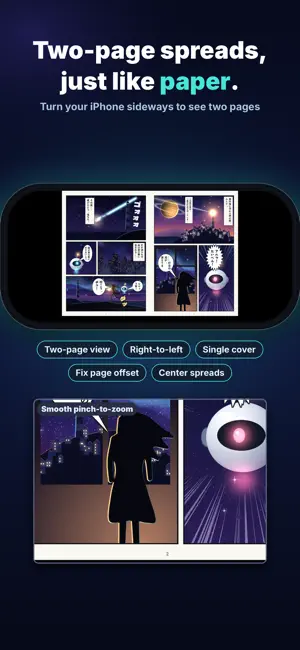
Versa Comic & Manga Viewer for iPhone / iPad / Mac / Apple TV / Apple Watch Versa lets you read comics stored on your NAS, in the cloud, or on your device, just as they are. No copying needed: open files directly from a NAS or PC on the same Wi‑Fi, or from WebDAV and Dropbox. [WHAT YOU CAN DO] ◆ Read comics straight from your NAS or device Connect to a NAS or PC over SMB and browse ZIP, CBZ, RAR, CBR, 7Z, CB7, TAR, CBT, PDF, EPUB and image folders. Covers line up on your bookshelf automatically, and large files stream where possible. ◆ Read comics in the cloud (new, Pro) Connect to WebDAV (NAS, Nextcloud, InfiniCLOUD and more) and Dropbox, and add folders straight to your bookshelf. ZIP and CBZ files load only the pages you need, so you can start reading without waiting for a download. ◆ Jump to any page Drag the slider to see page previews and jump straight to the scene you want. Auto page turn, bookmarks and cover thumbnails are one tap away in the menu. ◆ Pick up where you left off History and "Continue" take you back to your last page, and the list shows how far you have read at a glance. Within the same folder, you can move smoothly to the next or previous volume. ◆ Clean two-page spreads On iPad, Mac and iPhone in landscape, read with two pages side by side. Show the cover on its own or shift pages to fix mismatched spreads. Right-to-left or left-to-right reading and page-turn direction are fully adjustable. ◆ Comfortable novel reading Read EPUB and text novels in a dedicated novel viewer, with vertical or horizontal text, adjustable font and size, and ruby (furigana) support. ◆ Edit and enhance archives (Pro) Reorder, delete or split pages in ZIP, EPUB, RAR, PDF and other archives. Adjust brightness, contrast, sepia and hue, upscale images and convert formats. Save your adjustments as presets. ◆ Connected across iPhone, iPad and Mac Sync reading progress, bookmarks, history and registered folders with iCloud. Continue on iPad or Mac right where you stopped on iPhone. ◆ On the big screen with Apple TV Open your bookshelf on your TV and turn pages with the remote. ◆ Read on Apple Watch Open your iPhone bookshelf from Apple Watch. Turn pages with the Digital Crown and double-tap to zoom. Enjoy a few pages whenever you have a spare moment. ◆ Server integration (Pro) Open Komga and Kavita libraries from your bookshelf, with offline saving. ◆ Lock your private folders Protect folders with a passcode or Face ID. ◆ Try it right away with demo books Demo comics and a demo novel are included, so you can try everything even without a NAS or server. [SUPPORTED FORMATS] Image folders / ZIP / CBZ / RAR / CBR / 7Z / CB7 / TAR / CBT / PDF / EPUB / Text (TXT) [GREAT FOR] ・People who keep their comics on a NAS or in the cloud (WebDAV, Dropbox) ・Anyone who wants the same library on iPhone, iPad and Mac ・Readers who like to fine-tune spreads and page turning ・Fixing faded colors and page order in old scans [PRICING] Try every Pro feature free for the first 7 days. Basic local and SMB reading stays free. (Free: 1 registered folder, 5 folder bookmarks, 1 playlist) Pro removes ads and unlocks Komga / Kavita integration, opening books from the cloud (WebDAV, Dropbox), offline saving, unlimited playlists, and archive editing, enhancement, upscaling and format conversion. Quad-A Digital
What’s new
Version 1.12 · Updated October 31, 2026
• Added support for iPhone Duo. Unfolding switches to two-page spreads automatically, and folding switches back to single pages. • On the unfolded iPhone Duo screen, you can set the number of bookshelf columns separately for portrait and landscape. • Added a "Camera hole: full screen / avoid" option to the reader settings. • Ads now disappear as soon as you buy Pro. • Fixed an issue where images inside folders in ZIP files on a NAS or in the cloud could fail to load (e.g. ZIP files created on Windows). • Extra files in ZIP files created on a Mac are no longer shown as pages.
App privacy
The developer, yuya takahara, reported these privacy practices to Apple.
Data Not Collected
The developer does not collect any data from this app.
Alternatives to Versa: Comic & Manga Reader
Looking for apps like Versa: Comic & Manga Reader? Here are 6 similar apps on the App Store.
-
 ComiNAS - NAS Comics & Video
-
 Emaki - Manga & Image Viewer
-
 Manga Folio : NAS Comic Viewer
-
 Pocket Library - Comic Viewer
-
 Euria Manga, Comic & E-Books
-
 ComicJet: Comic & Manga Reader
| App | Rating | Price | Last updated | Compare |
|---|---|---|---|---|
| Versa: Comic & Manga Reader | – | Free | October 31, 2026 | |
| ComiNAS - NAS Comics & Video | – | Free | Nov 1, 2026 | Compare |
| Emaki - Manga & Image Viewer | – | Free | Nov 1, 2026 | Compare |
| Manga Folio : NAS Comic Viewer | – | Free | Nov 7, 2026 | Compare |
| Pocket Library - Comic Viewer | – | Free | Oct 22, 2026 | Compare |
| Euria Manga, Comic & E-Books | – | Free | Nov 2, 2026 | Compare |
| ComicJet: Comic & Manga Reader | – | Free | Sep 26, 2026 | Compare |