

ComiNAS - NAS Comics & Video
Takatsugu Kobayashi Book iPhoneiPadiPod touch
ComiNAS - NAS Comics & Video is a free Book app for iPhone and iPad by Takatsugu Kobayashi. Requires iOS 15.1. Updated October 18, 2026.
- Price
- Free
- on the App Store
- Size
- 79 MB
- Age 4+
- Updated
- Oct 18
- 2026 · v1.19.0
Screenshots

About ComiNAS - NAS Comics & Video
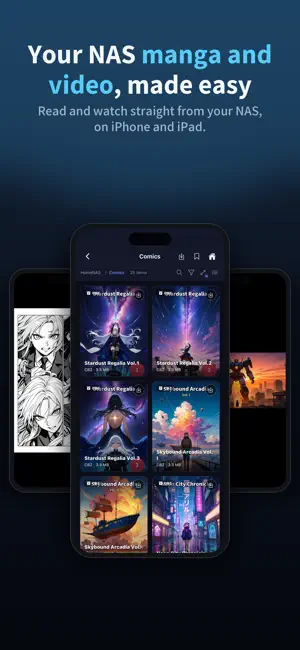
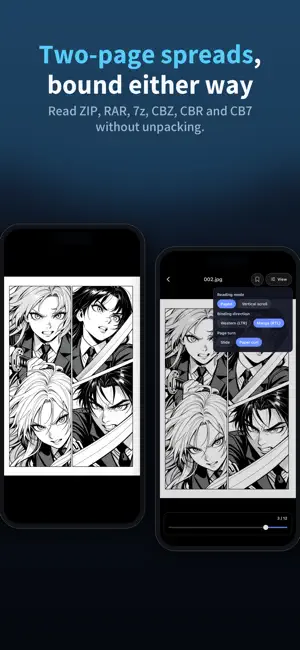
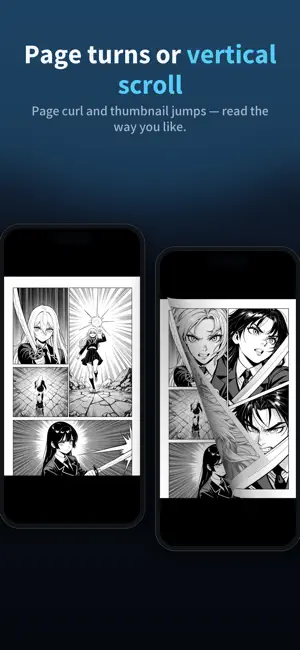
ComiNAS is a file browser and media player for enjoying comics, videos, music, PDFs, EPUB ebooks, and text files stored on your home NAS, along with photos and videos in your iPhone or iPad Photo Library. It connects directly via WebDAV / SMB / OPDS, so you do not need to upload your private library to a cloud service. ◆ Open folders on your device and iCloud Drive Use Add a folder to register a folder from the Files picker. Open images, videos, music, PDFs, EPUBs, text, and archives with the same viewers used for your NAS. Search, sort, and bookmark folders too. Some storage providers do not allow folder selection; cloud files require a connection and free space. ◆ Read comics directly from your NAS Open ZIP / RAR / 7z / CBZ / CBR / CB7 archives without extracting them first, and browse the images inside as thumbnails. ComiNAS supports common image formats such as jpg, png, webp, gif, and heic, including playback of animated WebP and GIF images. Comic-friendly reading options include two-page spreads, right-to-left or left-to-right reading, cover-first layouts, and single-page display for wide images. Choose paged reading, continuous Vertical Scroll, or a page-curl effect that feels closer to flipping through a real book. Move straight to the next volume when you finish one, or tap the screen edges to turn pages. You can also keep a small page number and clock on screen while reading. On iPhone Duo, read two-page spreads when open and single pages when closed. ◆ Browse photos and videos on your device Browse your iPhone or iPad Photo Library by album and open photos or videos directly from their thumbnails. ◆ Connect to Komga or Kavita libraries Browse self-hosted comic and book servers such as Komga or Kavita through their OPDS catalogs. On servers with OPDS-PSE support, stream CBZ pages without downloading an entire book, resume where you left off, and keep reading progress in sync with the server. Streaming reading is a Premium feature. ◆ Play videos stored on your NAS ComiNAS supports MP4 / MOV as well as many other formats including mkv, avi, wmv, flv, webm, m2ts, and vob. With VLC-powered playback, seek bar navigation, subtitle track switching, and adjustable playback speed, you can watch videos directly from your NAS. ◆ Take your library offline Download files from your NAS to your device and enjoy them without a connection. Open saved comics and videos anytime from Offline Downloads on the Home screen. ◆ Get back to your favorite files faster Bookmark frequently used folders and open them from the Home screen with a single tap. Recent Access lets you quickly return to the folders, files, and ZIP/RAR/7z archive entries you opened before. NAS Auto-Discovery helps find devices on your local network, so you can connect even if you do not know the IP address. Test Connection explains what went wrong if a connection fails. ◆ View many file types in one app ComiNAS also supports background music playback with continuous play, album art, and a sleep timer, a built-in PDF viewer, an EPUB ebook reader, and direct viewing of text files such as txt, md, json, and source code. Markdown is formatted, CSV appears as tables, and encodings such as Shift_JIS are supported. The EPUB reader provides font size, line spacing, margin, and horizontal or vertical writing controls as a Premium feature. Lock ComiNAS with biometrics or your device passcode. With Light / Dark themes, thumbnail browsing, cache management, and saved connections for multiple servers, ComiNAS gives you a smoother way to enjoy content stored on your NAS and Apple devices. To investigate problems and improve reliability, ComiNAS automatically sends crash information, app and device information, and diagnostic identifiers to Firebase Crashlytics. See the Privacy Policy for details. --- Terms of Use (EULA): https://www.apple.com/legal/internet-services/itunes/dev/stdeula/ Privacy Policy: https://sites.google.com/loki.jp/privacypolicy
What’s new
Version 1.19.0 · Updated October 18, 2026
This update makes connection setup and reading easier, and speeds up loading. • Added a setting to keep a small page number and clock on screen while you read. • Connection tests and NAS Auto-Discovery now show clearer results and explain why a connection failed. • ZIP and CBZ covers appear faster, and folders and images load faster over SMB. • Loading now shows its progress, with guidance when it takes a while or a file can't be opened. • The Connections, Bookmarks, and Offline Downloads lists and Settings are easier to use. • Fixed an issue where the screen could stop responding on iPad, a crash that could occur when SMB loading took too long, and other issues.
App privacy
The developer, Takatsugu Kobayashi, reported these privacy practices to Apple.
Data Not Linked to You
The following data, which may be collected but is not linked to your identity, may be used for the following purposes:
- Purchases: Purchase History
- Identifiers: Device ID
- Usage Data: Product Interaction
- Diagnostics: Other Diagnostic Data, Crash Data
Used for: Analytics, App Functionality
Alternatives to ComiNAS - NAS Comics & Video
Looking for apps like ComiNAS - NAS Comics & Video? Here are 6 similar apps on the App Store. The highest rated is ShelfStream - Comic Reader (5.0/5), and all 6 are free to download.
-
 Versa: Comic & Manga Reader
-
 Euria Manga & E-Book Reader
-
 ShelfStream - Comic Reader
5.0
ShelfStream - Comic Reader
5.0
-
 Comic Shelf - 自炊コミックリーダー
-
 Emaki - Manga & Image Viewer
-
 Pocket Library - Comic Viewer
| App | Rating | Price | Last updated | Compare |
|---|---|---|---|---|
| ComiNAS - NAS Comics & Video | – | Free | October 18, 2026 | |
| Versa: Comic & Manga Reader | – | Free | Oct 18, 2026 | Compare |
| Euria Manga & E-Book Reader | – | Free | Oct 15, 2026 | Compare |
| ShelfStream - Comic Reader | 5.0 / 5 (2) | Free | Sep 11, 2026 | Compare |
| Comic Shelf - 自炊コミックリーダー | – | Free | Sep 14, 2026 | Compare |
| Emaki - Manga & Image Viewer | – | Free | Oct 19, 2026 | Compare |
| Pocket Library - Comic Viewer | – | Free | Jul 22, 2026 | Compare |