

Emaki - Manga & Image Viewer
Masashi Kanamori Book iPhoneiPadiPod touchMac
Emaki - Manga & Image Viewer is a free Book app for iPhone and iPad by Masashi Kanamori. Requires iOS 18.0. Updated October 7, 2026.
- Price
- Free
- on the App Store
- Size
- 28 MB
- Age 12+
- Updated
- Oct 7
- 2026 · v1.10.0
Screenshots

About Emaki - Manga & Image Viewer
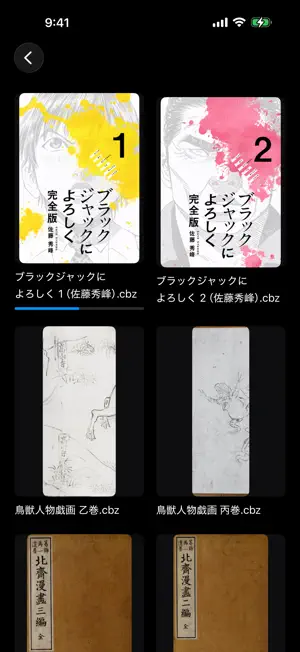
Emaki is an iPhone and iPad reader for comics, images, and PDFs you manage yourself. Open files from an SMB share, a location selected in Files, or on your device without reorganizing your existing folders. Free version and one-time unlock Download for free and read the first 20 pages of each archive, PDF, or image folder. A non-consumable In-App Purchase removes the reading limit. No monthly fees. Photos library, videos, connections, and bookshelf browsing are free. This purchase unlocks app functionality, not books or third-party content. Before purchase, Read Aloud covers about the first 12,000 characters of each text book. Key features • Connect directly to SMB, WebDAV, and OPDS • Browse Komga libraries and sync reading progress • Browse the Photos library by category and album • Start reading large archives from the pages you need • Save books or folders for offline reading • Pause and resume offline transfers • Read a folder of images as one book • Single-page, two-page spread, and automatic layouts • Right-to-left or left-to-right navigation • Reading position, history, favorites, and bookmarks with notes • Sync history, favorites, and bookmarks across devices with iCloud • Read EPUB ebooks, plain text, and Aozora Bunko files vertically or horizontally, and have them read aloud • Optionally skip unreadable images without showing an error page • A web bookshelf for titles, covers, and links from ebook services • Add URLs and text to the web bookshelf from the Share sheet Supported formats ZIP / CBZ, RAR / CBR (both RAR4 and RAR5), 7z / CB7, PDF, JPEG, PNG, GIF, TIFF, HEIC, WebP, AVIF, and more. Continue on another device Turn on Sync Across Devices in Settings to sync viewing history (last page and display settings), favorites, and bookmarks between your iPhone, iPad, and Mac with the same Apple Account through iCloud. Books are matched by connection, path, and file name, so open them from the same NAS or cloud location on each device. Book files and sign-in details are not synced. Speech bubble translation Tap the speech bubble button while reading to recognize the text in speech bubbles and show the translation inside them. Recognition and translation run on your device with Apple's frameworks, and images and text are never sent anywhere. Translations are machine-generated, and handwritten text or sound effects may not be recognized. Before purchase, you can try it on the first 20 pages of each book. Support Emaki is developed and maintained by Piktoo Studio, an independent developer. For questions or bug reports, write to [email protected] in English or Japanese. We read every message and reply in turn. One purchase, no subscription. Privacy No Emaki account, ads, usage analytics, or tracking. Reading history and connection details are stored on your device. When Sync Across Devices is on, viewing history, favorites, and bookmarks are stored in your iCloud and are not sent to the developer's servers. Komga integration syncs reading progress to the server you specify. Purchases and restoration use Apple In-App Purchase. The web bookshelf does not import purchased files or bypass DRM. It opens links you added in the provider's app or website. About the screenshots The works shown are "Give My Regards to Black Jack" by Shuho Sato, "Hokusai Manga" by Katsushika Hokusai, and "Choju-jinbutsu-giga." The first is used under the author's free secondary-use permission; the others are public domain. No works are bundled with this app. Saved pages and text Open WebScrapBook folders, HTZ and MAFF files. Read HTML and text in full for free. Long-press a folder and choose Open as Web Page to open index.html or index.htm. Saved-page reading is separate from the Web Bookshelf link collection. Purchases The one-time unlock offered on iPhone/iPad is for iPhone and iPad. You can also restore the universal unlock purchased in the Mac version. Previous unlock purchases remain valid.
What’s new
Version 1.10.0 · Updated October 7, 2026
・Added Standard Ebooks, Internet Archive and the National Library of Spain (BNE) to Public Library. ・Search Project Gutenberg EPUBs and publicly available Internet Archive EPUBs/PDFs, review book details, then save and read them. ・Search BNE bibliographic records and import official EPUBs saved in your browser. ・Choose where Public Library books are saved in Settings. ・Added genre filters, sorting, list/thumbnail views and book covers to catalog lists. ・Improved navigation back from Aozora Bunko and the display of saved books. ・Added an age check for Internet Archive, using Apple's age range sharing on supported OS versions.
App privacy
The developer, Masashi Kanamori, reported these privacy practices to Apple.
Data Not Collected
The developer does not collect any data from this app.
Alternatives to Emaki - Manga & Image Viewer
Looking for apps like Emaki - Manga & Image Viewer? Here are 6 similar apps on the App Store.
-
 Versa-漫画・PDF ビューア
-
 AirReader: ZIP, CBZ & PDF
-
 PDFviewX - 自炊本ビューア
-
 Manga Folio : Comic Viewer
-
 ComiNAS - NAS Comics & Video
-
 MangaFuru: Manga Reader
| App | Rating | Price | Last updated | Compare |
|---|---|---|---|---|
| Emaki - Manga & Image Viewer | – | Free | October 7, 2026 | |
| Versa-漫画・PDF ビューア | – | Free | Sep 4, 2026 | Compare |
| AirReader: ZIP, CBZ & PDF | – | Free | Sep 19, 2026 | Compare |
| PDFviewX - 自炊本ビューア | – | Free | Sep 5, 2026 | Compare |
| Manga Folio : Comic Viewer | – | Free | Sep 30, 2026 | Compare |
| ComiNAS - NAS Comics & Video | – | Free | Sep 25, 2026 | Compare |
| MangaFuru: Manga Reader | – | Free | Oct 1, 2026 | Compare |