

MangaFuru: Manga Reader
Zongxi Li Book iPhoneiPadiPod touch
MangaFuru: Manga Reader is a free Book app for iPhone and iPad by Zongxi Li. Requires iOS 18.6. Updated November 18, 2026.
- Price
- Free
- on the App Store
- Size
- 186 MB
- Age 17+
- Updated
- Nov 18
- 2026 · v1.2.2
Screenshots
Save to Pinterest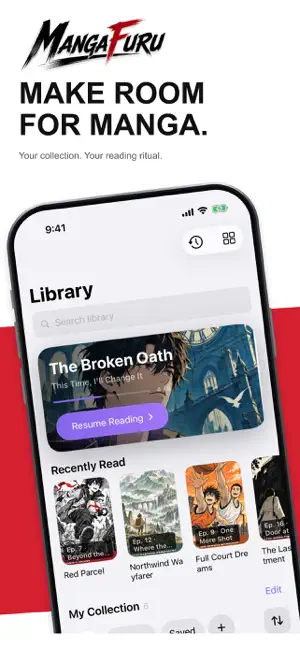


About MangaFuru: Manga Reader
MangaFuru is a manga reader built for iPhone and iPad. Choose your sources, organize your collection, and settle into a good read. From page-by-page manga to vertically scrolling webtoons, find the reading style that suits you. BUILD A LIBRARY AROUND YOUR FAVORITES Add supported manga sources, connect your own Komga server, or import local comics, EPUBs, and PDFs. Save titles to your library, organize them with custom categories, and add your next reads to a watchlist. Keep ongoing series and completed stories you want to catch up on easy to find. MATCH THE READER TO THE STORY Choose paged, vertical scrolling, or right-to-left reading to suit the comic's layout and your preferences. Zoom in on the artwork or use page thumbnails to revisit an earlier scene. Your progress is saved automatically, so you can pick up where you left off. MAKE MORE TIME FOR READING Find recent reads in your reading history and save chapters that support downloading for later. If you have a compatible backup, import it to restore the collection and reading data it contains. MANGAFURU PREMIUM A one-time purchase permanently unlocks more convenient features: • Background and concurrent chapter downloads • Automatic next-chapter downloads • Automatic iCloud backups • Smart cache cleanup • An alternate app icon See the app for full feature and purchase details. CONTENT AND PRIVACY MangaFuru provides reading and collection-management tools, with no manga content included. Add sources and files you own or are authorized to use. Availability and supported features vary by source. No separate MangaFuru account is required. Individual sources or Komga servers may require a login. Analytics collection can be turned off in Settings. Privacy Policy: https://mangafuru.github.io/privacy.html Terms of Use: https://www.apple.com/legal/internet-services/itunes/dev/stdeula/
What’s new
Version 1.2.2 · Updated November 18, 2026
What's New in 1.2.2 • Added support for iPhone Duo. • Added tag search: tap a tag on a book's details page to discover related titles from the same source. • Improved Library and book details layouts across different screen and window sizes. • Refined the manga, EPUB, and PDF reading interfaces and improved reading position preservation when resizing the window. • Optimized manga image rendering and the Continue Reading loading process. • Added Arabic, Hindi, Turkish and Italian interface languages. • Improved tab switching and preserved page state when changing languages. • Fixed an issue that could cause the app to crash during backup. • Fixed content clipping at the top and bottom, and restored the Library scroll position after language changes.
App privacy
The developer, Zongxi Li, reported these privacy practices to Apple.
Data Not Linked to You
The following data, which may be collected but is not linked to your identity, may be used for the following purposes:
- Purchases: Purchase History
- Location: Coarse Location
- Identifiers: Device ID
- Usage Data: Product Interaction
- Diagnostics: Other Diagnostic Data, Crash Data, Performance Data
Used for: Analytics, App Functionality
Alternatives to MangaFuru: Manga Reader
Looking for apps like MangaFuru: Manga Reader? Here are 6 similar apps on the App Store. The highest rated is Halftone: Comic & Manga Reader (5.0/5), and all 6 are free to download.
-
 Mangify: Manga Reader Comic
-
 Halftone: Comic & Manga Reader
5.0
-
 Neko: Manga Reader & Novels
4.6
-
 Manga Elite: Comic & Webtoon
4.2
-
 Mango: Offline Reader
5.0
-
 UpToon – Comics & Manhwa
1.0
| App | Rating | Price | Last updated | Compare |
|---|---|---|---|---|
| MangaFuru: Manga Reader | – | Free | November 18, 2026 | |
| Mangify: Manga Reader Comic | – | Free | Nov 13, 2026 | Compare |
| Halftone: Comic & Manga Reader | 5.0 / 5 (8) | Free | Nov 19, 2026 | Compare |
| Neko: Manga Reader & Novels | 4.6 / 5 (7) | Free | Nov 19, 2026 | Compare |
| Manga Elite: Comic & Webtoon | 4.2 / 5 (5) | Free | Nov 19, 2026 | Compare |
| Mango: Offline Reader | 5.0 / 5 (1) | Free | Nov 16, 2026 | Compare |
| UpToon – Comics & Manhwa | 1.0 / 5 (1) | Free | Sep 10, 2026 | Compare |