

Halftone: Comic & Manga Reader
Bony Yousuf Book iPhoneiPadiPod touch
Halftone: Comic & Manga Reader is a free Book app for iPhone and iPad by Bony Yousuf. Rated 5.0/5 from 6 ratings. Requires iOS 16.4.
- Rating
- 5.0
- 6 ratings
- Price
- Free
- on the App Store
- Size
- 60 MB
- Age 4+
- Updated
- Oct 12
- 2026 · v1.5.0
Screenshots
About Halftone: Comic & Manga Reader
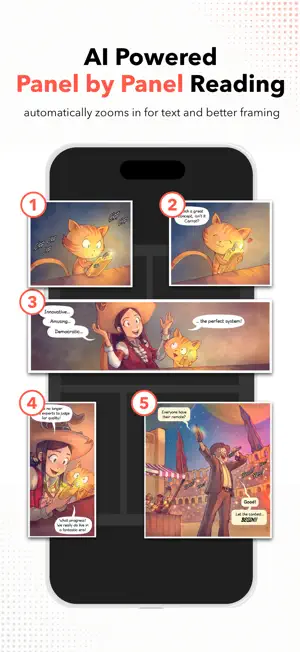
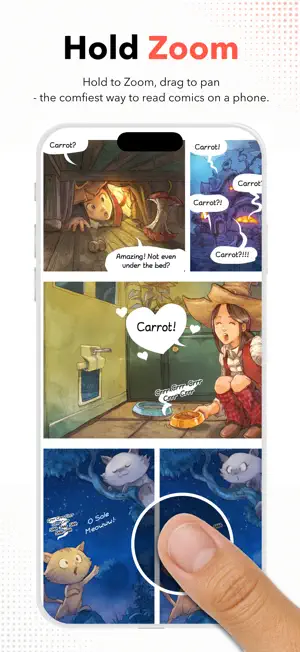
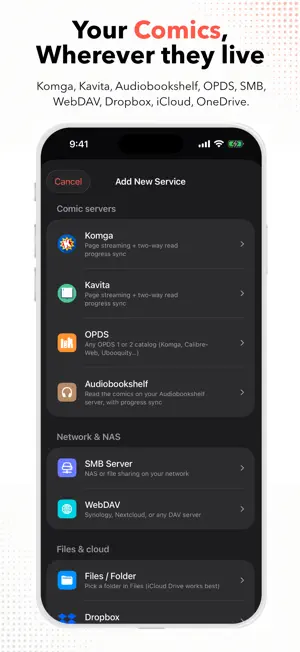
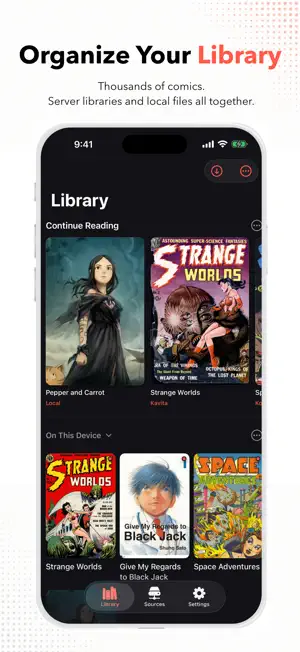
The reader your comic and manga server deserves — and the comfiest way to read on a phone. Halftone connects straight to the places you already keep comics: Komga and Kavita (native, not just OPDS), Audiobookshelf, any OPDS catalog, SMB shares on your NAS, WebDAV, Dropbox, OneDrive, and the files on your device. No account with us. No middleman server. No ads. PANEL VIEW Read one panel at a time, in the right order — manga's right-to-left included. Tap or swipe to step through the page, hold to peek at the whole thing, and pick Overlay or Fade to dim everything but the panel you're on. HOLD ZOOM Press and hold anywhere and the page magnifies; pan with the same finger — one-handed, made for dense pages and small lettering. Rest your thumb at a screen edge and the page keeps moving. Free for everyone — no unlock, no trial, no asterisk. YOUR SERVER, FIRST-CLASS • Komga and Kavita: native API clients — series, collections, page-by-page streaming • Audiobookshelf: your server's comics, with its covers and progress • Two-way, page-level progress sync — stop on your iPhone, and the server's web reader opens on the same page • OPDS for everything else: Codex, Ubooquity, Calibre-Web, Stump, and more • SMB and WebDAV — your NAS, found automatically • Dropbox, OneDrive, iCloud Drive, and any Files-app folder • Stream page by page without importing (CBZ and most CBR/RAR), or pin chapters for offline with one tap • Synced folders: point Halftone at a folder on your NAS or cloud drive and it mirrors the whole tree, subfolders and all • iCloud sync carries your place to your other devices through your own iCloud — for imported comics and every source with no sync of its own A READER BUILT FOR COMICS • Apple Books–style page curl that folds at the spine — or a classic slide • Double-page spreads with one-tap pairing fixes, spine shadow, and paper margins • True right-to-left for manga: page order, tap zones, curl, and scrubber all follow • A proper webtoon mode: smooth long-strip scrolling, detected automatically • AI Upscale: low-resolution scans are sharpened on-device as you read • Crop Borders trims scanned margins so the art fills the screen, and can drop credit strips • Tap zones your way: Left-Right, L-Shaped, Top-Bottom, or off • Match Page backgrounds: margins take the page's own color — or Backdrop, a soft blur of the page itself A LIBRARY THAT KEEPS UP • Built for thousands of files: search down to the single comic, collections, merge and move • Folders for loose comics — one-shots and odd issues, no fake series required • Reads ComicInfo.xml on import: real series names, correct chapter order, right-to-left detected • Wi-Fi transfer from any computer's browser • Bookmarks and a farthest-read marker — re-read an earlier chapter without losing your place • One-tap backup to a folder you pick; export as standard CBZ with ComicInfo.xml • Privacy tools: Incognito reading, Face ID app lock, hidden comics READS EVERYTHING CBZ/ZIP, CBR/RAR, CB7/7z, PDF, image-based ePub (DRM-free), and plain folders of images. FAIR PRICING, NO DARK PATTERNS Free is genuinely free: your whole local library, no series limit, full quality, spreads, right-to-left, webtoon scrolling, Hold Zoom, and the Panel View preview — and it never expires. Premium adds the connected half — servers, cloud drives, streaming, synced folders, iCloud sync, backup, privacy tools — plus the full reader: Panel View, AI Upscale, page curl, Crop Borders, spine shadow, and Match Page. Try it free for 24 hours. Lifetime unlock, or a small subscription. Nothing you imported or downloaded is ever deleted if you stop paying. SAMPLE ARTWORK IN SCREENSHOTS "Pepper&Carrot" by David Revoy (CC-BY 4.0, peppercarrot.com) · "Give My Regards to Black Jack" by Shuho Sato (author's free-use declaration) · US public-domain Golden Age comics. Privacy Policy: https://halftonereader.app/privacy.html Terms of Use: https://halftonereader.app/terms.html
Ratings & reviews
5.0
6 ratings
What’s new
Version 1.5.0 · Updated October 12, 2026
NEW • Kavita now connects through Kavita's own API instead of OPDS: proper titles and chapter order, covers, faster browsing and streaming. Existing Kavita libraries are moved over automatically. • Panel View groups small panels into one view. Choose Tiny Only, Small, or As Many as Fit in Panel Options. IMPROVED • Panel View reads inset panels and grids beside tall panels in the right order. • Hold Zoom and Panel View zoom further into wide pages and spreads. FIXED • Kavita reading progress was off by one page in both directions. • Swiping works while a page is still loading. • Fixed a crash at launch on some devices.
App privacy
The developer, Bony Yousuf, reported these privacy practices to Apple.
Data Not Linked to You
The following data, which may be collected but is not linked to your identity, may be used for the following purposes:
- Identifiers: Device ID
- Usage Data: Product Interaction
Used for: Analytics
Alternatives to Halftone: Comic & Manga Reader
Looking for apps like Halftone: Comic & Manga Reader? Here are 6 similar apps on the App Store. The highest rated is Manga Elite: Comic & Webtoon (5.0/5), and all 6 are free to download.
-
 ComicDeck: Comic Book Reader
1.0
ComicDeck: Comic Book Reader
1.0
-
 ChibiManga
-
 Manga Elite: Comic & Webtoon
5.0
Manga Elite: Comic & Webtoon
5.0
-
 GIGA - Online Manga Reader
-
 ComicShelf Reader
3.0
ComicShelf Reader
3.0
-
 Mango: Offline Reader
5.0
Mango: Offline Reader
5.0
| App | Rating | Price | Last updated | Compare |
|---|---|---|---|---|
| Halftone: Comic & Manga Reader | 5.0 / 5 (6 ratings) | Free | October 12, 2026 | |
| ComicDeck: Comic Book Reader | 1.0 / 5 (1) | Free | Aug 11, 2026 | Compare |
| ChibiManga | – | Free | Aug 30, 2026 | Compare |
| Manga Elite: Comic & Webtoon | 5.0 / 5 (4) | Free | Jun 30, 2026 | Compare |
| GIGA - Online Manga Reader | – | Free | Sep 19, 2026 | Compare |
| ComicShelf Reader | 3.0 / 5 (2) | Free | Jun 25, 2026 | Compare |
| Mango: Offline Reader | 5.0 / 5 (1) | Free | Sep 23, 2026 | Compare |