

Manga Folio : NAS Comic Viewer
Hirotoshi MAKINO Book iPhoneiPadiPod touchMac
Manga Folio : NAS Comic Viewer is a free Book app for iPhone and iPad by Hirotoshi MAKINO. Requires iOS 26.4. Updated October 23, 2026.
- Price
- Free
- on the App Store
- Size
- 144 MB
- Age 4+
- Updated
- Oct 23
- 2026 · v3.9
Screenshots
Save to Pinterest


About Manga Folio : NAS Comic Viewer
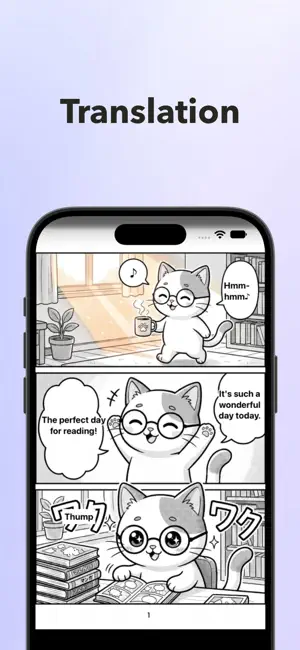
Access your manga from NAS and enjoy immersive two-page spreads with ZIP, CBZ, RAR, and CBR support — all in a next-generation manga viewer. ◆ Manga OCR & Translation ◎ On-Device Translation Translate manga directly on your device using Apple Intelligence. Your manga, your privacy. ◎ Cloud Translation (Beta) Translate recognized text using AI-powered cloud servers. Page images are never uploaded. An internet connection is required. Supported Languages Arabic (العربية) Chinese (Simplified) (简体中文) Chinese (Traditional) (繁體中文) Danish (Dansk) Dutch (Nederlands) French (Français) German (Deutsch) Hindi (हिन्दी) Indonesian (Bahasa Indonesia) Italian (Italiano) Japanese (日本語) Korean (한국어) Norwegian (Norsk) Polish (Polski) Portuguese (Brazil) (Português) Portuguese (Portugal) (Português) Russian (Русский) Spanish (Mexico) (Español) Spanish (Spain) (Español) Swedish (Svenska) Thai (ไทย) Turkish (Türkçe) Ukrainian (Українська) Vietnamese (Tiếng Việt) ◆ Two-Page Spreads, Perfected ◎ Designed for Immersive Reading Manga Folio was built from the ground up with one goal: to make two-page spreads look as beautiful and accurate as possible. ◎ Flexible Page Pairing If a page doesn't pair correctly, switch to single-page display or manually adjust page pairings. Save your custom layouts for future reading. ◎ Right-to-Left & Left-to-Right Reading Enjoy Japanese manga in right-to-left order or Western comics in left-to-right order. Switch reading direction whenever you need. ◆ A Smooth Reading Experience ◎ Fast & Fluid Rendering Optimized with SwiftUI and modern graphics processing for responsive page turning and smooth zooming, with minimal flickering and unnecessary loading screens. ◆ Powerful Library & File Support ◎ Wide File Format Support Import ZIP, CBZ, RAR, and CBR files, or image folders directly. No manual extraction required. ◎ Import from NAS & PC Connect to your NAS or PC via SMB and import manga directly into Manga Folio. ◆ Free & Pro Plans ◎ Read for Free Free plan limited to 5 books. ◎ Manga Folio Pro Unlock unlimited books with Manga Folio Pro. ◆ On-Device AI Features ◎ AI Super-Resolution Enhance older, low-resolution manga scans with on-device AI to make them sharper and more detailed. ◎ AI-Powered Automatic Organization Automatically organize your manga into groups by title using Apple Intelligence, right on your device. ◆ Your Manga, Your Privacy Your manga library stays on your devices. Cloud Translation sends recognized text to the server, not page images. No banner ads. No pop-ups. No distractions. Just your manga and a beautiful reading experience. Experience manga the way it was meant to be read, with stunning two-page spreads, ultra-smooth zooming, and fast page turning. Download Manga Folio and experience the difference for yourself. Terms of Use https://www.apple.com/legal/internet-services/itunes/dev/stdeula/
What’s new
Version 3.9 · Updated October 23, 2026
- Added full support for iPhone Duo. - Faster speech bubble translation and OCR with significantly reduced initial delay. - Automatic NAS and SMB server discovery on local Wi-Fi via Bonjour. - Improved ZIP and CBZ file compatibility and filename encoding support. - New "Add Book" drag-and-drop card in the library on macOS. - "Read from Beginning" button to easily restart completed books. - Faster, more reliable iCloud sync with lightweight metadata. - Reader navigation refinements and overall performance improvements.
App privacy
The developer, Hirotoshi MAKINO, reported these privacy practices to Apple.
Data Not Linked to You
The following data, which may be collected but is not linked to your identity, may be used for the following purposes:
- Identifiers: Device ID
- Usage Data: Product Interaction
Used for: App Functionality
Alternatives to Manga Folio : NAS Comic Viewer
Looking for apps like Manga Folio : NAS Comic Viewer? Here are 6 similar apps on the App Store. The highest rated is Comicbreath: Comic Book Reader (5.0/5), and all 6 are free to download.
-
 Panelly: Manga & Comic Reader
-
 Comicbreath: Comic Book Reader
5.0
-
 Versa: Comic & Manga Reader
-
 Grafumi: Book & Comic Reader
-
 Comic Readr
-
 NicoComic
5.0
| App | Rating | Price | Last updated | Compare |
|---|---|---|---|---|
| Manga Folio : NAS Comic Viewer | – | Free | October 23, 2026 | |
| Panelly: Manga & Comic Reader | – | Free | Nov 1, 2026 | Compare |
| Comicbreath: Comic Book Reader | 5.0 / 5 (1) | Free | Nov 6, 2026 | Compare |
| Versa: Comic & Manga Reader | – | Free | Oct 31, 2026 | Compare |
| Grafumi: Book & Comic Reader | – | Free | Oct 24, 2026 | Compare |
| Comic Readr | – | Free | Sep 16, 2026 | Compare |
| NicoComic | 5.0 / 5 (1) | Free | Oct 27, 2026 | Compare |