

Comicbreath: Comic Book Reader
JAEBAEK LEE Book iPhoneiPadiPod touch
Comicbreath: Comic Book Reader is a free Book app for iPhone and iPad by JAEBAEK LEE. Rated 5.0/5 from 1 ratings. Requires iOS 17.0.
- Rating
- 5.0
- 1 ratings
- Price
- Free
- on the App Store
- Size
- 20 MB
- Age 4+
- Updated
- Nov 3
- 2026 · v2026.11.03
Screenshots


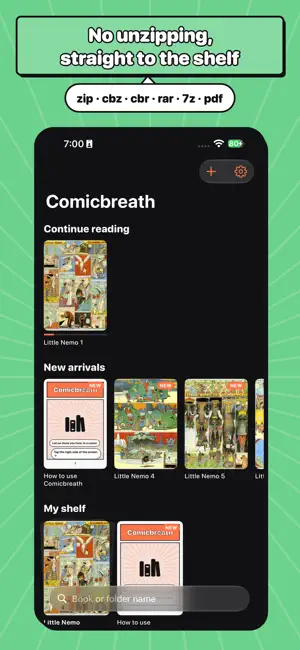
About Comicbreath: Comic Book Reader
Your comic shelf, with no ads: drop files in and start reading. No unzipping. ■ Any file, in the right order · zip, cbz, cbr, rar, 7z, cb7, tar, pdf and picture folders · Natural page order: 1, 2, 10, never 1, 10, 2 · File names from Windows, Korean and Japanese PCs stay readable · webp, gif and heic pictures too ■ Many ways to bring books in · Import files, the Files app, Mac Finder · Link USB drives, external SSDs, NAS, iCloud and Google Drive folders and read them in place · Drag and drop from a computer over Wi-Fi · Get comics straight from your NAS or comic server (Komga, Kavita, OPDS) ■ Read your way · Two-page spreads on iPad and Mac in landscape and on iPhone Duo, with no gap in the middle · Spread off by one? Fix it in one tap with “Cover on its own” · Manga right to left, webtoons as a vertical scroll (per book) · Double-tap to zoom; while zoomed, taps never turn the page by mistake · On iPhone, panels gathered to fit or one panel at a time, so the text stays big ■ Many ways to turn pages · Tap the sides or swipe · Volume buttons, Bluetooth keyboards and page turners, Apple Pencil double-tap · Moves on to the next volume by itself ■ Easy on the eyes at night · Warm, black & white, gray veil · Darker than the iPhone's lowest brightness · Your music keeps playing while you read ■ A tidy shelf · Continue reading, favorites, new arrivals · Folders become series, with how many volumes are left · Read marks, start over any time · A Keep Reading widget takes you back to your page from the Home Screen ■ Comicbreath Pro (pay once, keep forever) · iCloud shelf: comics you add and your page appear on iPhone Duo, iPad and Mac too · Trim margins: cut white borders off scans so the art is bigger · Deeper and sharper pages, page curl, tap areas your way, shelf styles Reading is completely free. No ads.
What’s new
Version 2026.11.03 · Updated November 3, 2026
· Turning the iPad sideways and back, or leaving for another app, keeps you on the same page · Cleaner Pro screen on unfolded foldables
App privacy
The developer, JAEBAEK LEE, reported these privacy practices to Apple.
Data Not Linked to You
The following data, which may be collected but is not linked to your identity, may be used for the following purposes:
- Purchases: Purchase History
- Location: Coarse Location
- Identifiers: Device ID
- Usage Data: Product Interaction
Used for: Analytics, App Functionality
Alternatives to Comicbreath: Comic Book Reader
Looking for apps like Comicbreath: Comic Book Reader? Here are 6 similar apps on the App Store.
-
 SSUKView - Comic, eBook Reader
-
 Grafumi: Book & Comic Reader
-
 PixComic - Manga Reader
-
 OneComic: Manga & Comics
-
 Manga Folio : NAS Comic Viewer
-
 Anyview - Comic & Book Reader
| App | Rating | Price | Last updated | Compare |
|---|---|---|---|---|
| Comicbreath: Comic Book Reader | 5.0 / 5 (1 rating) | Free | November 3, 2026 | |
| SSUKView - Comic, eBook Reader | – | Free | Oct 26, 2026 | Compare |
| Grafumi: Book & Comic Reader | – | Free | Oct 24, 2026 | Compare |
| PixComic - Manga Reader | – | Free | Aug 25, 2026 | Compare |
| OneComic: Manga & Comics | – | Free | Oct 12, 2026 | Compare |
| Manga Folio : NAS Comic Viewer | – | Free | Oct 23, 2026 | Compare |
| Anyview - Comic & Book Reader | – | Free | Nov 3, 2026 | Compare |