

PixComic - Manga Reader
PIXDYNE PTY LTD Book iPhoneiPadiPod touch
PixComic - Manga Reader is a free Book app for iPhone and iPad by PIXDYNE PTY LTD. Requires iOS 17.0. Updated August 25, 2026.
- Price
- Free
- on the App Store
- Size
- 8 MB
- Age 4+
- Updated
- Aug 25
- 2026 · v1.0
Screenshots


About PixComic - Manga Reader
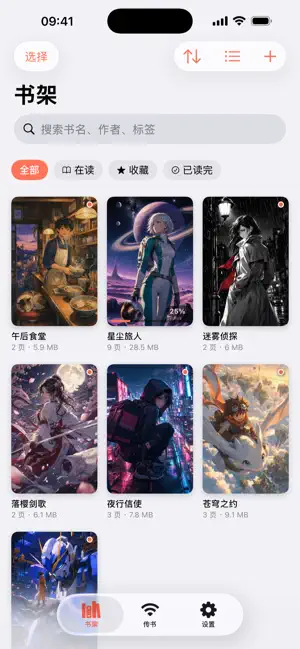
PixComic is a local comic reader. It does not provide any comics — it reads the archives you already own, and it reads them fast. WI-FI TRANSFER, NO CABLE Start the server on your phone, open the address it shows in your computer's browser, and drag your files in. Uploads are chunked and resumable, so a multi-gigabyte archive survives a dropped connection, a locked screen or a closed tab — it picks up where it left off. The same page lets you browse what is on the device, pull a book back to your computer, delete one, and check free space. Importing from the Files app, AirDrop and "Open in" from other apps all work too. EVERY FORMAT, NO MOJIBAKE CBZ / ZIP, CBR / RAR, PDF, and plain folders of images. Scan releases from Japan and Greater China routinely store filenames in Shift-JIS or GBK rather than UTF-8, which turns into garbage text in most readers. PixComic detects the encoding automatically, and sorts chapters naturally — page 2 comes before page 10, not after it. THREE READING MODES · Manga: right-to-left, automatic two-page spreads in landscape, cover on its own page so the spreads line up the way print does · Standard: left-to-right · Webtoon: seamless vertical scrolling, pinch to set the page width A wide double-page scan can also be split into two screens, so spreads are comfortable to read on a phone held upright. BUILT TO STAY SMOOTH Every image is decoded off the main thread and downsampled to your screen, with pages preloaded in both directions. Page dimensions are measured once in the background — you can read the whole time it runs — and cached, so reopening the same book skips the rescan, the "Analyzing pages" strip along the bottom, and the one relayout that lands when it finishes. FOUR THEMES Standard, Sci-fi, Pixel and Paper. Not just a tint — corners, borders, typeface and light/dark all change together. ALSO Double-tap for a quick zoom and pinch all the way to native pixels (6x at most on very large scans), thumbnail navigation, bookmarks, a scrubber with page preview, automatic border trimming, screen-awake and brightness lock. PixComic is free and ad-supported: a banner on the shelf and an occasional interstitial before a book opens — never while you are reading.
App privacy
The developer, PIXDYNE PTY LTD, reported these privacy practices to Apple.
Data Used to Track You
The following data may be used to track you across apps and websites owned by other companies:
- Identifiers: Device ID
Data Linked to You
The following data, which may be collected and linked to your identity, may be used for the following purposes:
- Location: Coarse Location
- Identifiers: Device ID
- Usage Data: Product Interaction, Advertising Data
Used for: Third-Party Advertising, Developer’s Advertising or Marketing, Analytics
Data Not Linked to You
The following data, which may be collected but is not linked to your identity, may be used for the following purposes:
- Diagnostics: Performance Data, Other Diagnostic Data, Crash Data
Used for: Third-Party Advertising, Developer’s Advertising or Marketing, Analytics
Alternatives to PixComic - Manga Reader
Looking for apps like PixComic - Manga Reader? Here are 6 similar apps on the App Store. The highest rated is Ice Comic - Local Image Reader (4.9/5), and all 6 are free to download.
-
 ComicJet: Comic & Manga Reader
-
 爱看漫阅 - NAS书架&本地漫画阅读器
-
 TinyReaderHub
1.0
TinyReaderHub
1.0
-
 EPUB Reader - JustRead
4.7
EPUB Reader - JustRead
4.7
-
 Ice Comic - Local Image Reader
4.9
Ice Comic - Local Image Reader
4.9
-
 Yomu: Manga & Webtoon Reader
1.0
Yomu: Manga & Webtoon Reader
1.0
| App | Rating | Price | Last updated | Compare |
|---|---|---|---|---|
| PixComic - Manga Reader | – | Free | August 25, 2026 | |
| ComicJet: Comic & Manga Reader | – | Free | Sep 26, 2026 | Compare |
| 爱看漫阅 - NAS书架&本地漫画阅读器 | – | Free | Sep 22, 2026 | Compare |
| TinyReaderHub | 1.0 / 5 (1) | Free | Sep 6, 2026 | Compare |
| EPUB Reader - JustRead | 4.7 / 5 (42) | Free | Sep 29, 2026 | Compare |
| Ice Comic - Local Image Reader | 4.9 / 5 (36) | Free | Sep 14, 2026 | Compare |
| Yomu: Manga & Webtoon Reader | 1.0 / 5 (1) | Free | Sep 29, 2026 | Compare |