

ProjectCheck Timetracking
Software by Design Business
Log project time on your Nextcloud ProjectCheck App.
- Downloads
- 11+
- on Google Play
- Price
- Free
- No in-app purchases
- Updated
- Sep 16
- 2026 · v1.2.16
Screenshots


About ProjectCheck Timetracking
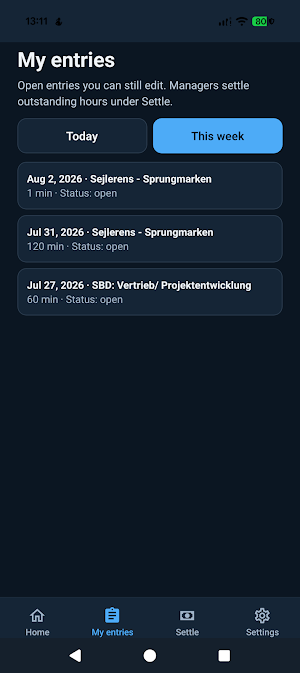
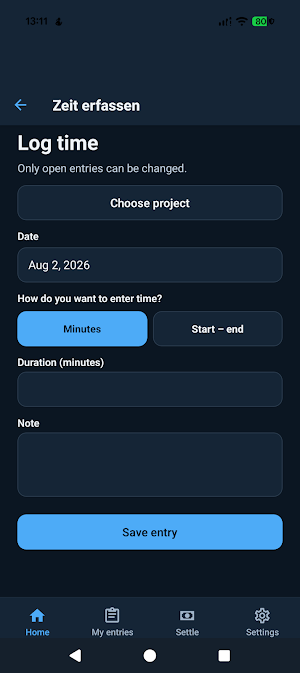
rojectCheck is the official mobile companion for project time on your organisation’s Nextcloud. Pick a project, enter duration or use the on-device timer, add a short note, and save — your server stays the source of truth.
SEARCHING FOR
Project time tracking Nextcloud, billable hours app, project hours mobile, self-hosted project time, ProjectCheck companion, DACH project Zeiterfassung on Nextcloud.
WHO IT IS FOR
• People who log project hours on site or between meetings
• Teams that already run ProjectCheck on Nextcloud
• Organisations that keep project time on their own Nextcloud (DACH and beyond)
WHAT YOU NEED
• Your organisation’s Nextcloud server (HTTPS)
• The ProjectCheck Nextcloud app installed and enabled
• A licensed ProjectCheck mobile seat assigned to your user — ask your IT
• The Play app itself is free; seats are billed to organisations
WHAT THE APP DOES
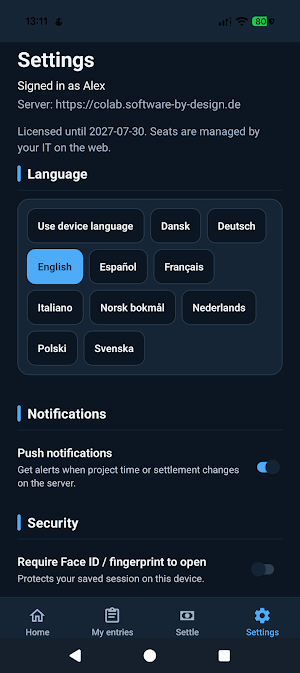
• Official Nextcloud Login Flow v2 — your main password is never stored in the app
• Log time on projects you can access
• Optional on-device timer (start → stop → save)
• Edit or delete your own open entries
• Read-only rate preview from the server
PRIVACY & SECURITY
• No third-party analytics or advertising SDKs
• Time entries stay on your Nextcloud — not on Software by Design servers
• HTTPS required in production builds
• Only a Nextcloud app password is kept, in the device secure store
ALSO AVAILABLE
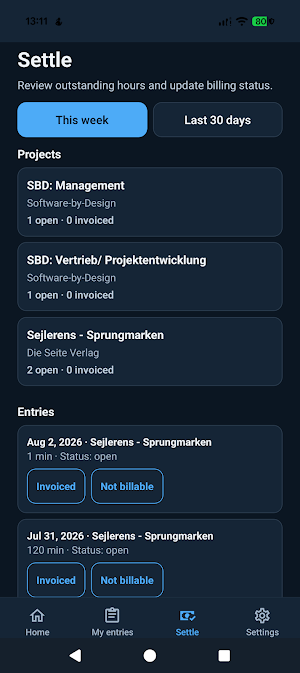
• ProjectCheck web app on Nextcloud (invoices, settlement, and admin stay on the web)
• Sibling: ArbeitszeitCheck — working-time clock / breaks (separate app; not a substitute)
• Product site: https://nextcloud.software-by-design.de/en/apps/projectcheck.html
IMPORTANT
No hosted trial account is included. Enter your organisation’s Nextcloud URL. Working-time clock, invoices, and settlement are not in this app. Your organisation purchases yearly mobile seats and assigns them in ProjectCheck → Settings → License. Without a seat, the app shows a clear message to contact IT.
Publisher: Software by Design GbR, Schleswig, Germany · [email protected]
SEARCHING FOR
Project time tracking Nextcloud, billable hours app, project hours mobile, self-hosted project time, ProjectCheck companion, DACH project Zeiterfassung on Nextcloud.
WHO IT IS FOR
• People who log project hours on site or between meetings
• Teams that already run ProjectCheck on Nextcloud
• Organisations that keep project time on their own Nextcloud (DACH and beyond)
WHAT YOU NEED
• Your organisation’s Nextcloud server (HTTPS)
• The ProjectCheck Nextcloud app installed and enabled
• A licensed ProjectCheck mobile seat assigned to your user — ask your IT
• The Play app itself is free; seats are billed to organisations
WHAT THE APP DOES
• Official Nextcloud Login Flow v2 — your main password is never stored in the app
• Log time on projects you can access
• Optional on-device timer (start → stop → save)
• Edit or delete your own open entries
• Read-only rate preview from the server
PRIVACY & SECURITY
• No third-party analytics or advertising SDKs
• Time entries stay on your Nextcloud — not on Software by Design servers
• HTTPS required in production builds
• Only a Nextcloud app password is kept, in the device secure store
ALSO AVAILABLE
• ProjectCheck web app on Nextcloud (invoices, settlement, and admin stay on the web)
• Sibling: ArbeitszeitCheck — working-time clock / breaks (separate app; not a substitute)
• Product site: https://nextcloud.software-by-design.de/en/apps/projectcheck.html
IMPORTANT
No hosted trial account is included. Enter your organisation’s Nextcloud URL. Working-time clock, invoices, and settlement are not in this app. Your organisation purchases yearly mobile seats and assigns them in ProjectCheck → Settings → License. Without a seat, the app shows a clear message to contact IT.
Publisher: Software by Design GbR, Schleswig, Germany · [email protected]
What’s new
Version 1.2.16 · Updated September 16, 2026
ProjectCheck Mobile 1.2.16 for Google Play. • Connect to self-hosted Nextcloud with your own Root CA (enterprise / private PKI) • Clearer certificate hints on the login screen when HTTPS fails • TLS validation stays enabled — only user-installed CAs you trust on the device are accepted Install your Root CA under VPN and apps (not Wi‑Fi only), update the app, then sign in again. Requires ProjectCheck server 2.0.86 or newer and a PC2 mobile seat.
Alternatives to ProjectCheck Timetracking
Looking for apps like ProjectCheck Timetracking? Here are 6 similar Android apps on Google Play. 4 of the 6 are free to download.
-
InventoryCheck
-
DutyCheck Roster
-
BudgetCheck
-
AudioCheck Audiobook Player
-
ArbeitszeitCheck Terminal
-
SeaCheck
| App | Rating | Price | Installs | Last updated | Compare |
|---|---|---|---|---|---|
| ProjectCheck Timetracking | – | Free | 10+ | Sep 16, 2026 | |
| InventoryCheck | – | Free | 5+ | Sep 13, 2026 | Compare |
| DutyCheck Roster | – | Free | 5+ | Sep 13, 2026 | Compare |
| BudgetCheck | – | 2.39 USD | 10+ | Sep 12, 2026 | Compare |
| AudioCheck Audiobook Player | – | 2.39 USD | 10+ | – | Compare |
| ArbeitszeitCheck Terminal | – | Free | 10+ | Sep 17, 2026 | Compare |
| SeaCheck | – | Free | 0+ | – | Compare |