ArbeitszeitCheck Terminal
Nextcloud foyer clock for DACH: NFC, USB badge, or PIN on tablets.
About ArbeitszeitCheck Terminal
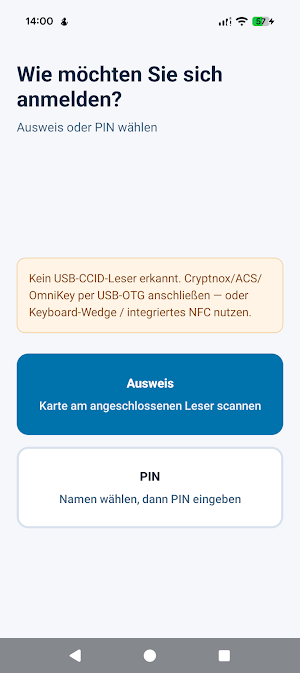
ArbeitszeitCheck Terminal is the official foyer / entrance time clock tablet app for Nextcloud ArbeitszeitCheck. Employees clock in and out with an NFC badge, USB or Bluetooth card reader, or name + PIN — working time stays on your organisation’s self-hosted Nextcloud, not in our cloud.
SEARCHING FOR
NFC time clock, foyer attendance tablet, entrance stempeluhr, badge RFID clock-in, PIN kiosk for Nextcloud, USB CCID reader tablet, self-hosted HR time clock, building entrance time tracking, DACH ArbZG AZG ArG.
WHO IT IS FOR
• IT / HR: pair tablets, assign badges and PINs, enroll cards at the device, manage terminal slots
• Employees: clock in/out and breaks at the door — no personal Nextcloud login on the tablet
• Organisations already running ArbeitszeitCheck on Nextcloud (EU / DACH: ArbZG, AZG, ArG)
WHAT YOU NEED
• Your organisation’s Nextcloud server (HTTPS)
• ArbeitszeitCheck installed and enabled on that server
• Terminal organisation license (device slots on the server — B2B, ask your IT)
• IT setup: enable kiosk, create terminal pairing code, allow employees for kiosk access
License & pricing: https://nextcloud.software-by-design.de/en/apps/arbeitszeitcheck.html#pricing
WHAT THE APP DOES
• One-time tablet pairing with an admin pairing code
• Built-in NFC with continuous Android Reader Mode for reliable foyer taps
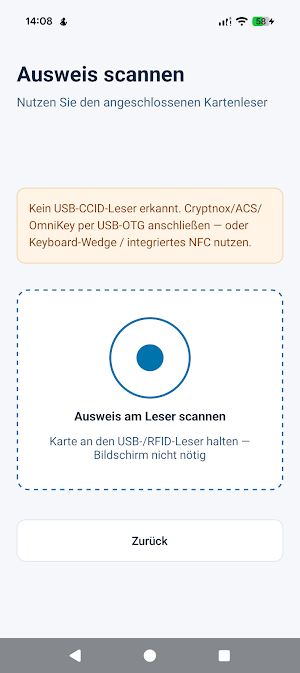
• USB CCID / PC/SC readers (Cryptnox, ACS ACR122U, OmniKey, and similar) via USB-OTG
• USB or Bluetooth keyboard-wedge RFID readers
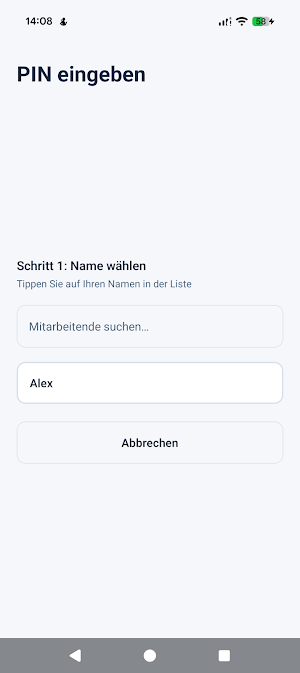
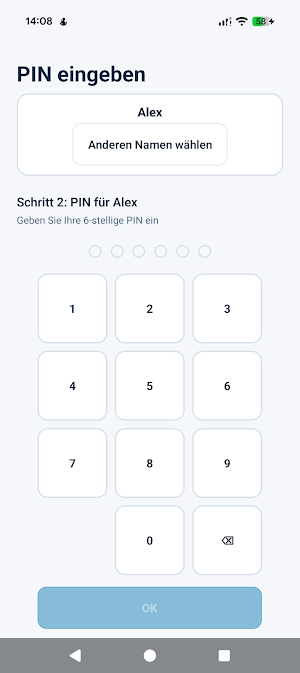
• Optional name search + PIN when badges are not used
• Clock in, clock out, and breaks — synced with web and ArbeitszeitCheck Mobile
• IT can assign a new badge by holding it at the tablet during admin enrollment
• Protected setup area with a device admin PIN (not visible to employees)
• Offline detection — scans pause until the connection returns
• Large touch targets and UI in 10 languages for foyer use
• No employee Nextcloud password stored on the device
PRIVACY & SECURITY
• No third-party analytics or advertising SDKs
• Working time stays on your Nextcloud — not on Software by Design servers
• RFID UIDs hashed server-side (HMAC)
• Terminal token stored in Android secure storage (Keystore)
• HTTPS required in production builds
ALSO AVAILABLE
• ArbeitszeitCheck — employee phone app for the same Nextcloud server (separate Play app)
• Open-source server app (AGPL): https://apps.nextcloud.com/apps/arbeitszeitcheck
• Product site: https://nextcloud.software-by-design.de/en/
IMPORTANT
No hosted demo account is included. Your IT provides the server URL, pairing code, and badges or PINs. Legal compliance (e.g. ArbZG, AZG, ArG) depends on your server country profile and processes.
ArbeitszeitCheck Terminal details
ArbeitszeitCheck Terminal is a free Business app for Android with 5+ installs on Google Play. It was released on July 21, 2026 and last updated on September 17, 2026. It's developed by Software by Design. It requires Android 7.0 or later.
- Category
- Business
- Installs
- 5+
- Price
- Free
- In-app purchases
- No
- Ads
- No ads
- Current version
- 1.2.0
- Requires Android
- 7.0
- Content rating
- Everyone
- Released
- July 21, 2026
- Last updated
- September 17, 2026
- Developer
- Software by Design
What’s new in ArbeitszeitCheck Terminal
ArbeitszeitCheck Terminal 1.2.0 • Android 15 Play compliance: edge-to-edge, R8 optimization, bitmap loading • Large-screen foyer tablets stay unlocked (orientation / resize) • Store-kit and reliability hardening for production terminals See in-app About for server compatibility.
Version 1.2.0 · Updated September 17, 2026
