
Codeframe: Code Screenshots
Scanner Techs Productivity
Turn code into beautiful images. 30 themes, 27 backdrops, one-tap export.
- Downloads
- 50+
- on Google Play
- Price
- Free
- No in-app purchases
- Updated
- Aug 30
- 2026 · v4.0.0
Screenshots
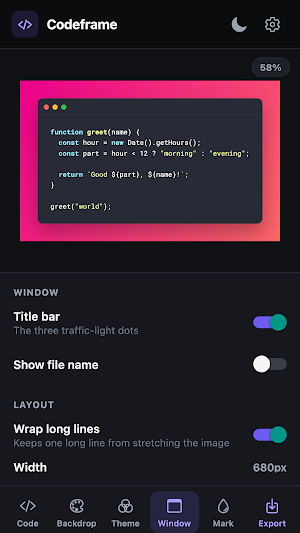


About Codeframe: Code Screenshots
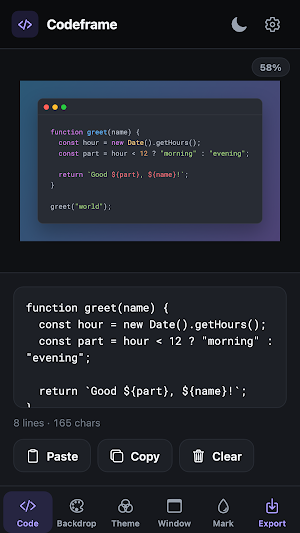
Codeframe renders the code you paste as a clean, syntax-highlighted image — ready for a pull request, a blog post, a slide deck or a tweet. No account, no upload, no waiting. Everything happens on your device.
Paste your code. Pick a theme and a backdrop. Export. That's the whole app.
HIGHLIGHTING THAT KNOWS YOUR LANGUAGE
• 35 languages — JavaScript, TypeScript, Python, Java, Kotlin, Swift, Go, Rust, C, C++, C#, PHP, Ruby, Dart, Scala, Elixir, Haskell, SQL, Bash, JSON, YAML, HTML, CSS, Markdown, Dockerfile and more
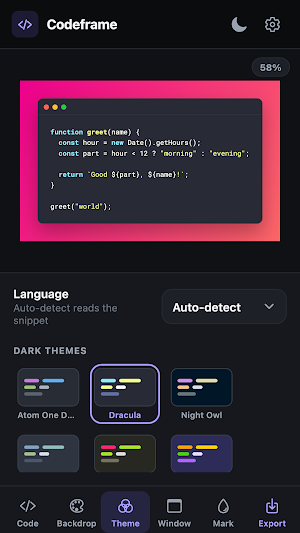
• Auto-detect reads the snippet and picks the language for you
• 30 editor themes, dark and light — Atom One Dark, Dracula, Nord, Night Owl, Monokai, Gruvbox, Solarized, Shades of Purple, GitHub, Xcode and more
MAKE IT YOURS
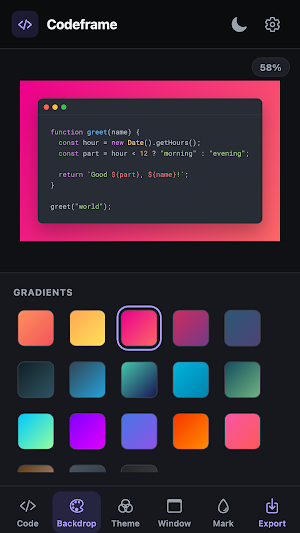
• 18 gradient and 8 solid backdrops
• Adjustable padding and corner radius
• Window title bar with an optional file name
• Line numbers
• Roboto Mono, Consolas or your system monospace, at any size
• Line wrapping with an adjustable width, so one long line never stretches the image into an unreadable strip
WATERMARK YOUR WORK
Add your name or your handle, set its size, opacity and rotation, then drag it anywhere on the image.
EXPORT ANYWHERE
• Save straight to your gallery
• Share to any app
• Copy the image to your clipboard
• Pick "None" as the backdrop for a transparent PNG that drops cleanly into slides and documents
BUILT TO STAY OUT OF THE WAY
• Free, and no ads
• No account, no sign-in
• Fully offline — your code never leaves your device
• Light, dark, or follow your system
• A layout built for tablets, not a stretched phone app
Codeframe is for anyone who has pasted code into a chat and watched the formatting fall apart.
What’s new
Version 4.0.0 · Updated August 30, 2026
Snap Here is now Codeframe — a complete rebuild. • Live preview — see the result as you type • 35 languages with auto-detect • 30 code themes, 27 backdrops, line numbers, line wrapping • Watermark: size, opacity, rotation, drag to place • Save, share or copy the image, or export a transparent PNG • Light/dark themes and a real tablet layout Fixed: custom fonts never applied and saved settings were lost on restart. Your existing settings carry over.
User reviews
Making my work more easier than ever. Undoubtedly an amazing application it is. Now I can neatly show my code and post or blog about it. Worth it !!

Amazing application for mobile phones, UI needs a little more improvements. Rest is all good

Functionality is good just need attractive UI
Alternatives to Codeframe: Code Screenshots
Looking for apps like Codeframe: Code Screenshots? Here are 6 similar Android apps on Google Play. The highest rated is Heroic | The Training Platform (4.7/5), and all 6 are free to download.
-
Heroic | The Training Platform 4.7
-
EdrawMind: AI Mind map & Note 4.1
-
CodeGym: learn Java 4.6
-
Letterly: Write by Voice & AI 4.6
-
TouchNote: Gifts & Cards 4.7
-
myReach - AI Assistant 4.0
| App | Rating | Price | Installs | Last updated | Compare |
|---|---|---|---|---|---|
| Codeframe: Code Screenshots | – | Free | 50+ | Aug 30, 2026 | |
| Heroic | The Training Platform | 4.7 / 5 | Free | 10,000+ | Oct 26, 2026 | Compare |
| EdrawMind: AI Mind map & Note | 4.1 / 5 | Free | 500,000+ | Jul 1, 2026 | Compare |
| CodeGym: learn Java | 4.6 / 5 | Free | 100,000+ | Sep 28, 2026 | Compare |
| Letterly: Write by Voice & AI | 4.6 / 5 | Free | 100,000+ | Sep 16, 2026 | Compare |
| TouchNote: Gifts & Cards | 4.7 / 5 | Free | 5,000,000+ | – | Compare |
| myReach - AI Assistant | 4.0 / 5 | Free | 10,000+ | Aug 18, 2026 | Compare |
Similar apps on Google Play
- Heroic | The Training Platform
- EdrawMind: AI Mind map & Note
- CodeGym: learn Java
- Letterly: Write by Voice & AI
- TouchNote: Gifts & Cards
- myReach - AI Assistant
- Spck Editor / Git Client
- IFTTT - Automate work and home
- The RockED App
- Fabric: your second brain
- GitMind: AI Mind Mapping App
- TAP Kiln Control Mobile
- KYRO: Storm, Linemen & VM
- Skit Premium - apps manager
- Private Screenshots
- Socie
- Pocket Prep IT & Cybersecurity
- QuickEdit Text Editor Pro
- Aegis Authenticator - 2FA App
- IronVest - Security & Privacy
- Mindbook Pro: Markdown Notes
- Taskade - One Prompt. One App.
- WaiverForever - Online Waiver
- SCRIBZEE®
- Nested Folder Notes - Folino