
Red Screen Night Filter
Moki lab Health & Fitness
Red light screen filter for night use, reading, astronomy, and low light.
- Downloads
- 190+
- on Google Play
- Price
- $1.39
- No in-app purchases
- Updated
- Apr 18
- 2026 · v2.6
Screenshots
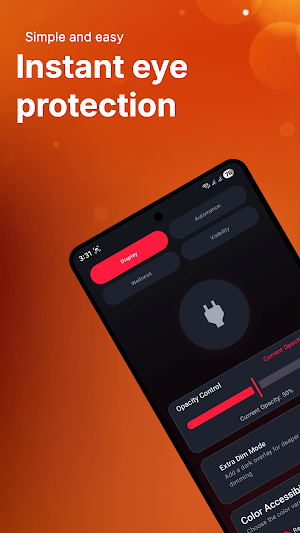
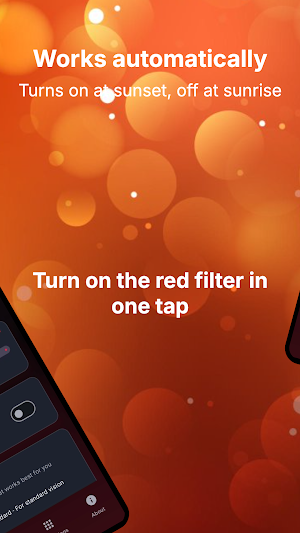
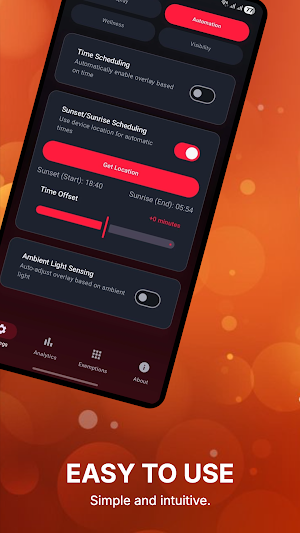
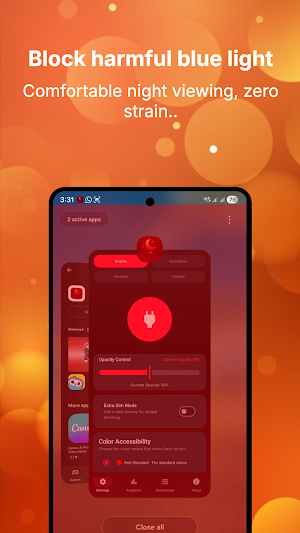


About Red Screen Night Filter
Add a red tint over your screen to make your display feel less harsh in the dark. Whether you are reading before bed, checking your phone at night, using star map apps outdoors, or working in a dim room, Red Screen Night Filter provides a quick and easy way to create a calmer screen experience.
This app is designed for users who want a simple red screen overlay without ads, accounts, subscriptions, or unnecessary clutter. It is a one-time purchase built to do one job well: apply a red night filter when you need it.
Why choose Red Screen Night Filter?
• Red light screen filter
Apply a red tint overlay to your screen for night use and dark environments.
• Useful for bedtime reading
Use a red screen filter while reading, browsing, or checking messages at night.
• Great for astronomy
Useful when viewing star maps, telescope apps, moon phase apps, and astronomy guides.
• Helpful for camping and outdoor use
Use your phone with a red-tinted display while camping, hiking, or stargazing.
• Low-light friendly
Create a softer red display effect when a normal screen feels too bright.
• No ads
Enjoy the app without popups, banners, or video ads.
• One-time purchase
Pay once with no subscriptions or hidden upgrades.
• No account required
Start using the filter immediately without signing up.
• Simple controls
Adjust the filter to match your environment and comfort level.
• Lightweight and focused
Built as a simple red screen utility without unnecessary features.
Popular uses:
• Night phone use
• Bedtime reading
• Reading in dark rooms
• Astronomy and stargazing
• Star map apps
• Camping and outdoor use
• Night shift routines
• Gaming in low light
• Red screen overlay
• Red night mode
• Blue light filter alternative
• Dark room phone use
• Late-night browsing
Red Screen Night Filter is ideal when a normal bright display feels too strong. Instead of relying on a complicated screen dimmer or generic blue light filter, this app focuses on a simple red screen overlay for users who prefer red light in dark environments.
The app is designed to be fast and easy. Open Red Screen Night Filter, adjust the filter, and create a red-tinted display in seconds. No account, ads, or complicated setup required.
Why paid?
Red Screen Night Filter is a paid app so it can remain clean, simple, and free from intrusive advertising. Many free screen filter apps rely on ads or distracting monetization. This app is built for users who prefer a straightforward one-time purchase.
No ad interruptions, no subscription prompts, and no unnecessary login screens. Just a simple red screen night filter whenever you need it.
Privacy first:
Red Screen Night Filter does not require an account. It is designed as a simple screen filter utility that works without personal profiles or unnecessary setup.
Who is this app for?
Red Screen Night Filter is useful for readers, campers, astronomy enthusiasts, night shift workers, gamers, students, and anyone who wants a simple red screen overlay for low-light use.
Important note:
Red Screen Night Filter is not a medical app and does not diagnose, treat, cure, or prevent any medical condition. It does not make medical claims about sleep, eyesight, or health. The app simply applies a red tint overlay to your screen for personal comfort and low-light use.
Download Red Screen Night Filter today and enjoy a clean, simple, no-ads red light screen filter whenever you need it.
What’s new
Version 2.6 · Updated April 18, 2026
• Fixed Sunset/Sunrise Scheduling: Resolved an issue where location-based automation would fail to trigger if the manual schedule was disabled. • Improved Background Reliability: Enhanced the scheduling logic to ensure overlay transitions occur accurately even after device reboots. • UI Clarity: The automation section now correctly displays calculated sunset and sunrise times when location scheduling is active.
Alternatives to Red Screen Night Filter
Looking for apps like Red Screen Night Filter? Here are 6 similar Android apps on Google Play. The highest rated is Breethe - Sleep & Meditation (4.6/5), and all 6 are free to download.
-
Pzizz - Sleep, Nap, Focus 4.4
-
BeeDone - Gamified To-Do List 3.9
-
One Deep Breath: Breathwork 4.5
-
Glance – Shop with AI 4.2
-
PhotoWear Classic Watch Face 4.2
-
Breethe - Sleep & Meditation 4.6
| App | Rating | Price | Installs | Last updated | Compare |
|---|---|---|---|---|---|
| Red Screen Night Filter | – | $1.39 | 100+ | Apr 18, 2026 | |
| Pzizz - Sleep, Nap, Focus | 4.4 / 5 | Free | 500,000+ | Jul 27, 2026 | Compare |
| BeeDone - Gamified To-Do List | 3.9 / 5 | Free | 10,000+ | Oct 30, 2026 | Compare |
| One Deep Breath: Breathwork | 4.5 / 5 | Free | 100,000+ | Sep 15, 2026 | Compare |
| Glance – Shop with AI | 4.2 / 5 | Free | 100,000+ | Sep 12, 2026 | Compare |
| PhotoWear Classic Watch Face | 4.2 / 5 | Free | 5,000,000+ | Dec 28, 2025 | Compare |
| Breethe - Sleep & Meditation | 4.6 / 5 | Free | 1,000,000+ | – | Compare |
Similar apps on Google Play
- Pzizz - Sleep, Nap, Focus
- BeeDone - Gamified To-Do List
- One Deep Breath: Breathwork
- Glance – Shop with AI
- PhotoWear Classic Watch Face
- Breethe - Sleep & Meditation
- MeeAww-AI Photo & Video Editor
- Sleep Tracker - Sleep Cycle
- YourCoach - Health Coaches
- Manual Camera DSLR (Lite)
- LoFi Cam: Film Digital Camera
- Chaos Audio: Effects & Amp AI
- mcpro24fps manual video camera
- Cameringo Lite. Filters Camera
- RosettaMind
- Optimalprint: Photo Gifts
- Lensa: photo editor & AI art
- Photo Editor Pro - Square Pic
- Starii-AI Beauty Editor
- PicWish: AI Photo Editor
- Lift: AI Photo Editor
- Barbell Medicine
- ROAR Beauty Parlor
- MiX Camera for Mi Camera
- Camera FV-5 Lite
- Sleep Number
- Framelapse 2 Time Lapse Camera
- BlackVue
- PhotoPills
- HD Camera
- Presets For LR - Photo Filters
- Solocator - GPS Field Camera
- FIMO - Analog Camera
- Avigilon Unity Video
- Sportvibez
- SelfieCity
- LightX AI Photo Editor Retouch
- Protake - Mobile Cinema Camera
- YouCam Video: AI Video Editor
- Polarr: Photo Filters & Editor