
MeasureMate AR Ruler
Tools Contains ads
Measure distance, height, paths, circles, and areas with AR camera anchors.
- Downloads
- 35+
- on Google Play
- Price
- Free
- No in-app purchases
- Updated
- Aug 25
- 2026 · v1.0.0
Screenshots
About MeasureMate AR Ruler
Measure everyday objects and spaces with real-world AR camera anchors.
MeasureMate AR Ruler combines a focused camera workspace with clear geometry,
unit conversion, and private on-device results.
FIVE AR MEASUREMENT MODES
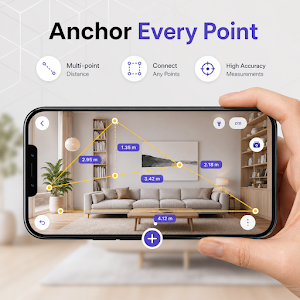
• Distance — place two anchors for a direct point-to-point length
• Polyline — connect up to six anchors and total every segment
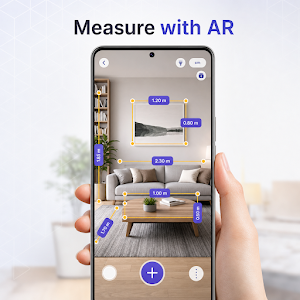
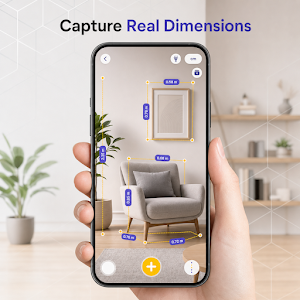
• Rectangle — measure adjacent sides, area, and perimeter
• Circle — measure diameter, radius, circumference, and area
• Height — estimate gravity-aligned vertical change between two anchors
CLEAR CAMERA WORKSPACE
Move your phone slowly to let ARCore find a textured horizontal or vertical
surface. Place numbered yellow anchors, follow the dimension lines, undo the last
point, reset the geometry, and review the live result before saving.
METRIC AND IMPERIAL UNITS
Switch between meters/centimeters and feet/inches. Each presentation is derived
from the same meter-based anchor geometry, so saved projects remain consistent.
PRIVATE PROJECT HISTORY
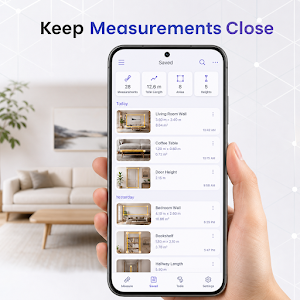
Save useful measurement summaries on your device without an account. Review the
mode, dimensions, derived values, time, and anchor count. Share a plain-text
summary through Android only when you choose, or delete individual records and
clear the full history.
DEVICE REQUIREMENTS
Real camera measurement requires an ARCore-compatible Android device, Google
Play Services for AR, and camera permission. Unsupported devices can still view
saved projects, settings, privacy details, and the accuracy guide.
IMPORTANT ACCURACY NOTE
AR measurements are estimates. Results vary with device calibration, lighting,
surface texture, tracking quality, distance, motion, and tap placement. Confirm
important dimensions with a calibrated physical measuring tool before cutting,
buying, building, shipping, or making safety-critical decisions.
MeasureMate does not save or upload camera frames. Saved history contains only
the measurement mode, calculated dimensions, timestamp, and anchor count.
Advertising may appear to support continued development without changing the
core AR measuring workflow.
MeasureMate AR Ruler combines a focused camera workspace with clear geometry,
unit conversion, and private on-device results.
FIVE AR MEASUREMENT MODES
• Distance — place two anchors for a direct point-to-point length
• Polyline — connect up to six anchors and total every segment
• Rectangle — measure adjacent sides, area, and perimeter
• Circle — measure diameter, radius, circumference, and area
• Height — estimate gravity-aligned vertical change between two anchors
CLEAR CAMERA WORKSPACE
Move your phone slowly to let ARCore find a textured horizontal or vertical
surface. Place numbered yellow anchors, follow the dimension lines, undo the last
point, reset the geometry, and review the live result before saving.
METRIC AND IMPERIAL UNITS
Switch between meters/centimeters and feet/inches. Each presentation is derived
from the same meter-based anchor geometry, so saved projects remain consistent.
PRIVATE PROJECT HISTORY
Save useful measurement summaries on your device without an account. Review the
mode, dimensions, derived values, time, and anchor count. Share a plain-text
summary through Android only when you choose, or delete individual records and
clear the full history.
DEVICE REQUIREMENTS
Real camera measurement requires an ARCore-compatible Android device, Google
Play Services for AR, and camera permission. Unsupported devices can still view
saved projects, settings, privacy details, and the accuracy guide.
IMPORTANT ACCURACY NOTE
AR measurements are estimates. Results vary with device calibration, lighting,
surface texture, tracking quality, distance, motion, and tap placement. Confirm
important dimensions with a calibrated physical measuring tool before cutting,
buying, building, shipping, or making safety-critical decisions.
MeasureMate does not save or upload camera frames. Saved history contains only
the measurement mode, calculated dimensions, timestamp, and anchor count.
Advertising may appear to support continued development without changing the
core AR measuring workflow.
What’s new
Version 1.0.0 · Updated August 25, 2026
Initial release of MeasureMate AR Ruler. Includes camera-based measuring, distance guides, and on-device measurement tools.
Alternatives to MeasureMate AR Ruler
Looking for apps like MeasureMate AR Ruler? Here are 6 similar Android apps on Google Play. All of them are free to download.
-
NorthStar Compass
-
RoadGauge GPS Speedometer
-
AltitudeTrail GPS Altimeter
-
MetalSense Metal Detector
-
VibeTrace Vibration Meter
-
DecibelScope Sound Meter
| App | Rating | Price | Installs | Last updated | Compare |
|---|---|---|---|---|---|
| MeasureMate AR Ruler | – | Free | 10+ | Aug 25, 2026 | |
| NorthStar Compass | – | Free | 10+ | – | Compare |
| RoadGauge GPS Speedometer | – | Free | 10+ | Aug 25, 2026 | Compare |
| AltitudeTrail GPS Altimeter | – | Free | 5+ | – | Compare |
| MetalSense Metal Detector | – | Free | 10+ | – | Compare |
| VibeTrace Vibration Meter | – | Free | 10+ | Aug 25, 2026 | Compare |
| DecibelScope Sound Meter | – | Free | 5+ | – | Compare |