
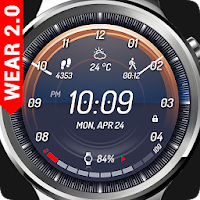
Cluster Watch Face
RichFace Personalization Contains ads
Modern futuristic watch face, fully supported for Android Wear 2.0
- Rating
- 3.9
- 207 ratings
- Downloads
- 50K+
- on Google Play
- Price
- Free
- No in-app purchases
- Updated
- May 29
- 2018
Screenshots
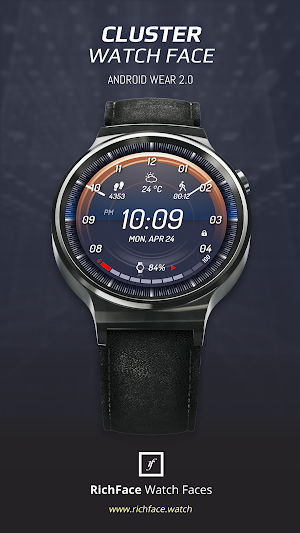
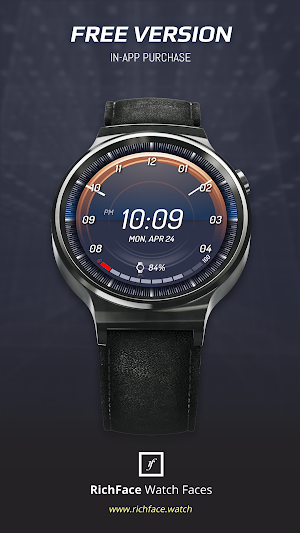
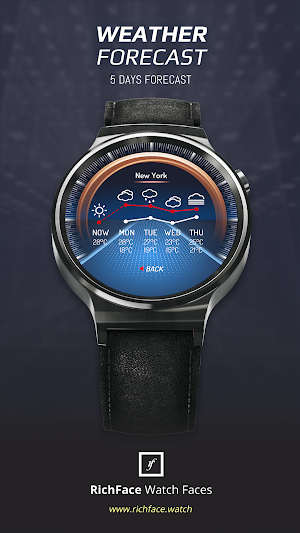


About Cluster Watch Face
Cluster watch face for Android Wear is modern digital watch face with interactive functions and nice color presets.
Watch face contains a huge number and user friendly settings on the watch and the phone companion app.
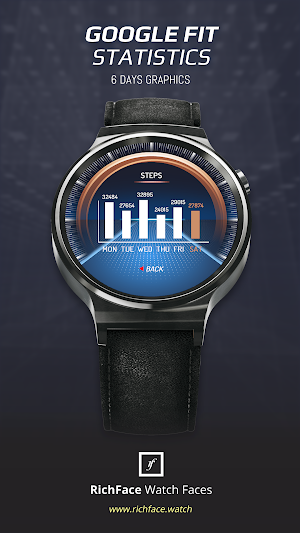
The watch face contains tap targets on the screen and you can customize them to be more informative which includes various number of data such as battery level status, FIT data, weather information, etc..
The Android Wear 2.0 comes with external complication which this watch face supports completely.
★ Cluster is fully Android Wear 2.0 supported
★ ANDROID WEAR 2.0 integration
• Fully standalone! (iPhone and Android compatible)
• External complication data for the indicators
★ ANDROID WEAR 2.0 installation instructions
• Find Cluster watch face on Wear store on your watch
• Install it
• For additional settings, download our settings app on phone
★ Compatible with all Android Wear watches
★ NEW ★
• Vibrate on every hour
★ Built-in complications:
• Weather
• Steps
• Distance
• Walking
• Running
• Biking
• Calories
• Fit statistics
• Stopwatch
★ FAQ
!! Please contact us if you have any trouble with the app !!
[email protected]
How do I install the watch face on Android Wear 1.0?
1. After install run 'Re-sync app' from the Android Wear app.
2. Long press your watch and choose Digital Vision as your watch face, or select the watch face using the Android Wear app.
How do I install the watch face on Android Wear 2.0?
1. Install it from Google Play Wear Store on your watch.
2. Install the companion app for fully customization (Android phone devices).
★ PERMISSIONS Explained
http://www.richface.watch/privacy.php
Watch face contains a huge number and user friendly settings on the watch and the phone companion app.
The watch face contains tap targets on the screen and you can customize them to be more informative which includes various number of data such as battery level status, FIT data, weather information, etc..
The Android Wear 2.0 comes with external complication which this watch face supports completely.
★ Cluster is fully Android Wear 2.0 supported
★ ANDROID WEAR 2.0 integration
• Fully standalone! (iPhone and Android compatible)
• External complication data for the indicators
★ ANDROID WEAR 2.0 installation instructions
• Find Cluster watch face on Wear store on your watch
• Install it
• For additional settings, download our settings app on phone
★ Compatible with all Android Wear watches
★ NEW ★
• Vibrate on every hour
★ Built-in complications:
• Weather
• Steps
• Distance
• Walking
• Running
• Biking
• Calories
• Fit statistics
• Stopwatch
★ FAQ
!! Please contact us if you have any trouble with the app !!
[email protected]
How do I install the watch face on Android Wear 1.0?
1. After install run 'Re-sync app' from the Android Wear app.
2. Long press your watch and choose Digital Vision as your watch face, or select the watch face using the Android Wear app.
How do I install the watch face on Android Wear 2.0?
1. Install it from Google Play Wear Store on your watch.
2. Install the companion app for fully customization (Android phone devices).
★ PERMISSIONS Explained
http://www.richface.watch/privacy.php
What’s new
Updated May 29, 2018
- Fixed position for title in range complications. - Added date in ambient mode - Small performance improvements
User reviews

I really like the way this looks. Too bad all the features are Premium

Great!

great combination of information that is easily readable.

My favorite watchface. I use this on my LG Style watch. It not only looks great in regular mode but also ambient. Most watchfaces are hard to see when in ambient mode but not this one. I can see it perfectly. Also great battery life. A+. Also people need to stop being cheap and buy the Premium version. Everyone want...

Great app! By far my fave watchface. Only suggestion is give us customizable colors and also ability to remove clock hand in ambient mode.

Had trouble setting up. Dev was quick to respond and help through several emails. Problems were mine. Watch face is beautiful. Nicely done.
Alternatives to Cluster Watch Face
Looking for apps like Cluster Watch Face? Here are 6 similar Android apps on Google Play. The highest rated is Ferrum Watch Face (4.2/5), and all 6 are free to download.
-
Ultra Watch Face 3.8
-
Challenger Watch Face 4.1
-
Cyber Watch Face 3.8
-
Delta Watch Face 3.7
-
Fury Watch Face 4.0
-
Ferrum Watch Face 4.2
| App | Rating | Price | Installs | Last updated | Compare |
|---|---|---|---|---|---|
| Cluster Watch Face | 3.9 / 5 | Free | 50,000+ | May 29, 2018 | |
| Ultra Watch Face | 3.8 / 5 | Free | 1,000,000+ | Sep 30, 2026 | Compare |
| Challenger Watch Face | 4.1 / 5 | Free | 1,000,000+ | Sep 28, 2026 | Compare |
| Cyber Watch Face | 3.8 / 5 | Free | 500,000+ | Aug 17, 2026 | Compare |
| Delta Watch Face | 3.7 / 5 | Free | 100,000+ | Mar 15, 2019 | Compare |
| Fury Watch Face | 4.0 / 5 | Free | 100,000+ | Oct 4, 2024 | Compare |
| Ferrum Watch Face | 4.2 / 5 | Free | 100,000+ | Oct 4, 2024 | Compare |
Compare Cluster Watch Face with the top alternatives: ratings, updates, ASO score and keyword gaps →
Similar apps on Google Play
- Ultra Watch Face
- Challenger Watch Face
- Cyber Watch Face
- Delta Watch Face
- Fury Watch Face
- Ferrum Watch Face
- Digitium Watch Face
- Evander Watch Face
- Novus WatchFace
- Digitec Watch Face
- Digital Striker Watch Face
- Digital Vision Watch Face
- SmartDrive Watch Face
- Guard Watch Face
- Royal Steel Watch Face
- Cluster Watch Face
- eTronic Watch Face
- Watch Face Valiant
- Shield Watch Face
- Neo Watch Face
- Smartoid WatchFace
- Active Point Watch Face
- Digital Monster Watch Face
- Rolling Watch Face
- Rotax Watch Face
- Power Watch Face
- Time Gate Watch Face
- RoverOne Watch Face
- Rapid Watch Face
- Inventor Watch Face
- Watch Face Armada
- 2Elegant Watch Face
- Iron Watch Face
- Dynamic Watch Face
- Runner Watch Face
- Watch Face Military Digital