
SmartDrive Watch Face
RichFace Personalization In-app purchases Contains ads
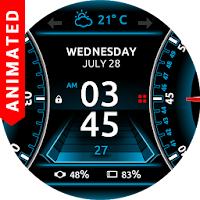
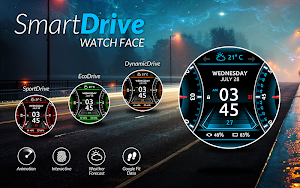
Animated watch face in modern 3D car design with 4 themes
- Rating
- 3.7
- 1.1K ratings
- Downloads
- 100K+
- on Google Play
- Price
- Free
- In-app purchases
- Updated
- Sep 28
- 2017
Screenshots
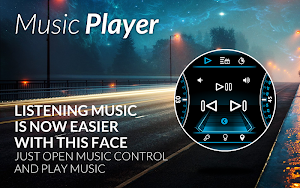


About SmartDrive Watch Face
★★★ Animated and interactive Watch Face for Android Wear watches ★★★
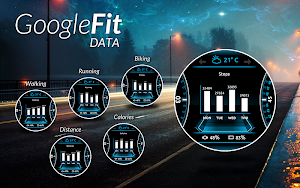
★★★ Google FIT data: ★★★
✔ Daily steps with graph (click in a center to switch between graphs)
✔ Total data (Today, Week, Month)
✔ Active running time
✔ Active walking time
✔ Active biking time
✔ Burned calories
✔ 4 color themes
★★★ Other data: ★★★
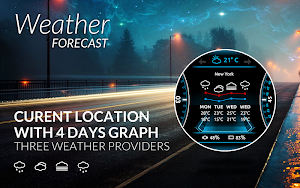
✔ Weather forecast with graph (3 weather providers)
✔ Stopwatch
✔ Music player
✔ Watch and phone battery
✔ Date with date format settings
✔ 24 hour format
✔ Screen time
✔ Interactive menu with app shortcuts
✔ Automatic or manual weather location
✔ Current location
✔ Shortcuts for Hangouts, Google Keep, Google Maps, Alarm clock, Stopwatch, Music, Translate, Flashlight, Timer, Google Fit, Agenda, Find my phone, Google Messages, Shazam
✔ Full ambient mode
✔ Small peek card option
✔ Translucent peek card
✔ Time zone
★★★ Configuration in companion app ★★★
✔ Google FIT sync time
✔ Automatic or custom added weather location
✔ Smooth seconds or tick seconds
✔ Screen time settings
✔ Weather update time
✔ Simple and full ambient mode
✔ Peek card configuration (transparent, small or big)
✔ Notifications
To install:
1. After install run 'Resync app' on Android Wear App.
2. Long press your android wear watch and choose SmartDrive Watch Face as your watch face
★★★ Google FIT data: ★★★
✔ Daily steps with graph (click in a center to switch between graphs)
✔ Total data (Today, Week, Month)
✔ Active running time
✔ Active walking time
✔ Active biking time
✔ Burned calories
✔ 4 color themes
★★★ Other data: ★★★
✔ Weather forecast with graph (3 weather providers)
✔ Stopwatch
✔ Music player
✔ Watch and phone battery
✔ Date with date format settings
✔ 24 hour format
✔ Screen time
✔ Interactive menu with app shortcuts
✔ Automatic or manual weather location
✔ Current location
✔ Shortcuts for Hangouts, Google Keep, Google Maps, Alarm clock, Stopwatch, Music, Translate, Flashlight, Timer, Google Fit, Agenda, Find my phone, Google Messages, Shazam
✔ Full ambient mode
✔ Small peek card option
✔ Translucent peek card
✔ Time zone
★★★ Configuration in companion app ★★★
✔ Google FIT sync time
✔ Automatic or custom added weather location
✔ Smooth seconds or tick seconds
✔ Screen time settings
✔ Weather update time
✔ Simple and full ambient mode
✔ Peek card configuration (transparent, small or big)
✔ Notifications
To install:
1. After install run 'Resync app' on Android Wear App.
2. Long press your android wear watch and choose SmartDrive Watch Face as your watch face
What’s new
Updated September 28, 2017
- Fixed minor weather bugs - Improved performance
User reviews
Sweet look!
Excellent! Very smart looking my watch. Thanks

It was nice watch face. I wish someone well like this.

I like it except that phone battery percentage on watch doesn't match the the actual percentage on phone (Ex: watch shows 90% although phone shows 95%). It looks like sync issue. Plesse support and advise

Good

the best
Alternatives to SmartDrive Watch Face
Looking for apps like SmartDrive Watch Face? Here are 4 similar Android apps on Google Play. The highest rated is Steinsaltz Daily Study (4.5/5), and 2 of the 4 are free to download.
-
Horizon Samsung Galaxy Watch 4 4.5
-
WFP 241 digital watch face 4.3
-
Compass 4.0
-
Steinsaltz Daily Study 4.5
| App | Rating | Price | Installs | Last updated | Compare |
|---|---|---|---|---|---|
| SmartDrive Watch Face | 3.7 / 5 | Free | 100,000+ | Sep 28, 2017 | |
| Horizon Samsung Galaxy Watch 4 | 4.5 / 5 | 1.99 USD | 5,000+ | Oct 23, 2024 | Compare |
| WFP 241 digital watch face | 4.3 / 5 | 0.99 USD | 10,000+ | Aug 20, 2026 | Compare |
| Compass | 4.0 / 5 | Free | 5,000,000+ | Apr 10, 2025 | Compare |
| Steinsaltz Daily Study | 4.5 / 5 | Free | 50,000+ | Aug 31, 2026 | Compare |