
To do
al-Khwarizmi IT school House & Home
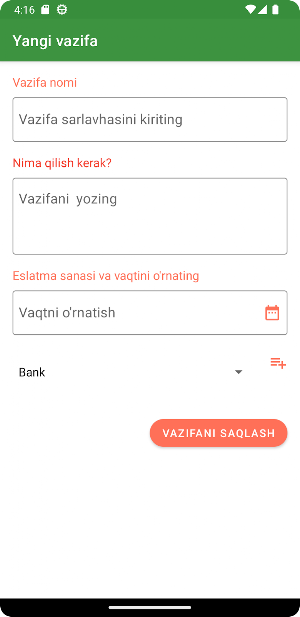
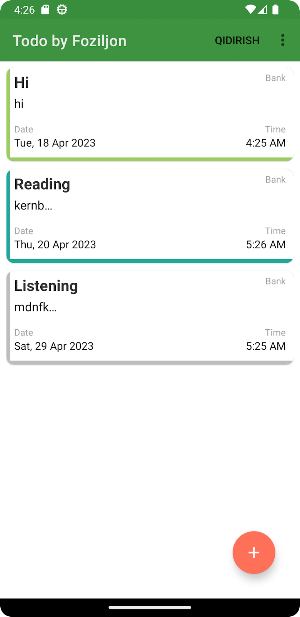
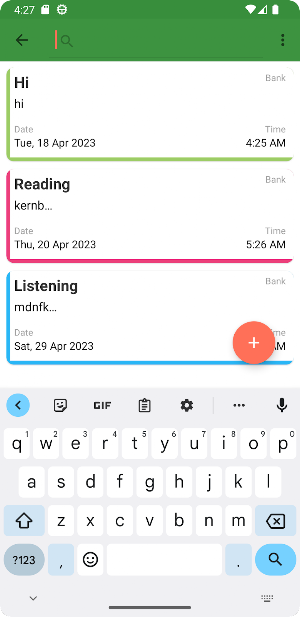
"To do" app helps manage time and energy. Also to increase productivity.
- Downloads
- 1+
- on Google Play
- Price
- Free
- No in-app purchases
- Updated
- Apr 16
- 2023 · v1.1
Screenshots

About To do
To-do apps typically have features such as reminders, due dates, and the ability to categorize tasks into different projects or categories. Some apps also allow users to collaborate with others, share tasks, and assign tasks to team members.
To use a to-do app, users can create a new task by typing in the task name, setting a due date, and adding any additional details or notes. They can then mark the task as complete once it's finished, or reschedule it if necessary.
To-do apps can be used for personal or professional purposes, and are especially useful for people who have a lot of tasks to manage or who need help staying organized. They can be accessed on desktop or mobile devices, making it easy to manage tasks on-the-go.
To use a to-do app, users can create a new task by typing in the task name, setting a due date, and adding any additional details or notes. They can then mark the task as complete once it's finished, or reschedule it if necessary.
To-do apps can be used for personal or professional purposes, and are especially useful for people who have a lot of tasks to manage or who need help staying organized. They can be accessed on desktop or mobile devices, making it easy to manage tasks on-the-go.
Alternatives to To do
Looking for apps like To do? Here are 6 similar Android apps on Google Play. The highest rated is Simply Goals & Tasks ToDo List (3.1/5), and all 6 are free to download.
-
Pocket Timetable
-
To Do List: Manage Daily Tasks
-
Simply Goals & Tasks ToDo List 3.1
-
TaskOwl – Get things done
-
Toodledo 2.7
-
School Planner
| App | Rating | Price | Installs | Last updated | Compare |
|---|---|---|---|---|---|
| To do | – | Free | 1+ | Apr 16, 2023 | |
| Pocket Timetable | – | Free | 10,000+ | Oct 1, 2026 | Compare |
| To Do List: Manage Daily Tasks | – | Free | 10,000+ | Jun 24, 2026 | Compare |
| Simply Goals & Tasks ToDo List | 3.1 / 5 | Free | 50,000+ | Oct 6, 2026 | Compare |
| TaskOwl – Get things done | – | Free | 10+ | Jan 6, 2022 | Compare |
| Toodledo | 2.7 / 5 | Free | 100,000+ | Mar 18, 2020 | Compare |
| School Planner | – | Free | 10+ | Apr 11, 2023 | Compare |
Compare To do with the top alternatives: ratings, updates, ASO score and keyword gaps →
Similar apps on Google Play
- Pocket Timetable
- To Do List: Manage Daily Tasks
- Simply Goals & Tasks ToDo List
- TaskOwl – Get things done
- Toodledo
- School Planner
- To-do list +
- Routinero: Daily Task List
- Flashcards: English Vocabulary
- Tutorline
- TasKey: To Do List & Tasks
- ROI4Presenter
- ToDo & Tasks List | Habit RPG
- Studicata
- Tutor on mySylvan Marketplace+
- Checklist - Todos, Tasks, Shop
- Kickresume: AI Resume Builder
- ToDodo: To Do List & Reminder
- Amplenote
- Picture Notes - Visual Notepad
- Elle Task Tracker
- Digital planner - Hubmee
- RemNote - Notes & Flashcards
- Flashcards AI
- Fanya Todo List: Lists & Tasks
- Reda: Online To Do Lists/Tasks
- Cover Letter Writer - CV Maker
- To-do list
- Teach Online
- ForgetMeNot - Flashcards
- TimetableNotes
- Note-ify: Note Taking & Tasks
- Today's Tasks: daily planner
- Habitomic: Smart Daily Planner
- HibiDo: Todo, Calendar & Notes
- MuseClass: Student Assignments
- Note Manager: Notepad app with
- Brainscape: Smarter Flashcards
- Promova Easy Language Learning
- Classteam: Organize Classrooms
- Routine48: time planner
- Cuckoo - Mind Management
- Canotes
- RoutineFlow: Routine & ADHD
- Advanced Language Therapy Lite
- Planndu: Task Manager & Focus
- To Do List with Reminder
- Everdo: to-do list and GTD® ap
- Practice speaking English - AI
- Shared To-Do List: We-Do