
My Diary
KreoSoft Lifestyle In-app purchases Contains ads
Easy-to-use, intuitive, fast, elegant and secure diary.
- Rating
- 4.4
- 5.3K ratings
- Downloads
- 431K+
- on Google Play
- Price
- Free
- In-app purchases
- Updated
- Jun 25
- 2026
Screenshots
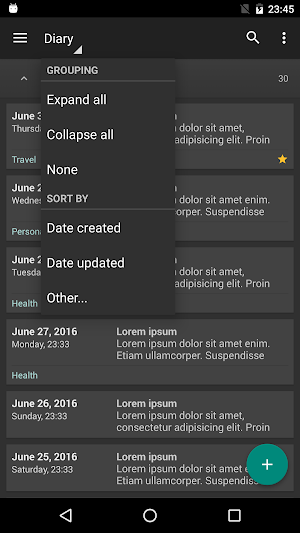


About My Diary
My Diary is an easy-to-use, intuitive, fast, elegant and secure diary with cloud syncing (Google Drive™). Save your own thoughts, memories, secrets, life events, notes or other confidential information. You can also use My Diary as a journal or notepad.
Key Features:
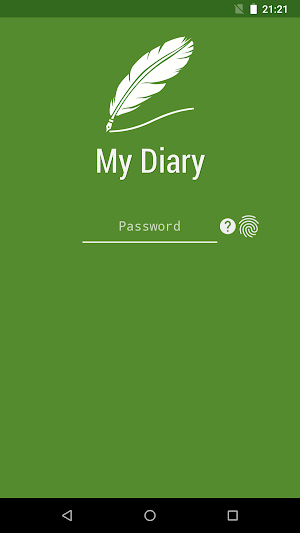
- App lock (Password or PIN + Fingerprint).
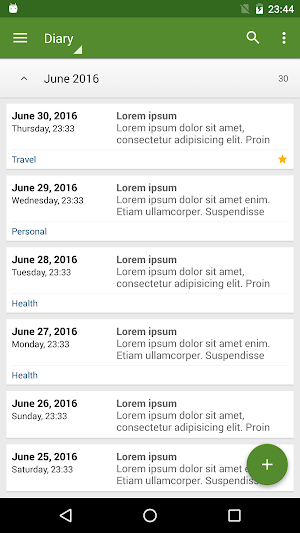
- Save, browse, search and share diary entries on your smartphone and tablet.
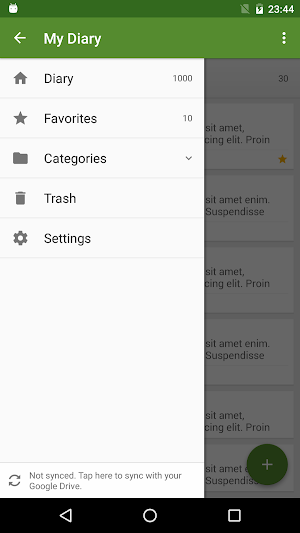
- Organize diary entries by categories.
- Sort diary entries by date created, date updated, title and category.
- Manage categories.
- Navigate between diary entries in a horizontal position.
- Manage backups.
- Export (Text file and HTML)
- Sync diary entries via Google Drive between all Android devices you use.
- Keep your diary entries safe in the cloud.
- Store and display thousands of diary entries without any performance penalty.
- Store large diary entries.
- Dark theme.
- Theme color.
- English language.
Premium Features:
- No ads
- Sync options > Auto sync *
- Backup > Preview
- Backup > Export > Text file and HTML
* Manual sync also works in the free version
Please remember to use the "Sync" option or the "Backup" option (in this app) to avoid accidental data loss. Especially before updating the app.
Sync details:
App data is stored in a hidden folder on your Google Drive. This folder is accessible only by "My Diary" app. Although the folder is hidden you can see the amount of space it occupies and delete its contents.
1. Go to Google Drive on the web at "drive.google.com"
2. From the settings menu, select "Manage Apps".
3. Find the app called "KreoSoft - My Diary".
Like us on Facebook:
https://www.facebook.com/KreoSoft.MyDiary
Key Features:
- App lock (Password or PIN + Fingerprint).
- Save, browse, search and share diary entries on your smartphone and tablet.
- Organize diary entries by categories.
- Sort diary entries by date created, date updated, title and category.
- Manage categories.
- Navigate between diary entries in a horizontal position.
- Manage backups.
- Export (Text file and HTML)
- Sync diary entries via Google Drive between all Android devices you use.
- Keep your diary entries safe in the cloud.
- Store and display thousands of diary entries without any performance penalty.
- Store large diary entries.
- Dark theme.
- Theme color.
- English language.
Premium Features:
- No ads
- Sync options > Auto sync *
- Backup > Preview
- Backup > Export > Text file and HTML
* Manual sync also works in the free version
Please remember to use the "Sync" option or the "Backup" option (in this app) to avoid accidental data loss. Especially before updating the app.
Sync details:
App data is stored in a hidden folder on your Google Drive. This folder is accessible only by "My Diary" app. Although the folder is hidden you can see the amount of space it occupies and delete its contents.
1. Go to Google Drive on the web at "drive.google.com"
2. From the settings menu, select "Manage Apps".
3. Find the app called "KreoSoft - My Diary".
Like us on Facebook:
https://www.facebook.com/KreoSoft.MyDiary
What’s new
Updated June 25, 2026
Remember to regularly use the "Sync" or "Backup" option in the "My Diary" app to avoid accidental data loss. Version 2.3.2 - Support for Android 17 - Updated libraries to improve app performance, stability, and security Version 2.3.1 - Support for edge-to-edge requirements (Android 15+)
User reviews

Awesome!
I find this app. easy to use. Just wish we could sort into the order we want. The only way I can do this is to copy and paste on top, then delete the copied entry.

Hello! I've been using the older version of this app (the grey one) for three+ years now and I want to move all my files into this newer application. I've tried syncing it both but somehow I couldn't see my files being transferred into this new one??

Good, please fix can attach Pictures on Diary . Thank.

Great diary, better than the last one.

Excellent application for short term notes.
Alternatives to My Diary
Looking for apps like My Diary? Here are 6 similar Android apps on Google Play. The highest rated is Diarium: Journal, Diary (4.8/5), and all 6 are free to download.
-
Diarium: Journal, Diary 4.8
-
Memory: Simple diary with lock 4.5
-
Oak Diary – Daily Journal, Moo 4.1
-
Daybook - Diary, Journal, Note 4.5
-
Diary with Lock, Free Diary Ap 4.6
-
Diary - Campus Diary, Journal 4.6
| App | Rating | Price | Installs | Last updated | Compare |
|---|---|---|---|---|---|
| My Diary | 4.4 / 5 | Free | 100,000+ | Jun 25, 2026 | |
| Diarium: Journal, Diary | 4.8 / 5 | Free | 500,000+ | Oct 11, 2026 | Compare |
| Memory: Simple diary with lock | 4.5 / 5 | Free | 50,000+ | – | Compare |
| Oak Diary – Daily Journal, Moo | 4.1 / 5 | Free | 50,000+ | Nov 2, 2025 | Compare |
| Daybook - Diary, Journal, Note | 4.5 / 5 | Free | 1,000,000+ | Oct 29, 2026 | Compare |
| Diary with Lock, Free Diary Ap | 4.6 / 5 | Free | 10,000+ | Dec 15, 2020 | Compare |
| Diary - Campus Diary, Journal | 4.6 / 5 | Free | 1,000+ | May 4, 2022 | Compare |
Compare My Diary with the top alternatives: ratings, updates, ASO score and keyword gaps →
Similar apps on Google Play
- Diarium: Journal, Diary
- Memory: Simple diary with lock
- Oak Diary – Daily Journal, Moo
- Daybook - Diary, Journal, Note
- Diary with Lock, Free Diary Ap
- Diary - Campus Diary, Journal
- Writeaday - Journal & Mood
- MyDiary Notebook
- NoteFor - Private And Sharable
- Day One Journal: Private Diary
- Journal it! - Bullet & Planner
- Mind journal: Diary, Mood trac
- Thera: Diary and mood tracker
- Reflection.app: Guided Journal
- Mood Diary and Stress Journal
- 5 Minute Journal
- Glitter Secret Diary With Lock
- Custom Bullet Journal, Prompts
- Presently: A Gratitude Journal
- DailyLife - My Diary, Journal
- Daily Diary: Journal with Lock
- Grid Diary - Journal, Planner
- UpNote - notes, diary, journal