

Datum: Timestamp Camera GPS
Anthonin Cocagne Photo & Video iPhoneiPadiPod touch
Datum: Timestamp Camera GPS is a free Photo & Video app for iPhone and iPad by Anthonin Cocagne. Requires iOS 15.6. Updated October 6, 2026.
- Price
- Free
- on the App Store
- Size
- 52 MB
- Age 4+
- Updated
- Oct 6
- 2026 · v1.1.0
Screenshots


About Datum: Timestamp Camera GPS
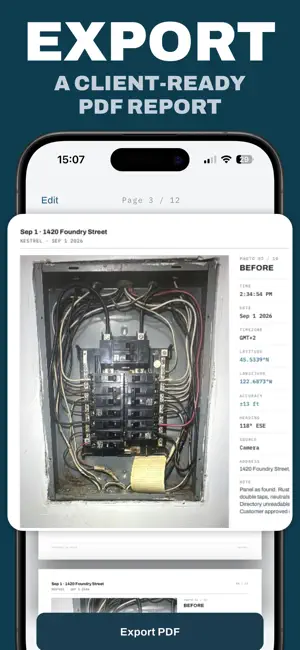
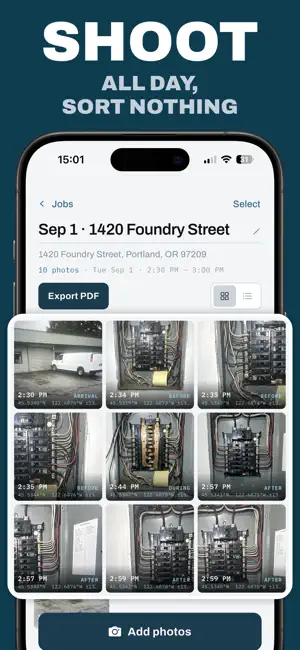
Proof of when and where, stamped on every photo. Datum is a timestamp and GPS camera for people who document work. Every shot is stamped with the time, the date and time zone, the street address, the GPS coordinates, the accuracy of the fix and the compass heading, all measured at the moment the shutter fired. WHAT GETS STAMPED - Time, date and time zone, so a photo still reads correctly wherever it was taken. - Street address, geocoded from your location at capture. - Latitude and longitude, with GPS accuracy in meters and the compass heading. This is the line that separates a nice photo from a photo that answers questions. - Your company name and logo, set once (Pro). MEASURED IS LOCKED, AUTHORED IS YOURS The time, the coordinates, the accuracy and the heading are measured by your iPhone, and the app gives you no way to edit them. What you write, the label on the stamp and the note on a photo, stays yours to change at any time. Datum records what the device measured and will not let you move it. It does no network verification and claims no legal certification. THE STAMP IS NEVER BURNED IN Your original photo is kept exactly as the sensor wrote it. The stamp is composed on top at the moment the photo is shown, shared or exported. That is what lets you reposition it, restyle it, or apply a new look to an entire job weeks after the visit, without ever altering the original file. BUILT FOR SPEED ON SITE - Volume buttons fire the shutter, so it works with gloves on. - Camera Control support on iPhone 16 and later. - No review screen after a shot. Frame, fire, keep moving. - An honest GPS accuracy chip, green, amber or red, so you know what the fix is worth before you rely on it. - A high-contrast dark interface that stays readable in direct sun. JOBS AND PDF REPORTS Photos group into jobs, one visit to one site. A job names itself from the date and the street it started on. When you are done, export the whole job as a PDF report with the photos, your labels and notes, and a map page showing where each shot was taken. Send it before you leave the site. WE NEVER READ YOUR PHOTO LIBRARY Datum never asks for access to your photos. To bring an existing picture into a job you use the system picker, which hands over only the image you chose. The app sees nothing else. Imported photos are marked as imported in the report, and when a file carries no location we show the date alone rather than invent a position. WORKS WHERE THE SIGNAL DOES NOT No account, no sign-in, no server. Everything stays on your iPhone. If an address cannot be looked up on site, Datum falls back to the last known address, then to raw coordinates. The shot is never blocked and never delayed. FREE AND PRO Free: unlimited stamped photos, one active job, the Proof stamp theme, notes and imports, and one watermarked PDF export. Pro: unlimited jobs, all three stamp themes, unlimited PDF reports with no watermark, and your company logo on every photo. WHO IT IS FOR Plumbers, electricians, HVAC and roofing crews, property inspectors, insurance adjusters, surveyors, delivery drivers, landlords running move-in and move-out. Anyone who has ever needed to show when and where a photo was taken. Privacy Policy: https://anthopak.dev/datum/privacy-policy.html Terms of Use: https://www.apple.com/legal/internet-services/itunes/dev/stdeula/
What’s new
Version 1.1.0 · Updated October 6, 2026
- Added the ability to hide timestamps from PDF exports - Added auto-suggestions for previously used labels within the same job
App privacy
The developer, Anthonin Cocagne, reported these privacy practices to Apple.
Data Not Linked to You
The following data, which may be collected but is not linked to your identity, may be used for the following purposes:
- Identifiers: Device ID
- Usage Data: Product Interaction
- Diagnostics: Crash Data, Performance Data
- Location: Precise Location
- Contact Info: Physical Address
- User Content: Photos or Videos
Used for: Analytics, App Functionality
Alternatives to Datum: Timestamp Camera GPS
Looking for apps like Datum: Timestamp Camera GPS? Here are 6 similar apps on the App Store.
-
 Field Camera & Coordinates
-
 Photo Stamp: Date & Location
-
 ProofCam: Real-Time Mark
-
 MapTag Camera - GPS Camera
-
 GPS Map Camera: GPS Stamp
-
 GPS Camera: Geotag & Timestamp
| App | Rating | Price | Last updated | Compare |
|---|---|---|---|---|
| Datum: Timestamp Camera GPS | – | Free | October 6, 2026 | |
| Field Camera & Coordinates | – | Free | Sep 3, 2026 | Compare |
| Photo Stamp: Date & Location | – | Free | Oct 23, 2026 | Compare |
| ProofCam: Real-Time Mark | – | Free | Aug 20, 2026 | Compare |
| MapTag Camera - GPS Camera | – | Free | Jul 19, 2026 | Compare |
| GPS Map Camera: GPS Stamp | – | Free | Mar 31, 2026 | Compare |
| GPS Camera: Geotag & Timestamp | – | Free | Aug 7, 2026 | Compare |