

MapTag Camera - GPS Camera
Keyten Technologies Private Limited Photo & Video iPhoneiPadiPod touch
MapTag Camera - GPS Camera is a free Photo & Video app for iPhone and iPad by Keyten Technologies Private Limited. Requires iOS 17.0. Updated July 19, 2026.
- Price
- Free
- on the App Store
- Size
- 21 MB
- Age 12+
- Updated
- Jul 19
- 2026 · v1.0.0
Screenshots


About MapTag Camera - GPS Camera
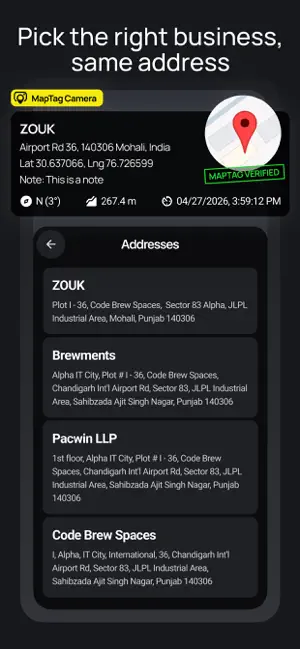
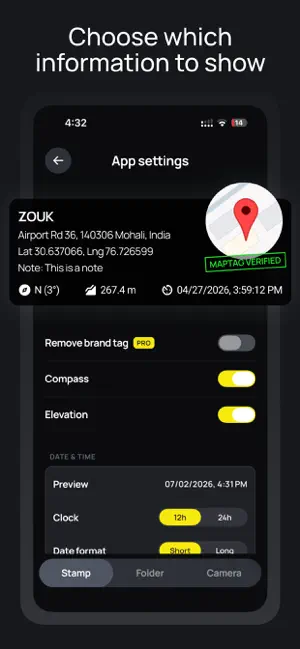
MapTag GPS Camera turns your phone into a GPS-stamping field camera. Every photo is automatically tagged with where it was taken: place name, address, map, GPS coordinates, compass heading, elevation and timestamp, all burned directly onto the image. No more guessing where a photo was taken or losing the location when you share it. The geotag becomes part of the picture, and standard GPS EXIF is written too, so the location travels with the file. WHY MAPTAG GPS CAMERA • Real location, not guesswork: reads your true GPS fix and nearest place • Live map badge: roadmap or satellite mini-map baked into every shot • Full field record: compass heading, altitude and timestamp on each photo • Offline fallback: keeps GPS and cached address/map when available if refresh fails • Camera tools: flash, zoom, tap-to-focus, grid and level guides • Free templates: choose from built-in stamp layouts • Portrait & landscape: captured at full native resolution with EXIF intact • Save & share: saves to your gallery, then share to WhatsApp, email, Files and more • Add a note: label shots with a job number, site name or description BUILT FOR WORK Perfect for construction and site documentation, inspections, surveys, insurance claims, real estate, field service and any job where you need proof of location and time. GO PRO Keep core GPS stamping features, free templates, camera guides and save/share for free. Upgrade to Pro for: • An ad-free experience • Professional Pro templates • Removing the MapTag tag • Adding your own logo, text and colours YOUR PRIVACY Your photos stay on your device. We never upload or store them. Only approximate coordinates are sent to look up the place name and map. Camera guide settings, templates and local app settings stay on your device. No account required. Download MapTag GPS Camera and put a location on the record. Terms of Use (EULA): https://www.apple.com/legal/internet-services/itunes/dev/stdeula/ Privacy Policy: https://maptagcamera.zouk.agency/privacy
App privacy
The developer, Keyten Technologies Private Limited, reported these privacy practices to Apple.
Data Used to Track You
The following data may be used to track you across apps and websites owned by other companies:
- Purchases: Purchase History
- Identifiers: Device ID
- Usage Data: Advertising Data
Data Not Linked to You
The following data, which may be collected but is not linked to your identity, may be used for the following purposes:
- Identifiers: Device ID
- Usage Data: Advertising Data
- Purchases: Purchase History
- Location: Precise Location, Coarse Location
Used for: Third-Party Advertising, Developer’s Advertising or Marketing, Analytics, App Functionality
Alternatives to MapTag Camera - GPS Camera
Looking for apps like MapTag Camera - GPS Camera? Here are 6 similar apps on the App Store. The highest rated is ProStamp - Timestamp Camera (5.0/5), and 5 of the 6 are free to download.
-
 GPS MAP CLICK - GPS CAMERA
-
 Datum: Timestamp Camera GPS
-
 Field Camera & Coordinates
-
 ProStamp - Timestamp Camera
5.0
-
 GeoProof: GPS Work Camera
-
 GeoTag Camera Pro
| App | Rating | Price | Last updated | Compare |
|---|---|---|---|---|
| MapTag Camera - GPS Camera | – | Free | July 19, 2026 | |
| GPS MAP CLICK - GPS CAMERA | – | Free | Sep 18, 2026 | Compare |
| Datum: Timestamp Camera GPS | – | Free | Oct 6, 2026 | Compare |
| Field Camera & Coordinates | – | Free | Sep 3, 2026 | Compare |
| ProStamp - Timestamp Camera | 5.0 / 5 (3) | Free | Oct 9, 2026 | Compare |
| GeoProof: GPS Work Camera | – | Free | Jun 29, 2026 | Compare |
| GeoTag Camera Pro | – | 0.99 USD | Apr 8, 2026 | Compare |