

ProofCam: Real-Time Mark
Nguyen Nghiem Photo & Video iPhoneiPadiPod touch
ProofCam: Real-Time Mark is a free Photo & Video app for iPhone and iPad by Nguyen Nghiem. Requires iOS 17.0. Updated August 20, 2026.
- Price
- Free
- on the App Store
- Size
- 10 MB
- Age 4+
- Updated
- Aug 20
- 2026 · v3.0
Screenshots


About ProofCam: Real-Time Mark
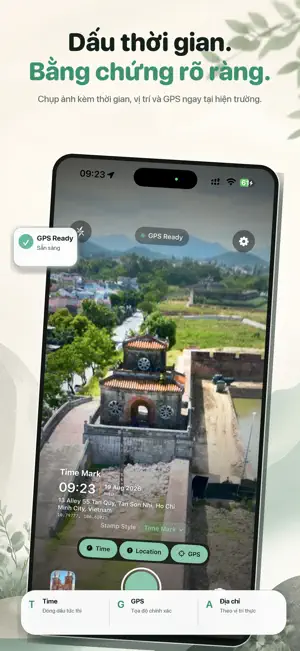
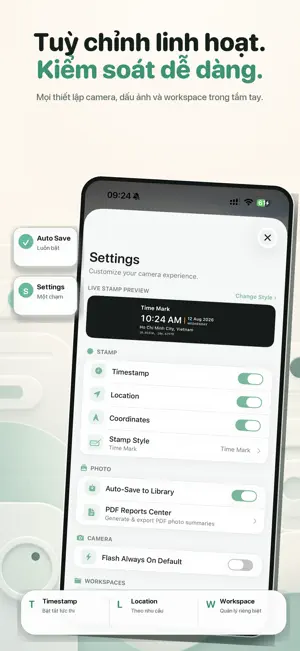
Capture the moment. Keep the context. ProofCam is a real-time TimeMark camera designed to add useful date, time, location and GPS information directly to your photos. Whether you're documenting field work, construction progress, inspections, maintenance, property conditions or everyday records, ProofCam makes it easy to capture photos together with the information that matters. REAL-TIME TIMEMARK See your TimeMark directly in the camera while capturing. Date, time, location and GPS information are displayed clearly so you know how your photo will look before you take it. CUSTOMIZABLE STAMP STYLES Choose from multiple professional TimeMark templates and select the layout that works best for your photos. DATE & TIME Add clear date and time information directly to captured photos with customizable display options. LOCATION & GPS Add location information and GPS coordinates when location access is enabled. ProofCam remains useful even when you choose not to use location. WORKSPACES Keep work photos organized by project or job site, making it easier to manage photo records from different locations and tasks. PHOTO RECORDS Review your captured photo together with its TimeMark information before saving or sharing. BUILT FOR REAL-WORLD WORK ProofCam is useful for: • Construction progress • Field work • Property inspections • Maintenance records • Installation documentation • Delivery records • Site visits • Before & after photos • Personal photo records SIMPLE BY DESIGN ProofCam is designed around a fast workflow: Open the camera. Check your TimeMark. Capture. Save. No complicated setup is required. Download ProofCam and create clearer photo records with real-time date, time and GPS context.
What’s new
Version 3.0 · Updated August 20, 2026
ProofCam 3.0 is here with a completely refreshed experience. • Redesigned camera interface for faster, easier capture • Improved real-time TimeMark display • New professional stamp styles • Refined date, time, location and GPS presentation • Improved photo review and save experience • Cleaner workspace and settings interface • Better permission and location status handling • Improved performance, stability and usability • UI improvements across the entire app Thank you for using ProofCam!
App privacy
The developer, Nguyen Nghiem, reported these privacy practices to Apple.
Data Used to Track You
The following data may be used to track you across apps and websites owned by other companies:
- Identifiers: Device ID
- Usage Data: Advertising Data
Data Not Linked to You
The following data, which may be collected but is not linked to your identity, may be used for the following purposes:
- Identifiers: Device ID
- Usage Data: Advertising Data
Used for: Third-Party Advertising, Analytics
Alternatives to ProofCam: Real-Time Mark
Looking for apps like ProofCam: Real-Time Mark? Here are 6 similar apps on the App Store.
-
 SV Super Timestamp
-
 AI Camera UULab
-
 AI GPS Timestamp Camera
-
 TrustShot: GPS Timestamp Cam
-
 Faded Cam - Viral Camera
-
 Camera Marqo
| App | Rating | Price | Last updated | Compare |
|---|---|---|---|---|
| ProofCam: Real-Time Mark | – | Free | August 20, 2026 | |
| SV Super Timestamp | – | Free | Mar 13, 2026 | Compare |
| AI Camera UULab | – | Free | Jul 27, 2026 | Compare |
| AI GPS Timestamp Camera | – | Free | May 25, 2026 | Compare |
| TrustShot: GPS Timestamp Cam | – | Free | Sep 15, 2026 | Compare |
| Faded Cam - Viral Camera | – | Free | Aug 25, 2026 | Compare |
| Camera Marqo | – | Free | Sep 17, 2026 | Compare |