

GPS Map Camera: GPS Stamp
Pawel Chmiel Photo & Video iPhoneiPadiPod touch
GPS Map Camera: GPS Stamp is a free Photo & Video app for iPhone and iPad by Pawel Chmiel. Requires iOS 18.6. Updated March 31, 2026.
- Price
- Free
- on the App Store
- Size
- 27 MB
- Age 4+
- Updated
- Mar 31
- 2026 · v1.0
Screenshots


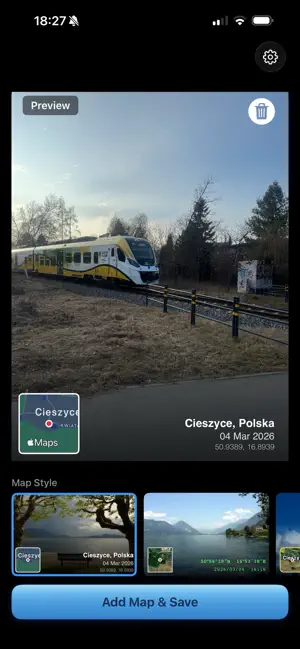
About GPS Map Camera: GPS Stamp
Turn your photos into travel memories with GPSStamp — the easiest way to stamp a map and location data directly onto your pictures. GPSStamp reads GPS coordinates from your photo's metadata and overlays a beautiful mini map with location name, coordinates, and date. Perfect for travel photography, geotagging memories, or sharing exactly where a moment happened. How it works: 1. Pick a photo from your library 2. Choose from 12 unique overlay styles 3. Save - your photo now has a map stamp with location and date Features: • Automatically reads GPS location from photo EXIF data • Reverse geocoding — shows city and country name • 12 beautiful overlay styles to choose from • Small map thumbnail or full-width map strip styles • Multiple map types: Standard, Satellite, Hybrid • Shows coordinates in decimal or DMS format • Date and time overlay alongside location • Set a default location for photos without GPS • Manual location search — type any place name • Preserves original photo quality and metadata • No account required, works completely offline • Clean, intuitive one-screen interface Styles for every taste: From clean minimal white to retro Kodak amber, green terminal monospace to bold centered typography — find the perfect look for your travel photos. Default Location: Set your home city or favorite spot as default. Photos without GPS data will automatically use your saved location — no manual entry needed every time. By using this app, you agree to the Apple Terms of Use (EULA): https://www.apple.com/legal/internet-services/itunes/dev/stdeula/ Terms of service: https://sites.google.com/view/gpsstamp-tos Privacy policy: https://sites.google.com/view/gpsstamp-pp
App privacy
The developer, Pawel Chmiel, reported these privacy practices to Apple.
Data Not Linked to You
The following data, which may be collected but is not linked to your identity, may be used for the following purposes:
- Purchases: Purchase History
- Identifiers: User ID
- Usage Data: Product Interaction
- Diagnostics: Crash Data, Performance Data
Used for: Analytics, App Functionality